

Sonos Installation & On-Site Support in Oakville
In Oakville, Sonos work often needs to match the finish level of the space—especially in white, design-forward lakefront homes and high-end commercial interiors. SetupTeam provides Sonos installation and on-site support with a planning-first process that keeps zones predictable and control simple. First, we map how you’ll actually use the system—TV audio, background music, entertaining, and any indoor/outdoor coverage—then we plan placement, power, and cabling so everything looks intentional and stays serviceable. Next, we standardize room naming and grouping behaviour, and we align the system for daily use across larger footprints where multiple zones need to stay responsive. Finally, we validate real-world scenarios before we leave—music playback, switching between zones, and control from the app or integrated platforms—so the system feels finished, not “almost done.”
Install, Upgrade and Troubleshoot Same Day/Next Day Service
onos Install, Upgrades, Or Troubleshooting — Same-Day / Next-Day On-Site in Oakville
Sonos should run cleanly every day, so we treat it like a full system—not a quick add-on. First, we map your zones, control goals, and how you actually listen. Next, we handle placement, power, and tidy wiring so the install looks intentional and stays serviceable. Then, because many Oakville setups span multiple floors, guest spaces, and outdoor entertaining areas, we confirm the network path, resolve conflicts, and decide when wiring is the more durable option. If Control4 is part of the plan, we align rooms, favourites, and daily actions, then test the routines you’ll repeat—so they behave the same way every time.
Dialogue + Surround Tuning That Holds Its Balance
We tune dialogue clarity, surrounds, and level matching so the room sounds consistent at low and higher volumes. Then we confirm remote/volume behaviour and source switching, so daily use stays simple.
Grouping + Switching That Doesn’t Drift
We clean up room names, remove duplicates, and rebuild grouping around real daily use. After that, we align timing and volume across zones, and then verify regrouping and switching between spaces.
Multi-Zone Upgrades Planned For High-End Homes
For larger systems, we plan the upgrade sequence so nothing breaks mid-change. We also decide whether to wire or go wireless, and then re-check responsiveness across floors and outdoor areas.
Network-First Stability Checks That Cut Repeat Visits
We check Wi-Fi vs Ethernet, mesh roaming, interference, and IP/DHCP issues that trigger dropouts. Then we apply fixes in the right order and re-test real scenarios, so it stays reliable after we leave.
Work With Trained Sonos Technicians
Clean Install, Verified In Real Use
SetupTeam’s trained Sonos technicians take a network-first approach, so zones stay online and grouping stays consistent. For larger Oakville homes and Control4-integrated systems, we map daily use, confirm reliable coverage across floors and outdoor areas, and then verify playback, switching, and control before we leave.

How We Plan, Install, And Validate Sonos Systems In Oakville
We don’t just recommend equipment—we supply it, install it cleanly, and then validate it in real use. Therefore, our workflow covers zone planning, placement, wiring decisions, configuration, and a hands-on verification checklist, so your Sonos system stays consistent day to day. In addition, for design-led homes, lakefront properties, and commercial spaces, we coordinate clean cabling, rack/utility layouts, and Control4 integration, so multi-zone audio stays predictable across rooms and floors.
Map Zones + Control Goals First
First, we confirm how you want to use the system: TV zones, music zones, outdoor areas, and grouped playback. Next, we match each zone to the right approach (soundbar, surrounds, Amp/Port zones, or distributed audio) and align how you want to control it—Sonos app, TV remote, voice, and/or Control4—so daily use feels natural, not patched together.
Install Cleanly And Keep It Serviceable
Next, we handle the physical install with finished results in mind: correct placement, tidy cabling, and accessible connections for future changes. Meanwhile, we plan power and cable routes early so the setup looks intentional and stays maintainable—especially where equipment is centralized in a rack, structured wiring panel, or tight utility space.
Configure, Tune, And Prove It In Real Use
Finally, we configure the system, standardize room names, and clean up grouping logic so switching feels consistent. Then, if Control4 is part of the job, we align sources, room selection, and scenes so the control path behaves predictably. After that, we run real tests—music playback, grouping/ungrouping, zone switching, and outdoor playback—so performance is confirmed before we wrap up.
How We Track Down Sonos Dropouts And Restore Stable Playback In Oakville
When rooms disappear, audio cuts out, or grouping becomes inconsistent, the goal is simple: a fix that holds. In Oakville, we reproduce the issue the way you actually use the system, identify whether the cause is network-, configuration or control-related, and then apply changes in the correct order. After that, we re-test your day-to-day scenarios before we leave—so it stays stable in real use.
Recreate The Issue The Way You Use It
First, you show us what’s happening—dropouts, missing rooms, delayed grouping, or AirPlay hiccups. Then we reproduce it on-site and confirm how the system is connected (Wi-Fi, Ethernet, mesh, or SonosNet, where applicable). Finally, we note what changed recently—new router/ISP swap, moved equipment, or new devices—so we work from evidence, not guesses.
Fix The Root Cause In The Right Sequence
Next, we stabilize the foundation: coverage, roaming, congestion/interference, and IP/DHCP conflicts that can make rooms vanish or audio cut out. In addition, we clean up configuration problems that create duplicates, “ghost” rooms, lag, or inconsistent control. Then, when wiring is the durable fix, we use it—especially in larger homes, racks, and commercial installs where reliability matters most.
Prove Stability With Repeatable Testing
Finally, we run the same scenarios you use every day—music playback, grouping/ungrouping, AirPlay (if used), and zone switching—until behaviour is consistent. Then we summarize what changed and what to watch for. If Control4 is part of the system, we also verify the day-to-day commands you’ll actually use, so the experience stays predictable after handoff.
What Oakville Clients Notice After A Proper Sonos Setup
Sonos On-Site Support, Consultation, And Installation Services
Pricing starts at the rates shown. Final cost depends on the number of zones, the equipment being installed or integrated, and the complexity of access—wiring paths, rack/closet work, and any troubleshooting required to stabilize the system.
$199.99+
If rooms disappear, audio drops, or grouping feels unpredictable, we start by recreating the problem the way you actually use the system. Then we determine whether the cause is network-, configuration-, or control-path-related, and we apply fixes in the right order. After that, we re-test the same scenarios on-site so performance stays consistent in larger Oakville homes and commercial spaces.
$159.99+
Adding speakers, expanding zones, or modernizing older distributed audio? We plan the layout first, then install cleanly so everything stays serviceable—especially in larger, design-forward Oakville properties with racks, structured wiring, and outdoor zones. Finally, we standardize setup and validate day-to-day use so switching, grouping, and control feel the same every time.
$199.99+
If you’re designing a new system or planning an upgrade, we build a clear room-by-room plan that matches how the space will be used. Then we confirm network readiness, wiring paths, and equipment locations before you commit, so the install goes smoothly—whether it’s a high-end lakefront home or a commercial environment.
Recent Oakville Project — Multi-Zone Audio Refresh + Basement Sonos Theatre Upgrade
This Oakville home started with what looked like a simple network adjustment. However, once we tested real-world use, it was clear that the older whole-home audio setup was the real bottleneck—zones were hard to control, grouping felt inconsistent, and day-to-day listening didn’t match how the house is used.
So, we rebuilt the system around dedicated Sonos zones for cleaner control in each area. First, we mapped every speaker run, confirmed which rooms were paired, and organized the rack so everything stayed labelled and serviceable. Next, we stabilized the network path and configuration so zones remain visible and responsive across floors, even when multiple areas are playing at once. Finally, we upgraded the basement man-cave into a proper theatre with a Sonos Arc Ultra and rear speakers, and then we validated the exact routines the client uses—music, grouping, and zone switching—so it stays consistent after we leave.
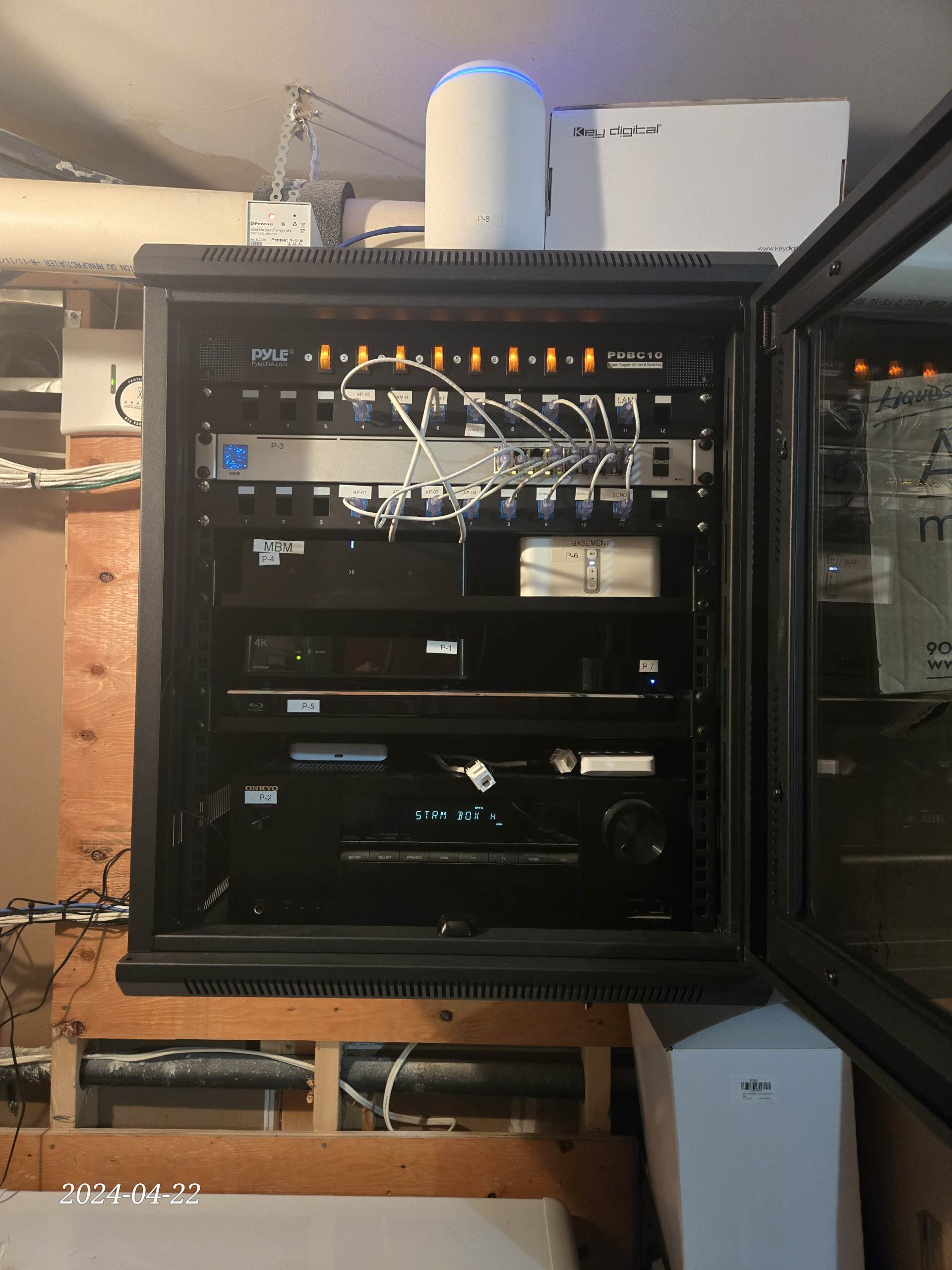
What We Installed (Oakville Home)
A reliability-first multi-zone rebuild with clean rack work, stable playback, and a dedicated basement theatre.
- Rebuilt whole-home audio into dedicated Sonos zones for straightforward room-by-room control
- Zone mapping + speaker-run verification completed (pairings confirmed, labelling finalized)
- Rack cleanup + cable dressing for a clean, serviceable finish
- Network and configuration stabilized, so zones stay visible, responsive, and easy to group
- Added Sonos Arc Ultra + rear speakers for the basement theatre/man-cave, then tested daily-use scenarios end-to-end
Sonos Installation & On-Site Support FAQs in Oakville
Quick answers to the questions we hear most about planning, upgrading, and stabilizing Sonos setups in Oakville—especially in design-forward homes, lakefront properties, and commercial spaces.
Request An Estimate For a Sonos Expert in Oakville
Tell us what you want the system to do and where in Oakville it’s located—for example, Bronte, Glen Abbey, Joshua Creek, Kerr Village, or Old Oakville. Then let us know if this is a new install, an upgrade, or troubleshooting for dropouts, missing rooms, grouping delays, AirPlay issues, or app glitches. If you already have equipment, list the Sonos models and the number of rooms/zones you want active (including any outdoor areas). Also include your space type (house, condo, or commercial) and any access constraints—finished millwork, rack location, parking/elevator bookings, or cable routes—because that directly affects the plan and timing. If you don’t have gear yet, we’ll recommend a layout that fits the space, then we install, tune, and verify day-to-day reliability.
- Fully licensed, insured & WSIB-covered with $2,000,000 liability protection
- Trained technicians + validation checklist: clean installs, correct room naming, consistent grouping/control
- Authorized Sonos dealer — we can supply equipment and support warranty-safe purchasing
- Network-first stability: we check Wi-Fi/mesh health, reduce conflicts, and use wired options when they’re the most reliable fix