


Network Installation & Structured Wiring Services in Vaughan

“SetupTeam specializes in smart home rewiring and network installation in Vaughan. We replace outdated coax and telephone lines with a modern backbone—running certified Cat6/Cat6A and fibre optic cabling to every TV area, access point, and security camera location. Whether it’s a full home retrofit or a targeted upgrade, we design structured wiring that supports high-bandwidth Control4 automation, Sonos audio, and unwavering Wi-Fi speed.”

370+ Reviews

Central Rack & Patch Panel Setup

A clean central termination is what makes changes realistic. Therefore, we build an organized rack or structured panel so switching, patching, and growth stay straightforward—especially when you later add more cameras, AV zones, or automation hardware.

Learn More

Motorized Blinds + Smart-Home Wiring (Control4-Ready)

Automation works better when wiring is planned early. Therefore, we pre-wire for motorized blinds, doorbell/intercom, and other smart-home device locations that benefit from dedicated cabling. In addition, as a Control4 dealer, we can coordinate wiring layouts that support clean integration over time.

Learn More

Structured Network Cabling (Cat5e/Cat6/Cat6A/Fiber)

In Vaughan homes and businesses—from Woodbridge to Concord—hardwired endpoints keep performance stable for TVs, offices, and critical devices. We run Cat6/Cat6A to home offices, TV zones, equipment locations, and key rooms to support modern usage and staged upgrades.

Learn More

Cameras, Doorbell & Security Wiring

For cleaner installs, we pre-wire camera locations and doorbell/intercom wiring before walls close whenever possible. Meanwhile, we can plan cabling that suits UniFi Protect camera deployments or Hikvision-style wiring layouts (where applicable), keeping the system serviceable when you expand coverage later.

Learn More

Video Distribution

For media rooms, finished basements, and multi-display, we plan TV Video Distribution properly and run the correct cabling so sources can be centralized and changed later without reopening walls. This is especially useful in Vaughan basements and great rooms where layouts evolve.

Learn More

Audio distribution

We run 14/2 or 16/2 speaker wire to planned in-ceiling/in-wall zones, and in some cases, add Cat6 to control locations for future flexibility. In addition, as a Sonos Gold Dealer, we can plan a Sonos-ready layout that supports reliable multi-room audio with clean finishes.

Learn More

Future-Ready Cabling Layouts for New and Renovated Spaces

If walls are open in a Vaughan build or renovation—it’s the best time to wire correctly. First, we map endpoints by use (office, video distribution, cameras, audio distribution, doorbell, blinds, equipment location). Then we rough in the structured wiring with a clear central plan. Finally, we verify each run before equipment goes live to keep setup smoother and minimize troubleshooting.

  • Cabling planned around actual TV, audio, network, and POS/device locations
  • All home-run lines brought to a clean central rack or panel with room to grow
  • Every run labelled and tested for speed, PoE, and reliability before handover
  • Conduit and spare Cat6 paths reserved for future AV, security, Sonos, and Control4 upgrades

Why Structured Cabling Matters for Modern Homes and Offices

Structured wiring eliminates the “one-off cable” mess. Every TV, network jack, access point, and camera is home-run to a labelled patch panel instead of disappearing into random junctions. That means you can add a new TV zone, expand Sonos audio, or move network gear without chasing mystery cables in the ceiling. A clean central rack also keeps power, switching, and patching organized, so service calls are faster, and the system stays maintainable long after the renovation is finished.

Commercial Cabling for Offices, Clinics, and Hospitality

Vaughan has a strong commercial base, especially around Concord, so business networks need to be dependable rather than improvised. We install stable Cat6/Cat6A drops for workstations, POS terminals, printers, Wi-Fi access points, and IP cameras, all home-run to a central rack with PoE-switching and UPS protection. For meeting rooms and training spaces, we design cabling that supports modern video conferencing, including Zoom Rooms and Microsoft Teams Rooms, with clear pathways for future display or camera changes. In clinics and hospitality spaces, we also separate staff, guest, and IoT networks at the wiring and switch level, so ongoing changes are practical without disrupting day-to-day operations.

Networking Infrastructure That Stays Reliable

A solid network starts with the backbone: correctly sized switches, sensible port planning, and clean terminations that keep everything easy to service and expand. We design that backbone around how you actually use the space—separating core devices, cameras, Wi-Fi, and AV so one change doesn’t break the rest of the system.

Because the cabling is structured and labelled from day one, it’s ready for more than just the internet. The same infrastructure can support Control4 automation, Sonos audio distribution, and future upgrades without locking you into a single layout or brand.

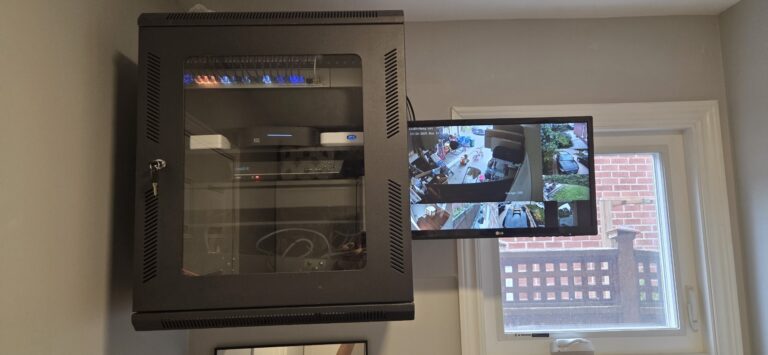
Wall-mounted equipment rack in a Vaughan home with UniFi network switch, security camera NVR, and audio distribution components.
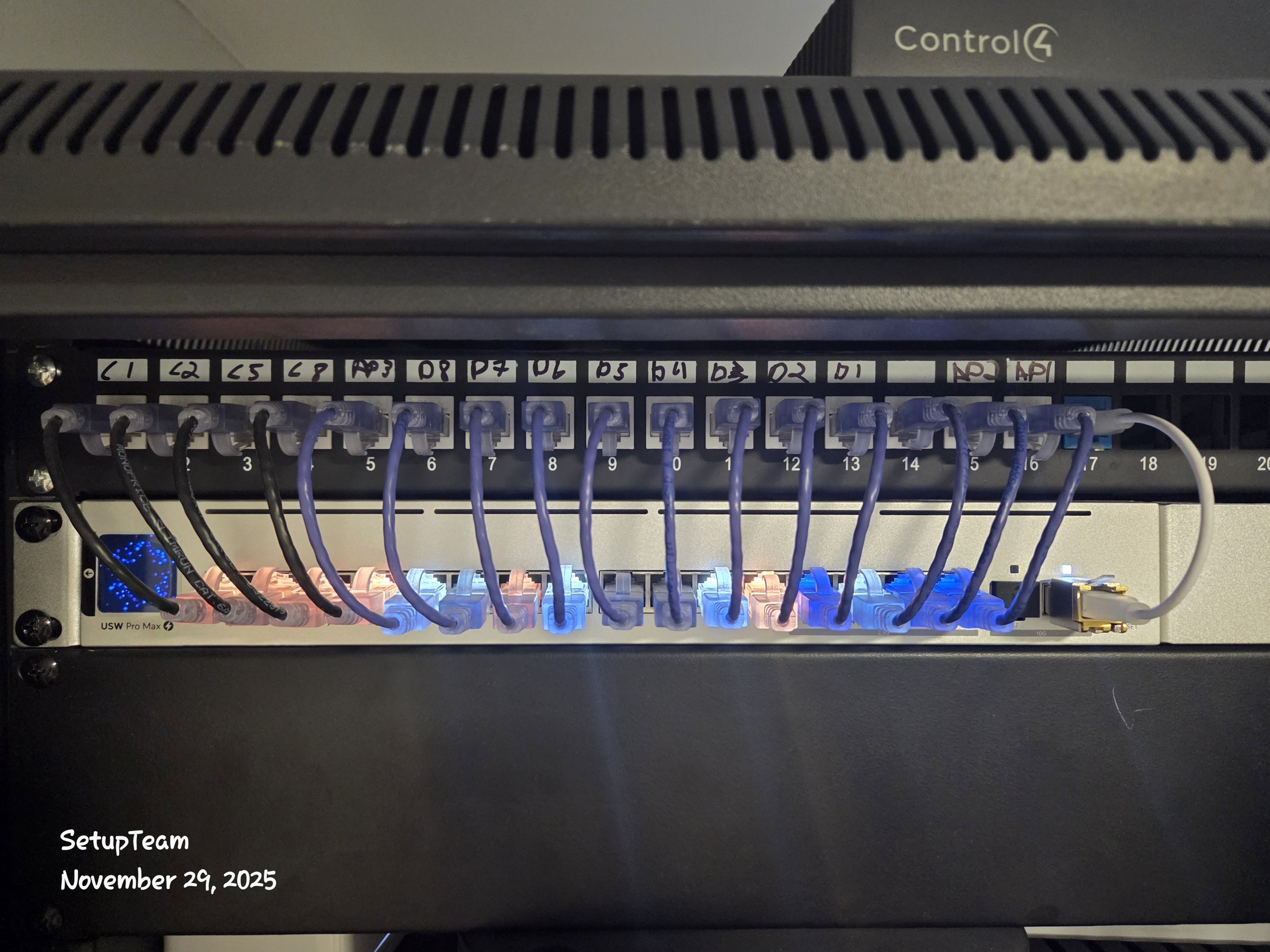
Network rack with patch panel, labeled cables, and neat cable management in maple
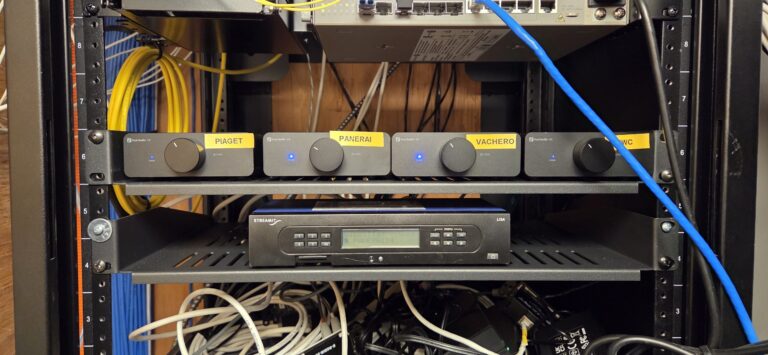
Commercial AV rack with audio distribution hardware and neatly managed cabling for a installation

Recent Vaughan Project — Structured Cabling + AV & Security Pre-Wire

On a Vaughan residential project in Woodbridge, we completed network installation backbone work by running Cat6/Cat6A to key endpoints, planning clean TV-zone cabling for future AV changes, and pre-wiring camera and doorbell locations for a tidy finish. Then we verified each run before equipment went live so the system could expand without rework.

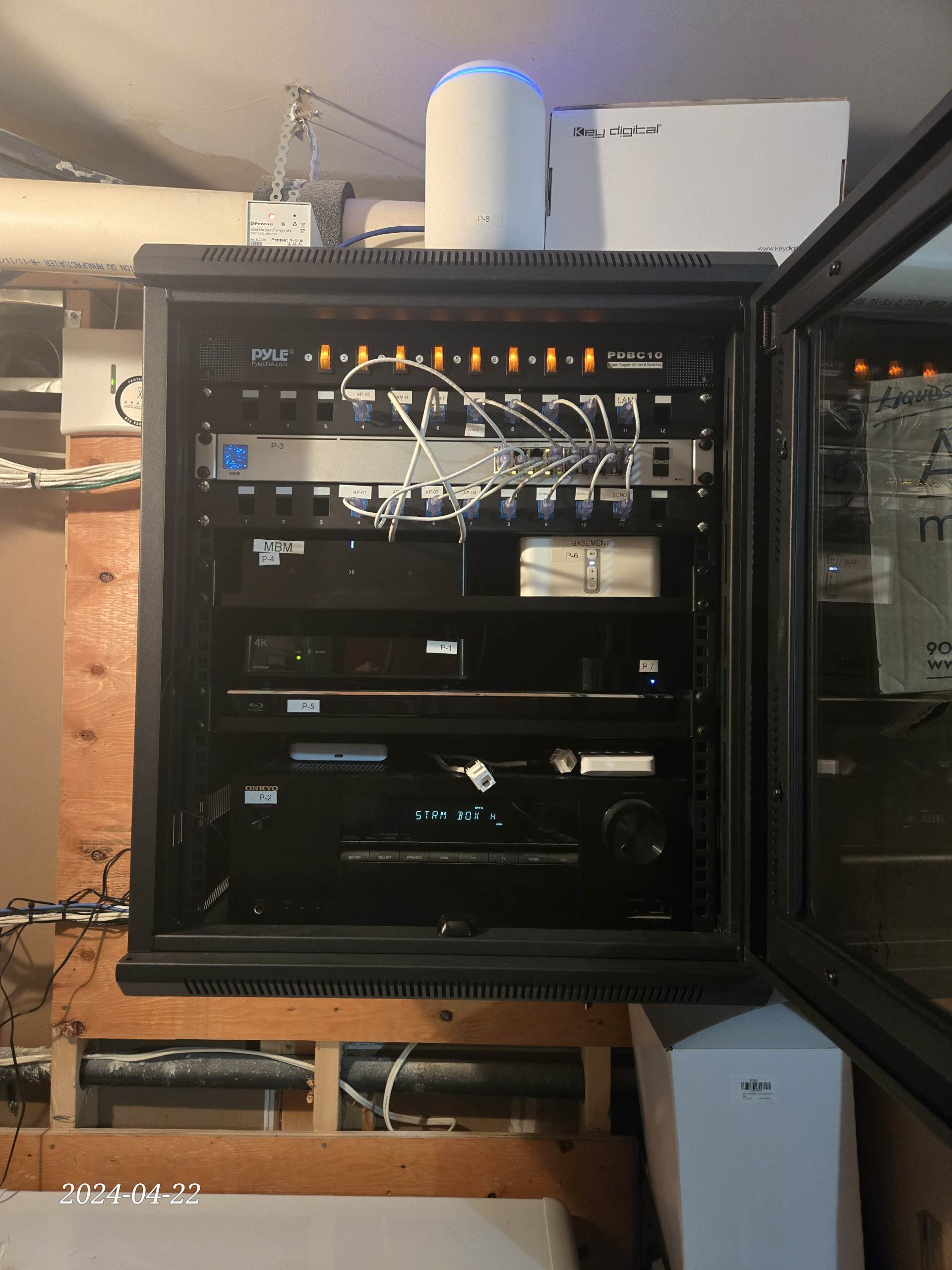
Residential network rack with patch panel and labeled Cat6 terminations for structured wiring in a Vaughan home

What We Installed in Woodbridge Home Renovation

This project focused on a clean, serviceable backbone for office and media zones, plus wiring that keeps audio, cameras, and automation options open. As a result, upgrades can be performed at the rack rather than inside the walls.

  • Cat6/Cat6A home-run drops to office, media rack, and all primary TV/audio zones
  • Dedicated wired access-point drops for full-bandwidth backhaul and whole-home Wi-Fi coverage
  • Pre-wire for exterior cameras and smart doorbells, home-run to a central PoE switch/NVR location
  • Central equipment rack with labelled patch panel, UPS, and space for additional switches/amps
  • Conduit and spare AV/data paths reserved for future Sonos zones, Control4 controllers, and extra displays
Call Now

What our client say about SetupTeam?


“SetupTeam modernized our wiring from the ground up—the rack is clean, everything is clearly labelled, and the network, AV, and cameras all work exactly as promised. It’s obvious they understand the technology, not just the installation.”

  • “Very happy with the service I received from SetupTeam. I sent them an e-mail, which they promptly responded to. Alex…”
    Patricia S
  • “Alex encountered issues that neither he nor I would have expected, but he stuck with the project through those challenges and completed it…”
    Mac B
  • “Came the same day that I called and did an amazing job…”
    Paul K

Vaughan Common Structured Wiring & Network Installation FAQs

If you’re planning structured wiring or network installation anywhere in Vaughan—whether it’s a new build, renovation, or retrofit—this FAQ section explains the key technical choices that affect reliability, performance, and upgrade flexibility over the long term.

We start by choosing a central location that works mechanically: enough wall space for a 19″ rack or panel, straight cable routes from key areas, solid mounting structure, and decent ventilation so switches and UPS gear don’t cook themselves. From there, we home-run Cat6/Cat6A and any coax or control cables back to this point, leaving service loops so wires can be re-terminated later if needed.

At the rack, we terminate low-voltage cables on patch panels rather than run them straight into switches. That lets us re-patch or move services without touching the permanent wiring. We also leave 20–30% spare rack space, extra patch-panel ports, and at least one empty conduit or raceway so future fibre, control wiring, or additional zones can be added without opening finished walls.

Power is treated the same way: a dedicated circuit, surge protection, and usually a UPS, with clear separation between high-voltage and low-voltage sections to stay safe and code-aware. Everything is labelled at both ends and routed through cable managers, so you can actually trace a run later. The result is a clean central hub where adding a new access point, camera, Sonos/Control4 zone, or switch is primarily a patching exercise—not a demolition project.

For new builds, you get the best opportunity to wire the backbone “once and properly.” In those cases we usually recommend Cat6 for most drops and Cat6A where you’re planning longer runs, higher bandwidth (multi-gig), or heavier PoE loads. The idea is to choose cabling and pathways that leave headroom for future upgrades instead of forcing you to re-pull wire in a few years.

For retrofits, we’re more pragmatic. Many Vaughan homes already have older Cat5 or Cat5e in the walls. If those runs test clean (length, continuity, and noise), we’ll often keep them in service for the right applications rather than tearing walls open. For example, security cameras, basic PoE devices, doorbells, and low-throughput endpoints rarely need more than 100 Mbps, so properly terminated Cat5/Cat5e is usually more than sufficient.

Where the layout calls for higher speeds, stricter PoE budgets, or new cable routes, we’ll pull Cat6 or Cat6A only where it truly adds value. This way, the backbone is upgraded where it matters, while the existing cable is safely reused when it meets the technical requirements—keeping the project efficient rather than unnecessarily invasive and expensive.

We start by confirming where each TV will go and where the central rack or media cabinet will live. From there, we run Cat6/Cat6A from every TV location back to that hub, rather than relying on long HDMI cables in the walls. Those data runs are then used for HDMI-over-Cat extenders / HDBaseT so 4K video, control, and audio can be distributed cleanly from a central source stack (Apple TV, cable boxes, streaming players, etc.).

At the rack, we typically use a video matrix or HDBaseT hub so that any source can be routed to any TV zone without extra boxes beside each screen. We also pull a second Cat line and a coax (where applicable) to each TV for future upgrades, plus a dedicated network drop for smart-TV apps or streaming devices.

Behind each display, we plan recessed boxes and service access so the TV can sit tight to the wall with no exposed wiring. The result is a tidy installation now, with structured Cat wiring that’s ready for future display changes, additional sources, or higher-bandwidth formats without opening finished walls.

“Control4-ready” means the house is wired so a complete Control4 system can be added later without tearing anything open or relying on wireless workarounds.
In practice, that usually includes:

Multiple data lines to every TV location. We typically run three Cat-grade cables (Cat6/Cat6A) to each display. That allows:
• 4K/8K video distribution over HDBaseT or AV-over-IP from a central rack
• An audio-return path (ARC/eARC over extender) back to the main amplifiers
• A dedicated line for control (IR/RS-232 over Cat, or a spare network run for future use)

Speaker and subwoofer pre-wire where it makes sense. TV walls, media rooms, and living areas get 14/2 or 16/2 speaker wire and low-level subwoofer runs back to the rack or local amp locations so that Control4 can drive proper surround or zone audio later.

Structured network cabling for the whole house. We home-run Cat-grade cabling from key rooms, offices, access-point locations, cameras, and touchscreens to a central rack. That supports stable Wi-Fi 6 coverage, PoE for Control4 touch panels and UniFi access points, and clean separation between automation, AV, and general data traffic.

A central equipment hub that’s sized for growth. The rack area gets enough space, power, and ventilation for switches, controllers, amplifiers, UPS, and future add-ons. Patch panels are labelled, so moves and changes are straightforward rather than a mystery.

When the backbone is designed this way, adding Control4 later is mostly a matter of installing hardware and programming scenes. You keep the walls closed, gain reliable networking and AV distribution, and the upgrade feels like a planned step—not a rebuild.

Yes. We normally home-run 14/2 or 16/2 CL-rated speaker wire from each speaker location back to a central equipment spot instead of daisy-chaining through volume controls. That keeps every zone independent and lets any future amp or matrix (Sonos Amp, Sonos Port + external amp, traditional AV receiver, or even a Control4 audio system) drive the speakers cleanly.

Where it makes sense, we also pull Cat6 to key locations — equipment racks, volume-control/keypad spots, and media cabinets — so you can add networked amps, touch panels, or control hardware later without opening walls. If the layout is more complex (outdoor zones, subwoofers, or future TV audio integration), we’ll often add conduit or spare cable paths to keep routing flexible.

Because the wiring follows standard speaker and data practices, the house ends up “Sonos-ready” and multi-brand-ready at the same time: you can start with a few Sonos Amps, expand to more zones, or switch platforms in the future without visible wiring changes.

We start by planning camera and doorbell viewpoints and the areas that must be covered—front entry, driveway, backyard, side access—then home-run low-voltage cabling (typically Cat5e/Cat6 or 18/2 + Cat) back to a central location for power, switching, and recording. When this is done during construction or a major renovation, we can hide all wiring in the walls and soffits; later moves or additions are as simple as terminating an extra pre-pulled cable.

For security and video doorbells, pre-wiring is critical. Once the finishes are in, adding proper cable to the door location often means opening walls or running conduit on the exterior of the house, which is rarely ideal. By pulling extra drops while the walls are open—at doors, eaves, and key camera positions—we keep the infrastructure serviceable and ready for more cameras, whether you choose UniFi Protect, Hikvision, or another platform in the future. The result is clean coverage today and predictable expansion without ugly surface-mounted wires later.

Request for Estimate in
Vaughan Area

Request a quote for network installation and structured wiring in Vaughan, including Woodbridge, Maple, Concord, Vellore Village, Kleinburg, Sonoma Heights, Thornhill, and nearby areas. Tell us whether this is pre-construction or a retrofit and what you want wired (Cat6/Cat6A, TV zones, Sonos-ready audio, cameras/doorbell, motorized blinds, smart home automation). We’ll reply with next steps and an estimate based on scope and access.

Call to ask any questions.

(647)464-0606

Or Email

[email protected]

  • Fully licensed & insured · WSIB coverage · $2,000,000 liability
  • Neat, low-impact installs with organized cabling and full system testing
  • Authorized Control4 partner • Sonos Gold Dealer
  • Expert layouts for UniFi / Eero Wi-Fi and UniFi Protect / Hikvision camera systems
  • One call for design, hardware, installation, and follow-up support

Request an Estimate

Let us know how we can help and where you’re located in the Greater Toronto Area, and we’ll reply with the following steps and a precise estimate.

By clicking “Submit”, you agree to SetupTeam’s Terms of Service and Privacy Policy.