Office Meeting-Room Types

Which meeting-room types do Mississauga offices most often build right now?

Office workplaces in Mississauga are still rebalancing their floor plans around hybrid work, and the recurring brief in 2026 is a mix of five or six distinct room types per floor rather than the old single-boardroom-plus-bullpen layout. The decisions cascade from room type, so the first conversation on every project is about what each room will actually be used for.

Boardrooms are the most procurement-sensitive of the bunch. A real boardroom — twelve to twenty-four seats around a single conference table, used for executive-committee meetings, partner meetings, board meetings, and client-facing presentations — needs a front-of-room display large enough to read from the back seat (typically a 98-inch commercial display or a 2×1 / 2×2 video-wall configuration), a camera with enough resolution and framing intelligence to make a person at the far end of the table look like the focal point on the remote participant's screen, a ceiling-microphone array engineered to pick up every seat without table mics, a programmable control surface in the table, and a level of cable-management discipline that the room never visibly looks like an AV install. The buyers are typically a managing director or the executive assistant who books the room, signed off by IT for the platform and security stack. The brief recurs across the Square One vertical-core towers at 90 Burnhamthorpe and 100 City Centre Drive, the Mississauga Executive Centre cluster on Robert Speck Parkway, and the Canadian-HQ tenants in the Airport Corporate Centre.

Executive meeting rooms — six to twelve seats — outnumber boardrooms five-to-one in Mississauga's purpose-built office parks. The brief is similar to a boardroom but compressed: a single large display (75-to-85 inches), an integrated all-in-one videobar (Logitech Rally Bar, Poly Studio X70, Neat Bar Pro, Cisco Room Bar Pro, or Yealink MeetingBar A40 depending on the platform), table-box AV with single-cable USB-C BYOD, and room-scheduling-panel integration. Most of these rooms are deployed as Microsoft Teams Rooms or Zoom Rooms with a certified appliance rather than a custom-integrated room. They show up at scale across Meadowvale Business Park pharma R&D campuses, the Convair Drive and Skymark Avenue Airport Corporate Centre tenants, and the Sheridan Research Park tech and engineering footprint.

Huddle rooms — three to six seats — are the highest-volume install in current Mississauga office builds. Tenants across the Airport Corporate Centre, Meadowvale, the Heartland Business Community, and the Robert Speck towers are converting former private offices and storage rooms into huddle rooms at a steady cadence. The brief is compact: a single 55-to-65-inch display, a wide-angle integrated videobar (Logitech Rally Bar Mini, Poly Studio X30, Neat Bar, Yealink MeetingBar A20), an in-table cable cubby for single-cable BYOD, and a Teams or Zoom scheduling panel outside the door. Most huddle rooms are deployed as BYOD-first and then certified to MTR or Zoom Rooms later if the use pattern justifies it.

Training rooms are the most underestimated room type. A real training room — twenty to forty seats in classroom or theatre layout, used for sales kickoffs, onboarding cohorts, product training, and recorded sessions — needs a different camera strategy (presenter tracking on the trainer, audience camera with auto-framing on the room), a different microphone strategy (a presenter lavalier or a desktop gooseneck for the trainer plus ceiling-mic coverage for the audience), and a different display strategy (typically dual front-of-room displays with one running content and one running the remote-participant grid, or a single ultra-wide display in larger rooms). Recording, livestreaming, and post-event content distribution are usually in scope. Pharma R&D campuses at Meadowvale often add a regulated-environment dimension to the training room — GxP-aware change control on hardware changes, restricted-access scheduling for validated-environment training, and documented sign-off on AV changes that touch lab-adjacent meeting space.

Town halls, all-hands rooms, and divisible multipurpose rooms — twenty to two hundred seats — show up frequently in larger Airport Corporate Centre tenants, in the Meadowvale Business Park pharma and tech campuses, and in the Square One tower amenity floors. The brief adds a second display, distributed audio reinforcement (ceiling or pendant speakers driven by a Biamp Tesira or QSC Q-SYS Core DSP), a wireless presenter microphone, and operable-partition logic so the room can be split into smaller rooms with independent AV.

Client-facing meeting rooms in professional-services tenants (law, accounting, consulting, financial services, advisory) in the Mississauga Executive Centre and the Square One towers add a layer of cosmetic and material discipline: the AV has to disappear into the millwork, the cabling has to be invisible, and the control surface has to be intuitive enough that a managing partner who has never seen the room before can start a Teams call without calling IT.

The practical takeaway: the right answer for any given room is driven by who uses it, how often, and for what — not by a default product specification. Every project starts with a use-case audit before any hardware is named. The same install team that handles your office conference-room work can also handle your executive team's residential displays — see our home theatre installation in Mississauga for the parallel residential briefs that frequently follow a corporate boardroom engagement.

Executive meeting room on a high floor of a Square One Mississauga office tower with an 85-inch commercial display, a Logitech Rally Bar Pro, a walnut table with integrated USB-C table-box, six leather chairs, soft warm pendant lighting, daylight view across Mississauga City Centre
Office Meeting-Room Types
Platform Decision

How do you choose between Microsoft Teams Rooms, Zoom Rooms, Google Meet, Webex Rooms, and BYOD for a Mississauga office?

By starting with the tenant's primary calendar and identity platform, not by starting with hardware. The platform decision is the upstream choice that constrains every downstream hardware and integration decision, and the wrong sequence (picking hardware first) produces rooms that fight the IT environment for the next three years.

If the tenant runs Microsoft 365 with Exchange Online and Microsoft Teams as the primary collaboration platform — which describes the majority of professional-services tenants in the Mississauga Executive Centre and the Square One vertical core, most pharma R&D tenants at Meadowvale Business Park, and a large share of the enterprise-tech and aerospace tenants in the Airport Corporate Centre — the default room platform is Microsoft Teams Rooms (MTR). MTR is Microsoft's certified room-system program: only Microsoft-certified hardware can be deployed as a managed MTR endpoint, the device joins the customer's Azure Active Directory tenant, it is managed through Microsoft Intune (the same MDM stack the rest of the corporate fleet runs on), it logs in with an Exchange resource-mailbox account, and it appears in the user's Outlook calendar as a bookable room. The certified hardware ecosystem is broad and growing: Logitech Rally Bar / Rally Bar Mini / Rally Bar Pro with Tap IP controllers, Poly Studio X30 / X50 / X70 / X90 with TC10 controllers, Neat Bar / Bar Pro / Board 50 / Frame, Cisco Room Bar / Room Bar Pro (cross-certified with Webex), and Yealink MeetingBar A20 / A30 / A40 / A50 with MTouch controllers. MTR runs in two variants — MTR on Windows (uses a small-form-factor PC, more flexibility on peripheral integration) and MTR on Android (appliance-only, simpler IT footprint). The Android appliance is the most common deployment for new rooms in 2026 because the management overhead is dramatically lower.

If the tenant runs Zoom as the primary collaboration platform — which describes a significant minority of Mississauga tenants, particularly in the Sheridan Research Park tech cluster, in the Meadowvale Argentia Road tech footprint, and in marketing, design, and creative-services tenants across the Heartland Business Community — the default platform is Zoom Rooms. Zoom Rooms uses its own certified hardware appliance ecosystem (largely the same Logitech, Poly, Neat, Yealink, and Cisco bars as MTR but in their Zoom-certified firmware), authenticates against the tenant's Zoom account, and uses a Zoom Rooms Scheduling Display panel for booking. Calendar integration runs against Microsoft 365 Exchange, Google Workspace, or Zoom's native scheduling.

Google Meet hardware is the right choice when the tenant standardises on Google Workspace as the identity and calendar platform. The hardware ecosystem is narrower than MTR or Zoom Rooms but stable: the Google Meet Series One bars (built by Lenovo and Logitech under Google certification), the Logitech Rally Bar with Google Meet firmware, and the Poly Studio X-series Google Meet variant. We see this less often in Mississauga's enterprise office geography than MTR or Zoom Rooms but it is a clean deployment when the customer's IT stack is committed to Google.

Cisco Webex Rooms is the right choice for tenants standardised on Webex — typically larger enterprise customers and certain regulated-industry deployments. The Cisco Room Bar, Room Bar Pro, Room Kit Pro, and Room Bar EQ all run RoomOS natively as Webex devices and can also be cross-certified for MTR or Zoom Rooms via firmware switch, which is uniquely useful for tenants in transition between platforms. We see meaningful Webex deployment in the Airport Corporate Centre and Meadowvale, where multinational tenants standardised on Cisco collaboration in the 2015-2020 cycle and are now in a slow refresh.

BYOD-first rooms are the right answer for huddle rooms, ad-hoc rooms, and rooms used by tenants who have not standardised on any single platform. The room runs no native platform — instead, an integrated USB-C single-cable connection in the table-box lets a presenter plug a laptop in, the laptop drives the room's display, camera, microphone, and speaker through a single connection, and the meeting runs on whatever platform the laptop has open (Teams, Zoom, Meet, Webex, GoTo, BlueJeans, or any browser-based call). BYOD rooms work especially well when paired with a wireless presentation overlay (Mersive Solstice or Barco ClickShare) for guest or non-Apple devices.

Cross-platform interoperability is a real concern for tenants who join meetings hosted on platforms other than their own. Direct Guest Join lets a Microsoft Teams Room or Zoom Room join the other platform's meeting natively (an MTR can join a Zoom or Webex call, a Zoom Room can join a Teams or Webex call), and Cisco Webex Edge for Devices brings older Webex endpoints into modern interop. The integrator's job is to scope the cross-platform mix the tenant actually has, not to assume a single platform.

The shortcut decision tree: Microsoft 365 tenant with Teams as primary platform → MTR on Android appliance. Zoom-primary tenant → Zoom Rooms appliance. Google Workspace tenant → Google Meet hardware. Webex-primary or regulated-enterprise tenant → Cisco Room Bar with Webex. Heavy cross-platform mix or huddle-room volume → BYOD-first with Mersive or ClickShare overlay. Every project we scope starts with this decision, documented in writing, signed off by IT, before any hardware is named.

Close-up of a Logitech Tap IP or Poly TC10 controller on a walnut conference table showing the Microsoft Teams Rooms home screen with the next scheduled meeting and a one-tap join button
Platform Decision
Hybrid Equity

How do you make a hybrid meeting feel fair to remote participants in a Mississauga boardroom?

By engineering the room around the remote participant's experience first and then layering the in-room experience over it, instead of designing for the people in the room and bolting a camera and microphone on at the end. Hybrid meeting equity is the single biggest workplace-AV design shift of the past five years, and it changes how cameras, microphones, displays, lighting, and acoustic treatment are specified.

Acoustic engineering is the foundation. A glass-walled boardroom on a high floor of a Square One Mississauga office tower, with hardwood floors, a long polished conference table, and a wall of glass facing the Absolute towers and Celebration Square, sounds beautiful to the in-room participants and brutal to the remote ones — every voice arrives at the remote participant's headset with a half-second of reverberation, the air-handling rumble bleeds into the microphone, and the person at the far end of the table sounds like they are calling from inside a swimming pool. The fix is twofold: ceiling-microphone arrays with proper beamforming and DSP, and acoustic treatment that reduces RT60 (room reverberation time) to under half a second. For ceiling mics we standardise on Shure MXA920 (the current reference standard for large boardrooms and training rooms), Shure MXA710 (linear array for narrower rooms and over-table coverage), or Sennheiser TeamConnect Ceiling 2 (premium alternative for image-conscious executive rooms), all running into a Shure IntelliMix P300, a Biamp Parlé or Tesira DSP, or a QSC Q-SYS Core for echo cancellation, automatic gain control, noise reduction, and audio routing. For acoustic treatment we add ceiling clouds, fabric-wrapped wall panels (designed to look like art or millwork, not industrial treatment), and acoustic baffles where the room's geometry demands them. The treatment is sized to the room volume and the surface materials — measured, not guessed.

Camera framing is the second pillar. The old camera model — a fixed wide-angle lens showing everyone in the room as a small face at the back of a long table — is the visual signature of pre-2020 conference rooms and is the single biggest contributor to hybrid-meeting fatigue. The 2026 model is AI-driven auto-framing and speaker tracking: the camera identifies each person in the room as an individual subject, frames whoever is currently speaking, and composites a multi-person grid view that gives each in-room participant the same on-screen presence as a remote participant. Logitech's RightSight 2 (with the optional Logitech Sight ceiling-mounted second-camera companion for tabletop framing), Poly's DirectorAI with the EagleEye Cube companion, Neat's audio-and-vision intelligence, and Cisco's Speaker Track 2 all deliver this. In larger rooms a multi-camera composition strategy is the right answer: a front-of-room bar for the wide and presenter view, a Logitech Sight or equivalent table-mounted camera for the seated-at-table view, and intelligent switching driven by the platform's AI. The remote participant sees the room as a series of well-framed faces rather than a wide-angle landscape.

Front-of-room display strategy is the third pillar. Hybrid meeting equity argues for either a single very large display (a 98-inch commercial 4K panel — Samsung QM98 or LG UH9 series — large enough that the remote-participant grid is readable from any in-room seat) or a dual-display setup (one display for content, one display for the remote-participant grid, mounted side-by-side at the front of the room). Some executive rooms run an all-in-one device instead: the Neat Board 50 (a 65-inch interactive bar with camera, microphone, speaker, and whiteboard built in) or the Microsoft Surface Hub 3 (85-inch, Windows-native MTR with touch and inking). Each has a place. The single-very-large-display approach is the cleanest for traditional boardrooms; the dual-display approach is the most functional for active hybrid working; the all-in-one approach is the fastest deployment for executive rooms where the room is also used as a whiteboard space.

Lighting is the fourth pillar, and it is the one most often overlooked. A conference room lit from directly overhead with strong downlights, no front-of-face fill, and a bright window behind the seating area makes every in-room participant look like a silhouette to the remote participant. The fix is layered: dimmable front-of-face fill (a wall-washing LED strip or a soft-emitting linear pendant above the table), reduced overhead downlight intensity, and motorised blackout or layered shading on any window that backlights the seating. For Control4 or Crestron-integrated rooms the lighting and shading run on the same control system as the AV, and the room presets ('Meeting', 'Presentation', 'Video Call', 'Off') reset the whole room in one tap.

The practical test: book a thirty-minute internal call with a remote participant before the room is signed off. Watch what they see, listen to what they hear, and have them tell you when a specific in-room participant is speaking. If the remote participant can identify each speaker by face and voice without strain, the room is ready. If not, the acoustic treatment, the camera framing, or the front-of-face lighting needs another pass. We do not sign off on a hybrid room until that test is passed.

Mississauga boardroom showing Shure MXA920 ceiling microphone tiles in the acoustic ceiling, a Logitech Rally Bar Pro at the front below a 98-inch commercial display, ten leather chairs around a walnut conference table, fabric-wrapped acoustic wall panels in warm grey, evening view across Mississauga City Centre through the windows
Hybrid Equity
Wireless Presentation

What is the best wireless presentation and BYOD setup for a Mississauga office meeting room?

It depends on the room's guest-access policy, the device mix, and whether the room is also deployed as a Microsoft Teams Room, a Zoom Room, or a BYOD-first room. Three models cover the vast majority of Mississauga office briefs.

Dedicated wireless-presentation platforms — Mersive Solstice, Barco ClickShare, and Crestron AirMedia — are the right answer for client-facing meeting rooms and boardrooms that frequently host outside guests. The platform appears to a user as a single SSID and a six-digit room code (or a USB dongle for the absolute simplest user experience), it runs across Windows, macOS, iOS, Android, and Chromebook without driver installs, and it lets multiple presenters share their screens at the same time on a side-by-side composition. Mersive Solstice is the most flexible for IT-managed environments (extensive admin controls, RoomKit-class deployment) and is our default for the multinational tenant base in the Airport Corporate Centre and the Meadowvale Business Park pharma and tech campuses; Barco ClickShare CX-series with the Conferencing extension is the most polished for users (the dongle gives a near-instant connection) and is a frequent choice for client-facing rooms in the Mississauga Executive Centre professional-services tenants; Crestron AirMedia integrates cleanly with rooms that already run a Crestron control system. We deploy whichever fits the tenant's preferred admin experience and budget.

Native platform sharing — Microsoft Cast, Apple AirPlay enterprise, USB-C single-cable BYOD — works without a third-party overlay in rooms deployed as a managed MTR or Zoom Room. Microsoft Cast lets a Teams-signed-in Windows or macOS device share its screen wirelessly to an MTR Android appliance over the local network; AirPlay (enterprise variant with proper network configuration) lets iOS and macOS devices share to compatible front-of-room devices; USB-C single-cable lets a presenter plug a single cable into the table-box and have the laptop's screen drive the room's display, the room's camera become the laptop's camera, the room's microphone become the laptop's microphone, and the room's speakers become the laptop's speakers — all over one cable. The USB-C single-cable model is the most reliable BYOD experience available in 2026 and is the default we recommend for huddle rooms and for any room where the tenant's device fleet is standardised on USB-C laptops.

Guest-device join is a real concern for boardrooms and client-facing rooms, particularly in the Mississauga Executive Centre professional-services tenants and the Square One client-facing offices. The tenant's network policy may not allow an outside guest's laptop to join the corporate VLAN, which breaks any wireless-presentation model that depends on the corporate network. The fix is a guest VLAN with its own SSID, isolated from the corporate network by firewall policy but with permitted-egress rules that let the wireless-presentation platform's discovery protocols work for guests on that VLAN. Mersive Solstice and Barco ClickShare both publish documented guest-network deployment patterns; we configure them as part of the project with the customer's IT team.

The shortcut decision tree: boardroom or client-facing room with frequent outside guests → Mersive Solstice or Barco ClickShare. Standard internal MTR / Zoom Room → USB-C single-cable plus native Cast. Mixed model in a flagship room → both, with the wireless platform as the primary path and USB-C as the wired fallback. Every project includes a wireless-presentation specification documented in writing.

Open in-table cable cubby on a walnut conference table with a USB-C connector being plugged in by a presenter's hand, an HDMI port and power outlet visible inside the cubby, the front-of-room display showing the laptop's content in the soft-focus background
Wireless Presentation
Room Scheduling

How does a Mississauga office connect its conference rooms to Microsoft 365 or Google Workspace for booking?

Through an Exchange resource mailbox or a Google Workspace resource calendar that represents the room as a bookable resource, paired with a wall-mounted room-scheduling panel outside the door that displays the room's current and upcoming bookings and lets a passing user reserve it on the spot. The integration is straightforward in principle and has half a dozen real decisions in practice.

For Microsoft 365 tenants — the majority of the Mississauga Executive Centre, the Square One vertical core, the Airport Corporate Centre, and the Meadowvale Business Park tenant base — the standard pattern is: IT creates an Exchange resource mailbox for each room (room name, capacity, equipment list, location), applies a room-policy that controls booking rules (max duration, auto-accept, recurring-meeting policy, conflict resolution), and adds the room to the Outlook room-finder list and to the global address list. End users book the room by adding it as a 'location' or an 'attendee' to a Teams meeting in Outlook. The room-scheduling panel logs into the resource mailbox and displays the calendar. For MTR-on-Android deployments the same Exchange resource mailbox also drives the room device itself — the device shows the upcoming meeting list on its panel and joins the meeting at the scheduled time with a single tap.

For Google Workspace tenants the equivalent pattern uses a Google Workspace resource calendar with the same policy controls, with the panel using a Workspace-native scheduling app or a third-party panel that supports Google Workspace.

The panel choice is where the procurement decision sits. Logitech Tap Scheduler (a clean PoE-powered panel that runs on Microsoft Teams Rooms Panel, Zoom Rooms Scheduling Display, or Webex Devices firmware) is the standard for rooms that match the bar manufacturer. Crestron Room Scheduling panels integrate with rooms already running a Crestron control system. Joan (battery-powered e-ink, no wiring required) is the fastest deployment for retrofit installs where running PoE Ethernet to every room is impractical — a frequent choice for Cooksville and Streetsville professional-office retrofits where ceiling and wall access is limited. Evoko Liso is the premium panel for image-conscious executive offices, with rich room status colouration visible at a distance. Robin (cloud-based, hot-desking and people-finding included) is the right answer for tenants who also want desk booking, neighbourhood-based seating, and meeting analytics — popular with Airport Corporate Centre and Meadowvale tenants running activity-based workplace strategies. Teem (by iOFFICE+SpaceIQ, now Eptura) overlaps similar ground for larger enterprise tenants.

Occupancy sensing is an increasingly common add-on. A people-counting camera or a ceiling-mounted occupancy sensor reports actual room usage back to the booking platform — the data shows which rooms are over-booked but under-used (the most common workplace-experience finding in Mississauga office surveys), which rooms are habitually under-booked but in heavy hallway demand, and which neighbourhoods are over-provisioned for meeting space. The data feeds workplace-strategy decisions on the next refresh cycle. For Microsoft 365 tenants, the Places app (formerly known as Outlook Places and Microsoft Places) is the native target for this data; for tenants on a third-party platform like Robin or Teem the data feeds the platform's analytics directly.

Presence-based room lighting and shading is the third connected element. Many of our Mississauga Executive Centre and Square One deployments tie the room-scheduling system into the room's lighting and shading scenes via Control4 or Crestron — when the room is booked, the lights warm up and the shades lower five minutes before the meeting; when the room is released, the lights and shades reset to the unoccupied state. The integration is invisible to the end user, which is the design goal.

Logitech Tap Scheduler or Evoko Liso scheduling panel mounted on a glass-fronted boardroom door in a Mississauga Executive Centre tower with the brushed-metal panel showing 'Available — Next: 10:30 Quarterly Review' in clean sans-serif type, the boardroom visible through the glass
Room Scheduling
IT Integration

What does a Mississauga IT team need from a conference-room AV integrator?

A device-by-device integration plan that fits the tenant's existing identity, network, and endpoint-management stack — not a parallel AV network operated outside of IT's visibility. The conference-room AV decisions live inside the customer's IT environment in 2026, and a good integrator behaves like a security-aware endpoint vendor rather than a low-voltage trade.

Identity is the first conversation. For a Microsoft Teams Rooms deployment, every room device joins the customer's Azure Active Directory tenant, authenticates with an Exchange resource-mailbox account secured with a strong password rotated on a documented cadence (the resource mailbox is a service account, not a user account, so multi-factor authentication is enforced at the device level rather than at sign-in). The device is enrolled in Microsoft Intune as a managed corporate endpoint, with the same baseline policies (BitLocker on the underlying Windows device for MTR-on-Windows, Conditional Access scoped to the device's location and compliance state, automatic Windows Update or Android security patching on a managed cadence). The same logic applies to Zoom Rooms (Zoom-managed device with the tenant's Zoom account binding), Google Meet hardware (Workspace-managed), and Webex Devices (Cisco Control Hub-managed).

Network segmentation is the second conversation. AV traffic — video conferencing media, content sharing, room control, scheduling panel sync — runs on its own managed VLAN, isolated from the user-device VLAN and the guest VLAN by firewall policy. The AV VLAN allows egress to the platform vendor's required endpoints (Microsoft 365 endpoint list for MTR, Zoom service endpoints, Google Meet endpoints, Webex endpoints) and to the customer's Intune / management plane, and otherwise behaves as a restricted network. We work with the customer's IT team on the firewall ruleset before any room is brought live. The room device is connected via wired Ethernet PoE+ rather than Wi-Fi — wired is faster, more reliable, easier to troubleshoot, and removes a class of failure modes that pure Wi-Fi deployments suffer from. The room's BYOD experience can still ride on Wi-Fi where it makes sense.

Conditional Access and compliance is the third conversation. The room device is a managed corporate endpoint subject to the same Conditional Access policies as a user laptop — sign-in is restricted to compliant devices, sign-in is restricted to specific geographic regions (typically the tenant's office locations), sign-in alerts route to the security team on anomaly. For regulated-industry tenants in Mississauga — pharma R&D campuses at Meadowvale running GxP-aware change control, multinational financial-services tenants in the Mississauga Executive Centre, aerospace and logistics tenants in the Airport Corporate Centre with ITAR-aware data handling — this is a non-negotiable procurement requirement. For pharma tenants specifically, the AV install discipline extends into change-control documentation, restricted-access scheduling for hardware work in validated-environment-adjacent spaces, and a documented hand-off to the tenant's qualified-supplier register.

Firmware and software lifecycle is the fourth conversation. Conference-room hardware receives platform-mandated firmware updates on a regular cadence — Microsoft pushes MTR-on-Android updates roughly monthly, Zoom Rooms appliance firmware updates ship quarterly with security patches on demand, Webex Devices update through Control Hub. We deploy with an update window scheduled outside business hours, monitor the platform vendor's release notes for breaking changes, and coordinate with the customer's IT team before any update that requires re-certification or re-enrollment.

Logging and observability is the fifth conversation. Microsoft Teams Rooms Pro Management portal, Zoom Dashboard, Google Admin Console for Meet hardware, and Cisco Control Hub each give the customer's IT team a single pane of glass for every room's health, usage, and incident history. We configure each device to report into the appropriate console at deployment and we hand off the management documentation as part of the project completion.

The practical outcome: by the time the rooms go live, the customer's IT team has the same visibility into the conference-room fleet that they have into the rest of the device fleet. They can patch, monitor, troubleshoot, and report on the AV estate without involving us for routine operations.
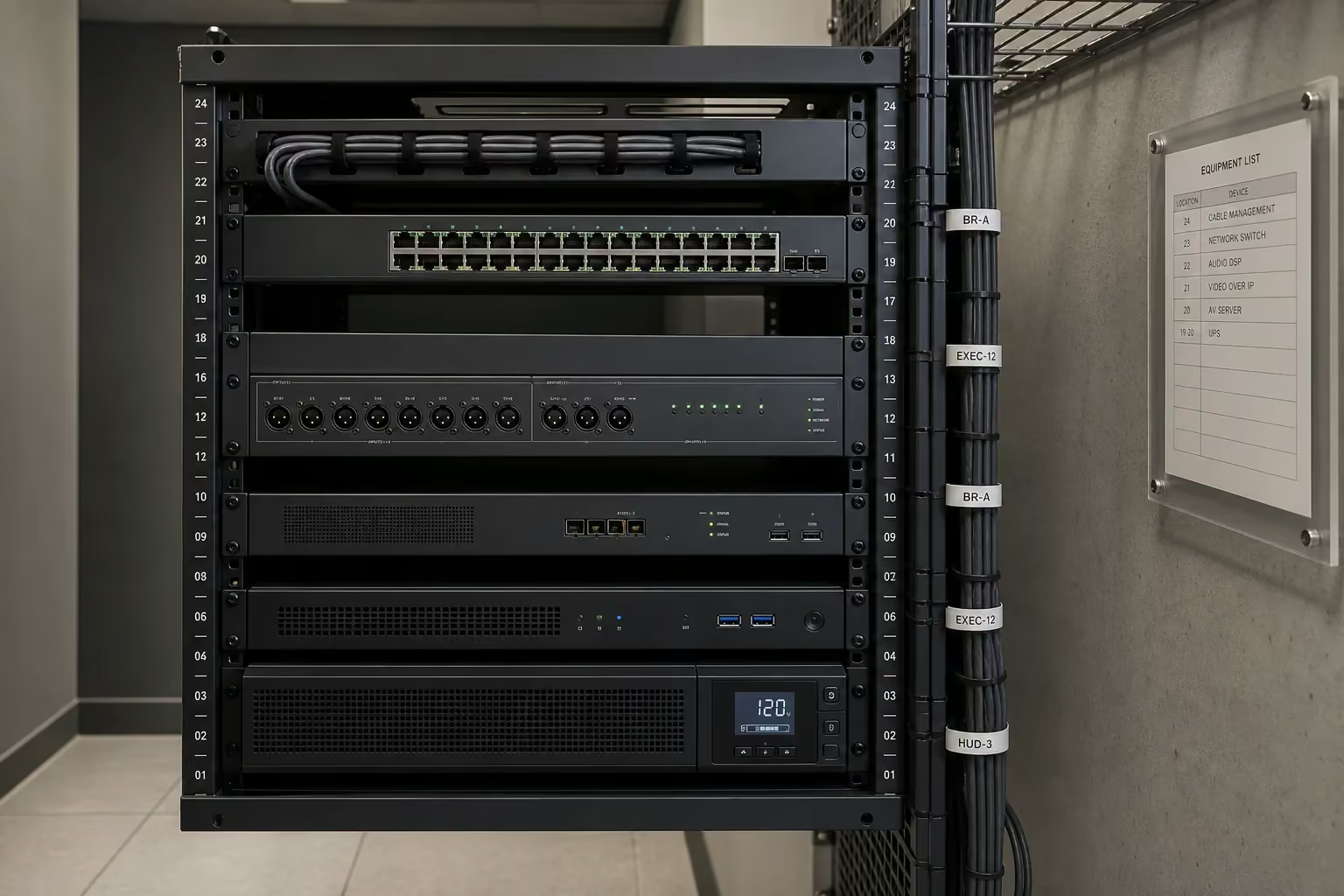
Back-of-office IT room in a Mississauga corporate office with a wall-mounted network and AV equipment cabinet showing a managed PoE switch, structured cabling to room devices, a Biamp Tesira DSP, a UPS, and tidy labelled patching with cable management
IT Integration
Pricing

How much does a conference room or boardroom AV install cost for a Mississauga office?

Pricing depends on room type, platform certification, hardware tier, and integration scope more than on any other factors. The ranges below reflect typical 2025-2026 Mississauga office projects and every project is quoted from a site survey and a documented requirements conversation, not from a phone description.

A huddle room (three-to-six seats, single 55-to-65-inch display, integrated videobar like a Logitech Rally Bar Mini or Poly Studio X30 or Neat Bar, in-table cable cubby with USB-C BYOD, optional scheduling panel outside the door) typically runs $4,500 to $9,500 installed for a single room, including the display, the bar, the mount, the cable cubby, the Cat 6A network run, and the certification of the room as an MTR or Zoom Room. Volume discounts apply for tenants rolling out multiple huddle rooms across a floor or a building — common at scale across the Airport Corporate Centre and Meadowvale Business Park.

A standard meeting room (six-to-twelve seats, single 75-to-85-inch display, integrated videobar like a Logitech Rally Bar or Poly Studio X70 or Neat Bar Pro, table-box AV with USB-C and HDMI, scheduling panel, Tap IP or TC10 controller) typically runs $9,500 to $19,500 installed per room, depending on display size, bar tier, table-box specification, and whether ceiling-microphone supplementation is in scope.

A real boardroom (twelve-to-twenty-four seats, 98-inch display or dual-85-inch displays, Shure MXA920 or Sennheiser TeamConnect Ceiling 2 microphone array, Biamp Parlé or Tesira DSP, Logitech Rally Plus or Poly Studio E70 plus companion table camera, acoustic ceiling clouds and wall-panel treatment, motorized blackout shading, Crestron or AMX control with table-integrated touch panel, full cable concealment in the millwork) typically runs $35,000 to $95,000 installed per room. The range is wide because boardroom briefs vary considerably — a corporate-committee room with broadcast-quality video capability for executive announcements sits at the high end; a partner-meeting room with a clean MTR appliance and an attractive front-of-room sits at the low end.

A training room (twenty-to-forty seats, dual front-of-room displays or single ultra-wide, presenter-tracking camera, audience-framing camera, presenter microphone plus ceiling-mic audience coverage, distributed audio reinforcement with ceiling speakers driven by a Biamp Tesira or QSC Q-SYS Core, recording and livestreaming capability, control surface for the trainer) typically runs $24,000 to $58,000 installed depending on size and recording sophistication. Pharma R&D training rooms in Meadowvale with GxP-aware change-control documentation and validated-environment-adjacent install discipline sit at the upper end of the range.

A town hall or all-hands room with divisible-room capability (forty-to-two-hundred seats, dual or triple display, multi-zone audio, operable-partition logic that splits the AV when the partition closes, wireless presenter microphones, video-streaming capability) typically runs $65,000 to $185,000 installed for a typical Airport Corporate Centre or Meadowvale large-tenant deployment.

Wireless-presentation platform deployment (Mersive Solstice, Barco ClickShare, or Crestron AirMedia) adds $1,800 to $5,500 per room over the base videobar deployment, depending on platform tier and whether guest-VLAN configuration is in scope. Room-scheduling panel deployment adds $850 to $2,400 per door for the panel plus the PoE-Ethernet run and the Exchange / Workspace resource-mailbox integration.

Multi-room rollouts attract a discount. A typical Mississauga Executive Centre or Airport Corporate Centre tenant with twelve rooms across a floor (two boardrooms, four executive meeting rooms, four huddle rooms, two training rooms) lands in the $260,000 to $480,000 range for a full deployment, depending on hardware tier and the cosmetic discipline required.

Ongoing support is priced separately as a managed-services agreement. A typical Mississauga tenant with eight-to-twenty conference rooms under management lands at $350 to $2,800 per month for the support agreement, which covers next-business-day response for room failures during operating hours, after-hours emergency response with defined response times, quarterly preventative maintenance (firmware updates, peripheral firmware checks, mount and cable inspections, panel cleaning), remote dashboard support, and quarterly asset-management reporting. All pricing is documented in writing before any work starts.

Recent Project

What kind of conference room project have you recently delivered in Mississauga?

A representative recent project — building cluster and floor identified, tenant identity withheld for privacy.

A multinational enterprise tenant occupying a full floor in an Airport Corporate Centre office tower along Convair Drive approached us during a post-lease-renewal interior refresh. The existing AV was a mix of legacy fixed-camera systems on long table-mic arrays (mostly unusable for hybrid meetings — remote participants routinely could not hear or see in-room speakers), two large 85-inch boardroom displays that had been wall-mounted by the previous tenant's general contractor with no AV integration, and a fleet of small private offices that the tenant wanted to convert into huddle rooms with no video conferencing capability at the time of survey. The tenant runs on Microsoft 365 with Teams as the primary collaboration platform, and has a global IT standard for Microsoft Teams Rooms on Android appliances managed through the Teams Rooms Pro Management portal.

The redesigned scope across the floor: fourteen rooms total, all deployed as Microsoft Teams Rooms on Android appliances. The main boardroom (twenty seats) was rebuilt with a 98-inch Samsung QM98 commercial display, a Logitech Rally Bar Pro at the front with a Logitech Sight tabletop companion camera for seated-view framing, a Shure MXA920 ceiling-microphone array running into a Biamp Parlé DSP for echo cancellation and audio routing, acoustic ceiling clouds and fabric-wrapped wall panels matching the tenant's brand neutrals, motorized blackout shading on the floor-to-ceiling glass facing the Pearson runway approach, a Crestron control panel integrated into the conference table for room presets ('Meeting', 'Presentation', 'Video Call'), and a Logitech Tap Scheduler outside the door tied to the tenant's Exchange resource mailbox. Five executive meeting rooms each got a 75-inch LG UH9 display, a Logitech Rally Bar with Tap IP, an in-table cable cubby with USB-C BYOD, and a Tap Scheduler panel. Six huddle rooms each got a 55-inch display, a Logitech Rally Bar Mini, a single cable cubby, and a Joan e-ink scheduling panel (no PoE run required given the retrofit constraint inside the existing tenant fit-out). Two training rooms got dual 86-inch displays in landscape, a Poly Studio E70 wide-angle audience camera plus a Logitech Rally Bar Pro for presenter framing, presenter lavalier microphones and Shure MXA710 audience ceiling coverage running into a QSC Q-SYS Core, distributed ceiling speakers, and recording capability for monthly all-hands sessions distributed to the tenant's other Canadian offices.

The install ran across five weekends inside the tenant's interior-refresh closure window. The customer's IT team was embedded in the project from the kickoff and was the sign-off authority on Azure AD device join, Intune enrollment, network VLAN configuration, Conditional Access policy, and Exchange resource-mailbox setup. Each room was commissioned with a documented thirty-minute hybrid-meeting acceptance test (a director in the room, a director remote from the tenant's Calgary office, a content-share test, a wireless-presentation test, an audio-clarity test from every seat), signed off by the tenant's IT director before the room was released to general use. The handoff package included a per-room asset list, the network and identity configuration, the management-portal credentials handed to the tenant's IT team, and a one-page operator card laminated and mounted inside each room for first-time users.

The operational outcome: hybrid meeting cancellations dropped to near zero across the first quarter of full operation; the tenant's Calgary and Vancouver offices report that their Mississauga counterparts are now the clearest-sounding rooms on the global Teams roster; the IT team manages the room fleet through the Microsoft Teams Rooms Pro Management portal without involving us for routine operations; and the tenant has scheduled a follow-on engagement to roll the same template to its Square One client-facing office and to a Meadowvale R&D campus that runs a parallel meeting-room standard with additional GxP-aware change-control discipline.

This is a representative scope. Smaller projects (a two-room huddle deployment for a Mississauga Executive Centre tenant, a single executive meeting room for a Sheridan Research Park boutique tech firm, a single training-room build for a Heartland Business Community tenant) run the same project discipline in proportion. Larger projects (a whole-floor rollout for a Meadowvale pharma R&D tenant, a multi-floor deployment for a Square One vertical-core tenant) extend the same pattern across more rooms and a longer timeline.

Training room in a Meadowvale Business Park Mississauga office with dual 86-inch landscape displays at the front of the room, classroom-style seating for twenty-four, a presenter standing at a lectern with a Poly Studio E70 audience camera mounted above the displays, fabric-wrapped acoustic panels on the side walls
Recent Project
Frequently Asked Questions

Conference room solutions in Mississauga FAQs

Both are certified room-system programs — only certified hardware can be deployed as a managed endpoint — but they bind to different identity and management stacks. A Microsoft Teams Room joins the customer's Azure Active Directory tenant, authenticates against an Exchange resource mailbox, and is managed through Microsoft Intune and the Teams Rooms Pro Management portal. A Zoom Room binds to the customer's Zoom account, uses Zoom's own scheduling display panel, and is managed through the Zoom Admin Dashboard. The hardware ecosystem (Logitech Rally Bar, Poly Studio X-series, Neat Bar, Cisco Room Bar, Yealink MeetingBar) overlaps almost entirely — most bars are firmware-switchable between MTR and Zoom Rooms. The platform decision should follow the tenant's primary collaboration and identity platform.
Ceiling microphones — typically Shure MXA920, Shure MXA710, or Sennheiser TeamConnect Ceiling 2 running into an audio DSP like a Biamp Parlé, Biamp Tesira, or Shure IntelliMix P300 — are the current standard for any boardroom over eight seats and for any room designed for hybrid meeting equity. Table mics work but they clutter the table, restrict reconfiguration, pick up table-surface noise, and produce uneven coverage for people not directly in front of a mic. A ceiling-mic array picks up every seat without table clutter and integrates cleanly with the room's acoustic treatment.
By engineering the room around the remote-participant experience first. The four pillars are acoustic treatment that brings room reverberation down to a working level with ceiling-mic arrays and DSP-based echo cancellation, AI camera framing that frames each in-room participant as an individual subject rather than as a small face at the end of a long table, a front-of-room display strategy that gives the remote-participant grid enough screen real estate to be readable from any in-room seat (a 98-inch single display or dual displays), and layered lighting with front-of-face fill that prevents the in-room participants from looking like silhouettes. Every hybrid-room build we deliver is acceptance-tested with a real remote participant before sign-off.
An integrated videobar with AI auto-framing and speaker tracking — typically a Logitech Rally Bar (full or Pro), a Poly Studio X70, a Neat Bar Pro, a Cisco Room Bar Pro, or a Yealink MeetingBar A40 — sized to the room and the platform. In a 12-seat room a single bar at the front of the room is usually sufficient if the AI camera does proper speaker framing; in rooms with significant depth or off-axis seating we add a tabletop companion camera (Logitech Sight, Poly EagleEye Cube) for seated-view framing. The room's platform certification (MTR, Zoom Rooms, Webex Rooms) determines the firmware variant we deploy.
Yes — through Direct Guest Join. A managed MTR endpoint can join a Zoom or Webex meeting natively by entering the meeting ID at the panel, and the meeting runs with full video and content sharing in the same room. The reverse also works for Zoom Rooms and Webex Devices in current firmware. Cisco Webex Edge for Devices extends the same interop to older Webex endpoints. For tenants with a heavy cross-platform meeting load — common in the Airport Corporate Centre multinational tenant base — we configure the room with primary-platform certification plus Direct Guest Join enabled to the most-used secondary platforms.
It depends on the room's guest-access policy and the device fleet. Mersive Solstice is the most flexible for IT-managed environments and is our default for tenant-wide deployments at the Airport Corporate Centre and Meadowvale Business Park. Barco ClickShare with the dongle is the most polished user experience and is the right answer for client-facing boardrooms in the Mississauga Executive Centre and Square One professional-services tenants where outside guests need a near-instant connection. Crestron AirMedia is the cleanest choice for rooms already running a Crestron control system. For MTR-on-Android rooms with a USB-C laptop fleet, USB-C single-cable BYOD plus native Microsoft Cast often eliminates the need for a separate wireless-presentation platform.
By creating an Exchange resource mailbox for each room with the appropriate booking policy (max duration, auto-accept, recurring-meeting rules), adding the room to the Outlook room finder and global address list, and configuring the room device (an MTR appliance) and the scheduling panel (Logitech Tap Scheduler, Crestron, or equivalent) to authenticate against that resource mailbox. End users book the room by adding it to a Teams meeting in Outlook; the panel shows the day's schedule on the door; the in-room device shows the upcoming meeting and joins it with one tap at the scheduled time. We work directly with the tenant's IT team on the resource-mailbox and policy configuration.
Yes. AV traffic — Teams or Zoom or Meet media, content sharing, room control, scheduling-panel sync, firmware updates — runs on its own managed VLAN, isolated from the user-device VLAN and the guest VLAN by firewall policy. The AV VLAN allows egress to the platform vendor's required service endpoints (Microsoft 365 endpoint list, Zoom service endpoints, Google Meet endpoints, Webex endpoints) and to the tenant's Intune or device-management plane, and is otherwise restricted. We work with the customer's IT team on the firewall ruleset before any room is brought live, and we connect every room device by wired Ethernet PoE+ rather than Wi-Fi for reliability.
A huddle room is typically a one-day install. A standard executive meeting room is one-to-two days. A full boardroom with ceiling microphones, acoustic treatment, motorized shading, control-system integration, and full cable concealment in millwork is typically four-to-seven days plus a tuning and acceptance-test day. A floor-wide deployment of ten-to-fifteen rooms is usually scoped across two-to-three consecutive weekends inside the tenant's existing interior-refresh window, with the IT integration scheduled across the same period. For pharma R&D tenants at Meadowvale that require GxP-aware change-control documentation and validated-environment-adjacent install discipline, we add a documented change-control window to the schedule. We document the schedule before kickoff and we hold the dates.
Yes — we serve the full Mississauga office footprint: the Mississauga City Centre / Square One vertical core (90 Burnhamthorpe West, 100 City Centre Drive, the Hurontario / Burnhamthorpe corner), the Mississauga Executive Centre on Robert Speck Parkway, the Airport Corporate Centre cluster (Renforth, Eglinton, Convair Drive, Skymark Avenue, Matheson Boulevard), Meadowvale Business Park (Mississauga Road, Britannia Road, Argentia Road), Sheridan Research Park along Erin Mills Parkway, the Heartland Business Community (Mavis Road, Derry Road), the Dixie / Eglinton corporate park, and the Cooksville and Streetsville professional-office strips. We also serve adjacent markets including Oakville, Brampton, Etobicoke, Burlington, and the rest of the GTA for office and corporate AV projects.
Service Areas

Conference Room AV Near You in the GTA

SetupTeam serves communities across the Greater Toronto Area.


Ready to Scope

Ready to scope a conference room or boardroom project in Mississauga?

Whether you are refreshing a single boardroom in a Square One Mississauga office tower, rolling out a hybrid-meeting standard across a floor of huddle rooms at a Mississauga Executive Centre tenant, building a training room for a growing Airport Corporate Centre team, or designing a full executive-floor AV standard for a Meadowvale Business Park pharma R&D campus — book a site survey and we will walk every room with you and your IT team before recommending anything. We can issue our $5M COI, WSIB clearance certificate, and tenant work-authorisation package the same day if your property manager needs documentation in hand before approving the project, and we can be embedded with your IT team from kickoff for Azure AD, Intune, network, and Conditional Access scope. For Meadowvale pharma tenants we also document change-control and validated-environment-adjacent install discipline as part of the qualified-supplier handoff.

$5M COI · WSIB clearance · tenant work-authorisation package on request

Residential & Commercial AV Services

TV wall mounting, home theatre, Wi-Fi, home automation, and commercial AV across Toronto and the GTA.

(647) 464-0606
Mon–Sun: 8:30 AM – 9 PM