

UniFi vs Enterprise Network Systems: What a Toronto Installer Actually Recommends
A field comparison of Ubiquiti UniFi against Cisco Meraki, Aruba, Omada, and Fortinet — from a team that installs all of them.
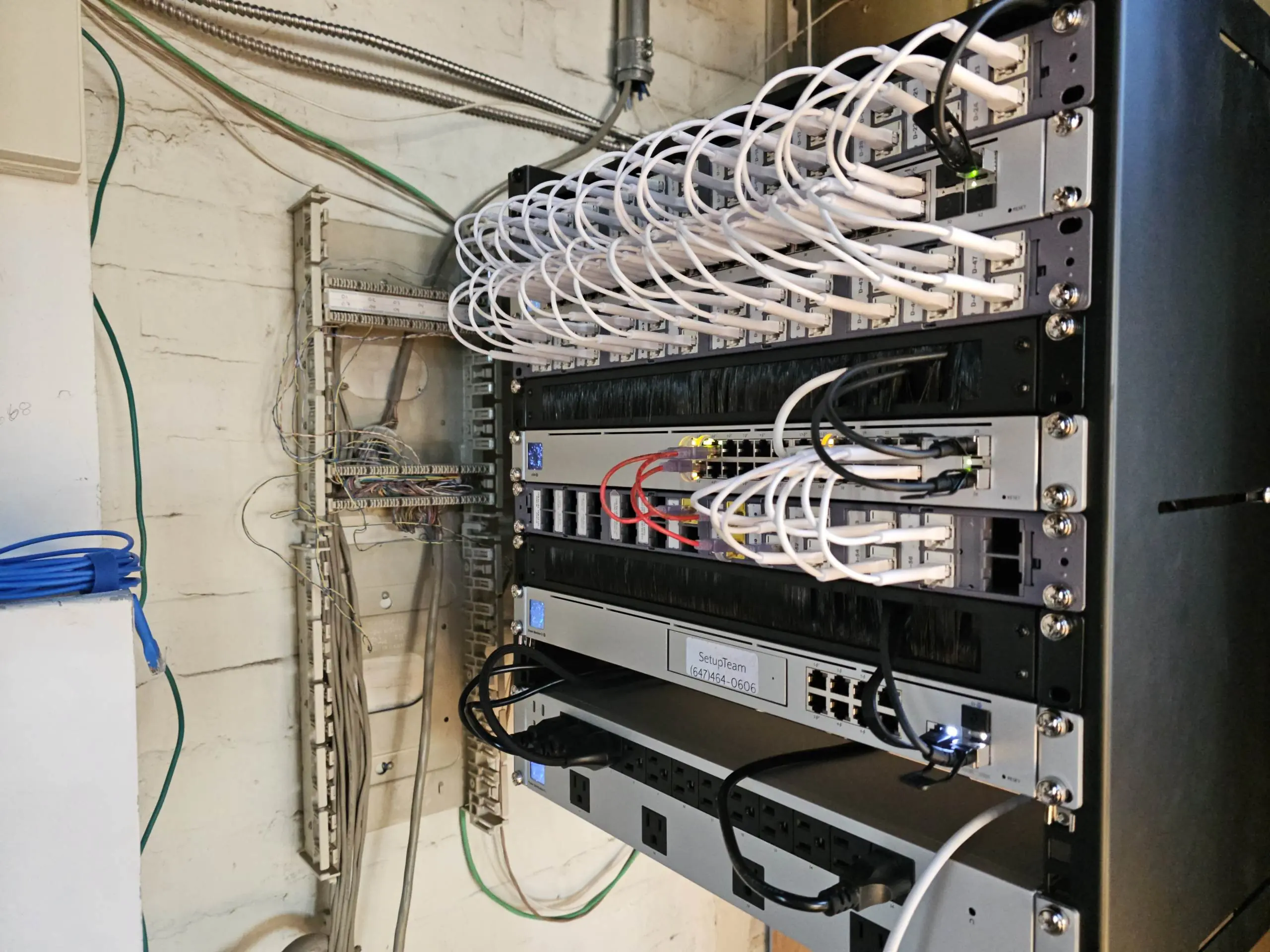
Most network problems in Toronto homes and small businesses are not caused by bad Wi-Fi. They are caused by consumer-grade equipment trying to do a job it was never designed for, or by enterprise equipment that was over-specified by someone who got paid on the license renewal. UniFi sits in the space between those two mistakes — and that is why, over the past few years, it has become the default answer for almost every serious network we install.
This is not a marketing post. We install UniFi, Cisco Meraki, Aruba, and occasionally TP-Link Omada and Fortinet gear across the GTA. Each has a place. But when a homeowner with a 6,000 square foot build in Oakville asks what to put in, or when a design firm in Liberty Village needs to replace a network that keeps dropping calls, the honest recommendation is almost always the same.
Quick Answers
Is UniFi really enterprise grade?
Yes, for the vast majority of homes and small-to-mid-sized businesses. UniFi delivers the core capabilities of enterprise networking — VLANs, PoE switching, centralized management, roaming access points — without recurring license fees. It falls short of Cisco Meraki or enterprise Aruba only in specific scenarios involving heavy compliance reporting, very high user density, or dispersed multi-site SD-WAN deployments.
Does UniFi require a subscription?
No. Unlike Cisco Meraki, UniFi has no recurring license fees. Firmware, controller software, and cloud access are all free for the life of the hardware.
Is UniFi better than TP-Link Omada?
For most use cases, yes. Omada is priced similarly and works reliably, but UniFi's management interface, ecosystem depth, and software maturity are still a generation ahead.
What UniFi Actually Is
UniFi is an ecosystem, not a single product. The hardware range goes from a $129 access point that outperforms most consumer mesh systems to a rack-mounted UniFi Dream Machine Pro Max running a 10-gigabit backbone with thirty access points underneath it. Everything is managed from one interface — the UniFi Network application — which can run on a local device Ubiquiti sells, on a self-hosted server, or through Ubiquiti's cloud portal at no charge.
That single-interface model is the hinge the whole comparison turns on. With Cisco Meraki, you log into a cloud dashboard and pay annually for the privilege. With traditional Cisco or Aruba enterprise gear, you often need a network engineer to touch the command line. With UniFi, a trained installer can design, deploy, and hand over a network that a business owner can actually monitor themselves — without needing a certification to change a Wi-Fi password.
The Real Competitors
To compare fairly, you have to know what UniFi is actually up against in this market.
Cisco Meraki
Meraki is the standard enterprise answer. It is excellent. The dashboard is polished, the cloud telemetry is deep, and the feature set around security, SD-WAN, and remote management is genuinely ahead of almost everyone else. The problem is the licensing model. Every Meraki device — every access point, every switch, every firewall — requires an active license to function. Let the license lapse, and the device stops passing traffic. A three-year Meraki MR access point license can exceed the cost of the access point itself. Over ten years, the total cost of ownership for a Meraki deployment is often two to three times the equivalent UniFi setup. For an enterprise with an IT department and a security compliance mandate, that math makes sense. For a Toronto law firm with forty people, it usually does not.
HPE Networking Instant On and Aruba Central
HPE's Aruba line splits in two. Instant On is their small business answer, priced competitively with UniFi and with a clean mobile app. It works well, but the ecosystem is narrower — fewer switch options, no cameras, no integrated door access, and limited advanced routing. Aruba Central, the enterprise tier, is closer to Meraki in both capability and cost structure. If your business is already committed to HPE for servers and storage, Aruba makes sense. Otherwise, UniFi tends to deliver more for the same budget.
TP-Link Omada
Omada is the closest direct competitor to UniFi at the price point. Same general idea — controller-managed access points, switches, and gateways, no recurring licenses. The hardware is cheaper and the performance is respectable. Where Omada falls short is ecosystem depth, software maturity, and the quality of the management interface. If budget is the only factor, Omada is defensible. If you want a network that a non-technical owner can actually use, UniFi's interface is still a generation ahead.
Fortinet and SonicWall
These are firewall-first platforms that extend into switching and Wi-Fi. Both are excellent at the security layer and common in law firms, accounting offices, and healthcare settings where compliance matters. They are not really competing on the same axis as UniFi — a Fortinet FortiGate paired with UniFi access points is a combination we deploy regularly, and it works well. The two ecosystems solve different problems.

Where UniFi Wins
Strip away the spec sheets and the real advantages are narrower than the marketing suggests, but they are significant.
No recurring licenses
This is the biggest one. A UniFi access point, once you own it, works forever. Firmware updates are free. Controller software is free. Cloud access is free. Over a ten-year ownership window, the difference against Meraki is not marginal — it is thousands to tens of thousands of dollars depending on the size of the deployment. For a business that does not need SOC 2 telemetry piped into a SIEM, that saved budget funds better access points, more cameras, or a proper ongoing technology support plan instead of going toward a licensing renewal.
One interface for everything
A UniFi network with cameras, door access, a VoIP system, and Wi-Fi is managed from a single dashboard. Not four vendors, four apps, four logins. This matters far more than it sounds on paper — it is the difference between a business owner who understands their own network and one who has to phone an MSP every time someone cannot print.
Hardware that looks like it belongs
This sounds superficial. It is not. In a custom home in Forest Hill, or a boutique retail space on Queen West, the aesthetics of the equipment matter. UniFi access points are the only enterprise-tier option that designers and architects consistently approve without a fight. The ceiling-mount units disappear into drywall. The in-wall models look like a light switch. Cisco and Aruba access points look like smoke detectors from a 1990s office park.
Genuine scalability
The same platform runs a two-bedroom condo and a 40,000 square foot warehouse. The interface does not change. The core concepts do not change. A homeowner who learns their UniFi network at home can manage the one at their office. That continuity is rare in this industry.
Planning a network for a home or business?
SetupTeam designs and installs UniFi — site survey, PoE switching, VLAN segmentation, and a controller you can actually monitor — across Toronto and the GTA, with the right vendor mix for your space.
Where UniFi Is Not the Right Answer
A post that only told you UniFi is always the answer would not be worth reading. There are real cases where we recommend something else.
If your business needs certified compliance reporting for PCI, HIPAA, or SOC 2, Meraki's audit trail and built-in compliance tooling are worth the license cost. If you have 500-plus concurrent users on a single site with demanding voice and video SLAs, enterprise Aruba or Cisco Catalyst gear still has an edge in raw performance under extreme load. If you are deploying across dozens of geographically dispersed sites and need true zero-touch provisioning with full SD-WAN, Meraki's cloud-native model is smoother than UniFi's. And if your IT is already outsourced to an MSP that only supports one ecosystem, fighting that is usually not worth the energy.
These are real constraints, and we have all three of those vendors in regular rotation for exactly those reasons. But they describe maybe 10 percent of the projects we see. The other 90 percent — high-end homes, small to mid-sized businesses, design-conscious commercial spaces, multi-unit residences — fit UniFi cleanly. For the structured cabling, rack, and PoE switching behind a business deployment, see our commercial network installation.
What a Proper UniFi Install Actually Looks Like
The reason some people have had bad experiences with UniFi is not the hardware. It is that someone bought a Dream Machine and three access points on Amazon and placed them in whatever spots looked convenient. UniFi, like any network platform, rewards design and punishes guesswork.
A properly designed UniFi network installation in Toronto starts with a site survey — measuring wall materials, identifying sources of interference, mapping where people actually work and stream, and placing access points based on signal propagation, not ceiling layout. The switch is sized for current and future PoE load. Cable runs are planned around the building, not pulled through whatever gap is easiest. VLANs are segmented so that guest Wi-Fi, IoT devices, security cameras, and the primary business network cannot see each other. The controller is configured for automatic failover and backup. This is what we do under our networking services across the GTA, and it is the part that turns good hardware into a good network.
If you already have a network that drops constantly, buffers at peak hours, or cannot cover the far end of the house, the fix is rarely more hardware. It is usually a redesign. That is what our Wi-Fi troubleshooting and network optimization work is built around — diagnose the real issue, then decide whether the existing gear can be salvaged or whether a UniFi replacement genuinely makes more sense.
UniFi is not magic. It is a well-built platform that, in the hands of someone who understands how networks actually behave, delivers enterprise outcomes without enterprise overhead. For most homes and most businesses in the GTA, that is exactly the right trade.
Frequently Asked Questions
10 answersMeraki has a more polished cloud dashboard and stronger built-in compliance tooling, but every device requires an active license to keep working. For a typical small business in Toronto, UniFi delivers comparable real-world performance at a fraction of the ten-year total cost, with no risk of devices going dark when a license lapses.
Yes. UniFi is one of the few platforms that scales cleanly from a condo to a multi-storey custom build. With proper site survey work and correct access point placement, UniFi covers large homes reliably and handles hundreds of connected devices without degradation.
To use one, no. The interface is clean enough that a non-technical owner can monitor connected devices, manage guest Wi-Fi, and see basic performance metrics. To design and deploy one properly, yes — UniFi rewards thoughtful configuration, which is why professional installation tends to deliver much better results than a self-install.
In most cases, yes. We deploy UniFi regularly in design firms, retail spaces, medical offices, and co-working environments across the GTA. The exceptions are offices with strict compliance reporting requirements or extreme user density, where Meraki or enterprise Aruba can make more sense.
The hardware continues to function. Because UniFi does not depend on a mandatory cloud service to pass traffic, even a worst-case scenario would leave existing networks operational. This is a meaningful difference from cloud-licensed platforms, where a vendor change can force a full hardware replacement.
Yes, for the vast majority of homes and small-to-mid-sized businesses. UniFi delivers the core capabilities of enterprise networking — VLANs, PoE switching, centralized management, roaming access points — without recurring license fees. It falls short of Cisco Meraki or enterprise Aruba only in specific scenarios involving heavy compliance reporting, very high user density, or dispersed multi-site SD-WAN deployments.
No. Unlike Cisco Meraki, UniFi has no recurring license fees. Firmware, controller software, and cloud access are all free for the life of the hardware.
For most use cases, yes. Omada is priced similarly and works reliably, but UniFi's management interface, ecosystem depth, and software maturity are still a generation ahead.
For most small to mid-sized businesses, yes. UniFi handles routing, switching, Wi-Fi, cameras, and door access from a single controller. Businesses with advanced compliance mandates or very high concurrent user density may still benefit from enterprise Meraki or Aruba, but these are a minority of real-world deployments.
A professional UniFi installation starts with a site survey covering wall materials, interference sources, and usage patterns. It includes correctly sized PoE switching, planned cable runs, VLAN segmentation for guest, IoT, camera, and primary networks, and a properly configured controller with backup and failover. The goal is a network that performs consistently — not just on day one.
Ready to upgrade your network?
We design and install UniFi networks for homes and businesses across Toronto and the GTA — with the right vendor mix for your space — as part of our networking services across the GTA.
Tell us about your space and we'll confirm the right approach before any hardware is bought.

