

UniFi Installation in Markham
The full Ubiquiti stack, designed around the Markham home you actually live in: tech-corridor home offices, multi-suite households with a basement in-law suite or Cornell coach house, Unionville and Cathedraltown heritage facades, Cachet and Angus Glen golf-course estates, and Highway 7 luxury condos. One controller, one app, every device on the network accounted for.
Why does UniFi installation in Markham start with the home office and the suite plan?
Because this city carries two demands most GTA cities do not: an executive home office that has to hold a corporate video call for nine hours a day, and a household plan that often includes a basement in-law suite or a Cornell coach house with its own family inside it. A credible UniFi installation here is built around both at once, not just the Wi-Fi in the living room.
This is Canada’s tech corridor. IBM Canada has held a head office on Steeles East since 1992. AMD, Huawei, and Toyota run major local offices, and York Region as a whole carries roughly seventy thousand tech jobs across more than a thousand firms. A meaningful share of those people are on calls from a Cornell, Wismer, or Berczy detached home most weekdays, and a UniFi gateway with a wired-backhaul U7 Pro access point above the home office is not a luxury here. It is the difference between a clean video call and a frozen one. This page is part of our UniFi installation across the GTA.
The second demand is the multi-suite household. This city is among the top three GTA municipalities for multi-generational living. A typical Wismer or Berczy detached home runs a main residence on the upper levels and a fully finished basement suite for grandparents or for an adult child’s family, often with its own kitchen and its own entrance, and a Cornell home often adds a separate coach house behind the main residence across the rear laneway. UniFi handles all of that on one controller: separate VLANs per suite, each suite gets its own SSID and its own bandwidth slice, and the homeowner sees the whole household on one dashboard.
The third layer is the property itself. Housing stock here ranges from Highway 7 corridor luxury condos through Unionville and Markham Village Heritage Conservation District (HCD) homes, into Cathedraltown’s European-village townhomes, and out to Cachet, Angus Glen, and Bayview Country Club golf-course estates. Each one is a different UniFi build, and the first call confirms which deployment your project is.
How do you build a UniFi network for a Markham home with a basement in-law suite or a Cornell coach house?
One gateway, one controller, one app across the whole property — and then a split underneath into per-suite VLANs, so each family on the property gets its own SSID, its own bandwidth, and its own privacy on the dashboard. That is the whole shape of a multi-suite UniFi build here.
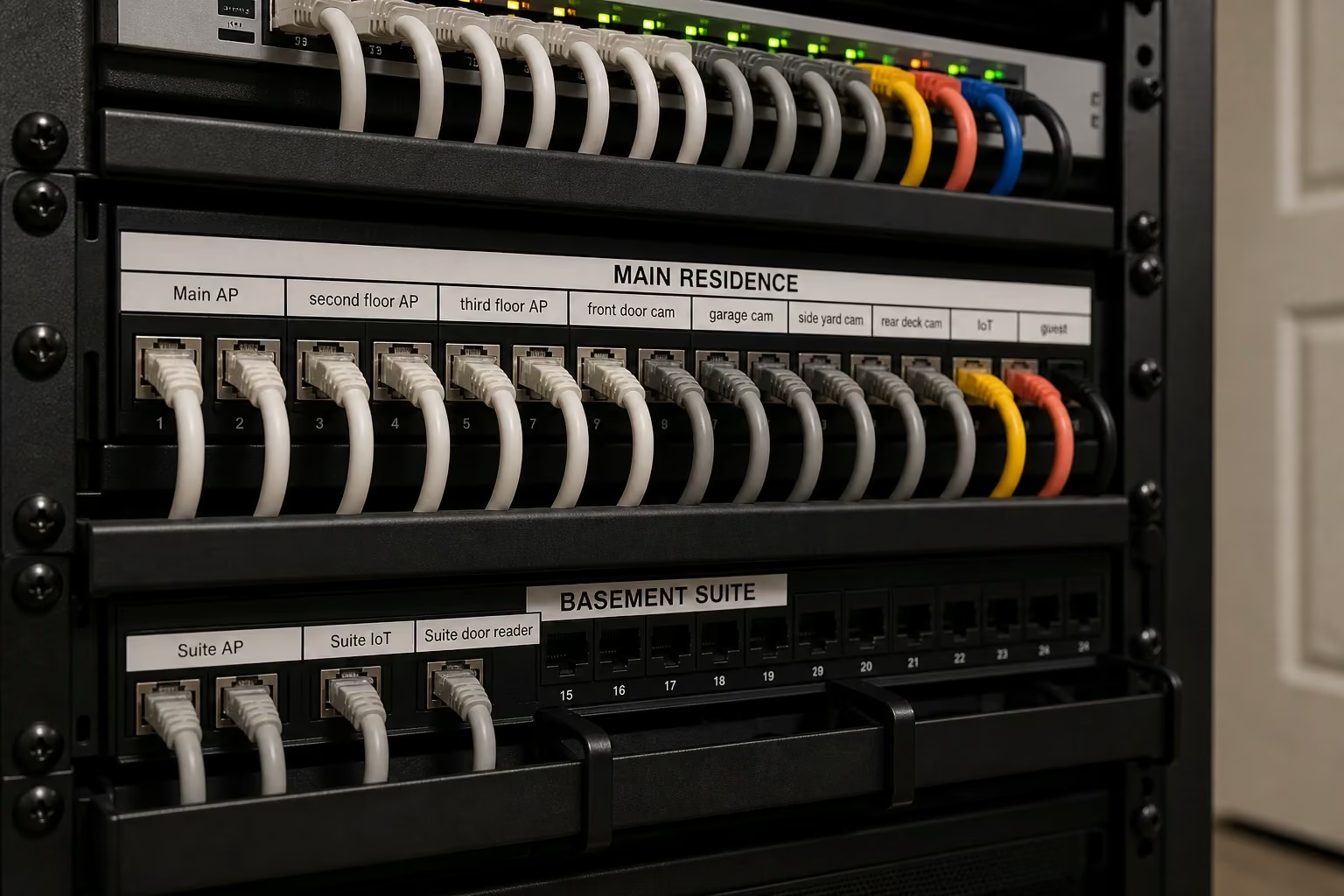
The starting point is the rack. We mount a wall rack in the main residence utility room with a UniFi Cloud Gateway Max or a UDM SE for the larger properties, a USW Pro Max 16 PoE or a USW-Pro-Max-24-PoE switch depending on the AP and camera count, and a labelled patch panel split visually between the main residence runs and the suite runs. Cable backhaul runs to every access point and camera location from that single rack, and each Cat6 run gets labelled at both ends.
The controller side does the rest. The UniFi Network app builds a VLAN for the main residence, a separate VLAN for the basement suite with its own SSID, its own DHCP scope, and its own bandwidth shape, plus a separate VLAN for IoT and cameras and a guest VLAN. The dashboard shows the property as one network with these slices clearly drawn: the grandparents in the suite cannot see the family’s smart locks, the family cannot see the suite’s printer, and the cameras do not see the household devices.
A Cornell coach house adds one wrinkle. It sits across the rear laneway behind the main residence, so the Cat6 backhaul either runs underground through a buried conduit for a new build, or runs aerially in a discreet cable between the two structures as the realistic retrofit answer. Either way, a single U7 Pro access point inside the coach house, mounted on the controller VLAN dedicated to that dwelling, gives the coach-house family its own clean Wi-Fi with no relay hops.
Where the secondary suite has its own entrance, UniFi Access at that door is an easy add. The suite door gets a separate reader with separate credentials, the family in the suite gets their own NFC tags or mobile-app unlock, and the homeowner controls scheduling and revocation from the same Access app. The same controller also fits inside a wider Control4 home automation in Markham program when one is already in place.
- One UDM SE or Cloud Gateway Max per property, not per suite
- Separate VLAN, SSID, and DHCP scope per dwelling
- Per-suite bandwidth shaping on the controller
- Cornell coach-house backhaul: buried conduit or aerial Cat6
- UniFi Access at the secondary-suite door, scheduled per credential
- Labelled patch panel split between main residence and suite runs
How do you scope UniFi for a Cornell, Wismer Commons, or Greensborough new-urbanist home?
At framing, before the drywall goes up. Cornell, Wismer Commons, Greensborough, Berczy Village, and Box Grove are the city’s planned-community detached-home neighbourhoods, and Cat6 rough-in is cheap and fast when the walls are open, and expensive and slow once they are closed. Where the wired backbone matters more broadly, see our Wi-Fi optimisation across the GTA notes.
A Cornell home is built to a 1999 DPZ master plan with rear laneways, front porches, and detached coach houses behind the main residence. A Wismer or Greensborough home is a more conventional 2000–2020 detached build with finished basements and three storeys above grade, and a Berczy or Box Grove home sits in the same scope band. The UniFi pre-wire scope at framing is similar across all of them.
The pre-wire scope covers one Cat6 to each future access-point location: one per level for a three-storey home, main-floor ceiling, second-floor hallway ceiling, basement family-room ceiling. It also covers one Cat6 to each future Protect camera location at the front door, garage, side yard, and rear deck, one Cat6 home run to each office or media-room wall plate, a fibre or Cat6 run from the main residence basement utility room to the future coach-house utility wall where one exists, and a labelled termination panel set in the basement utility wall with the gateway shelf and PoE switch shelf preset.
On install day, after drywall and finish, the rack populates with a UniFi Cloud Gateway Max (or UDM SE for the larger plans), a USW Pro Max 16 PoE or USW Pro Max 24 PoE switch, three to four U7 Pro indoor access points across the levels, and two to four UniFi Protect G5 cameras at the front door, the garage, and the rear. The controller comes up and onboards everything on the existing wiring. Most Cornell, Wismer, and Greensborough new-build UniFi installs after pre-wire take a single day on-site.
For an already-finished Cornell, Wismer, or Greensborough home where the wiring was not done at framing, the scope shifts. Cable backhaul fishes through closet stacks, kitchen soffits, and basement joist bays: the original wiring routes the home was built around. The hardware list stays the same; only the cabling labour is the variable, and the site survey identifies every realistic route before any quote goes out.
- Framing-stage rough-in is the cheapest stage to commit
- Cat6 to one AP per level plus to each Protect camera location
- Fibre or Cat6 backhaul to the coach-house utility wall where present
- Cloud Gateway Max or UDM SE plus USW Pro Max 16 PoE or USW Pro Max 24 PoE switch on install day
- Three to four U7 Pro indoor APs across three storeys, plus two to four Protect cameras
- Retrofit on a finished home: closet stacks, kitchen soffits, basement joist bays

How do you fit UniFi into a Unionville or Markham Village Heritage Conservation District home?
A credible UniFi installation respects the heritage bylaw from the survey forward, not after the cable is up. Inside the Unionville Main Street HCD and the Village HCD, every visible exterior alteration runs through the municipal heritage permit process, and the build plan assumes that from the first site visit.
A typical Unionville Main Street heritage home was built between 1860 and 1920, with original lath-and-plaster interior walls, decorative trim, single-pane wood-sash windows in restored frames, and a protected facade that cannot be drilled, conduit-mounted, or surface-cabled without permit. The same constraints apply across the Village HCD around Main Street North.
Inside the building envelope, UniFi access points mount to ceilings in the few rooms with conventional drywall ceilings (typically a 1980s or 1990s rear addition), or to soffits at the wall-ceiling junction in plaster rooms where the soffit detail allows a discreet flush-mount. Cable backhaul runs inside existing closet stacks, behind original baseboards in a colour-matched paint-grade raceway, or through the basement joist bays where the ceiling has been opened in a prior renovation. We do not penetrate the original trim, we do not drill through plaster ceiling medallions, and we never run visible cable on protected facade surfaces.
Outside the envelope, UniFi Protect cameras and outdoor APs require an exterior alteration permit. The realistic placement is under the original soffit at the eaves, mounted to the painted soffit board with the cable disappearing into the soffit cavity above; slate, cedar shake, or original siding is never the mounting surface. We coordinate the heritage-permit step into the proposal timeline before any equipment is ordered.
The gateway side is conventional. A UniFi Cloud Gateway Max or UDM SE lives in the basement utility room, with the existing Bell Fibe or Rogers Ignite demarc moved to bridge mode behind it, and a Flex 2.5G PoE or USW Pro Max 16 PoE switch feeds the indoor APs and the permitted outdoor cameras. The controller, the dashboard, and the apps look the same as any other UniFi build. The constraint is purely on the wiring path and the exterior aesthetic, which is what the heritage permit governs.

How does a UniFi installation handle Cathedraltown’s limestone facades and slate roofs?
By respecting the envelope rather than fighting it. Cathedraltown is built to a European-village architectural standard with limestone-clad facades, slate hipped roofs, and Tuscan streetscapes, and the UniFi Protect, outdoor AP, and exterior cable scope works around that from the first site visit.
The Cathedraltown envelope does not accept the cabling shortcuts that work on a vinyl-sided suburban home. We do not drill through limestone cladding, we do not mount junction boxes to slate, and we do not run exposed conduit across a Tuscan-style streetscape. The realistic options are soffit drops at the eave, painted-cedar soffit mounts for outdoor APs and Protect cameras, and concealed Cat6 routes that exit the wall envelope into the soffit cavity above each cladding break.
Indoor scope is conventional: a UniFi Cloud Gateway Max or UDM Pro Max in the basement utility room, a USW Pro Max 16 PoE or USW-Pro-Max-24-PoE switch depending on the AP and camera count, three to five U7 Pro indoor access points across the levels, and the controller documents the build. The interiors of Cathedraltown homes are typically conventional drywall, so AP placement and PoE backhaul follow the same logic as a Wismer or Greensborough detached home once the rack is set.
Outdoor scope is where Cathedraltown matters. UniFi Protect G5 Bullet or G5 Pro cameras mount under the eave at each protected approach — the front door, the garage, the rear yard, and the side yard — with painted-cedar soffit installs and Cat6 PoE drops that disappear into the soffit cavity. The camera bodies come in matte white or matte black, chosen against the limestone cladding colour and the slate roofline so they read as restrained and architectural rather than aftermarket. A single outdoor U6 Mesh Pro covers the rear yard for outdoor Wi-Fi if the homeowner uses the patio as an extension of the living space. The same surveillance scope translates to our broader work with UniFi Protect IP cameras across the GTA.
Where a Cathedraltown home has a coach-house garage or a secondary structure off the rear lane, the Cornell laneway logic applies: a separate VLAN for the secondary structure, a U7 Pro inside it, and a fibre or Cat6 run between the main residence and the secondary structure, underground or aerially.

What does a Cachet, Angus Glen, or Bayview Country Club UniFi build actually cover?
The full Ubiquiti stack: multi-floor U7 access points, a complete UniFi Protect camera grid with a UNVR, UniFi Access at the gate and the pedestrian entries, a centralised rack in a dedicated equipment closet, and an integration with the home’s existing Control4 program. That is what a UniFi installation covers across Cachet, Angus Glen, and Bayview Country Club.
The gateway tier sits at the top of the residential range. A UDM Pro Max with the on-board NVR anchors the smaller estate scopes, while an UniFi Enterprise Firewall anchors the larger Bayview Country Club and Angus Glen estates. A 24- or 48-port PoE switch (USW-Pro-Max-24-PoE or USW-Enterprise-24-PoE) feeds the APs and the cameras with dedicated VLANs for security, AV, household staff, and guest. Six to twelve indoor U7 Pro and U7 Pro Max access points spread across the main floor, the upper floors, and the basement, and outdoor U7 Pro Max or U6 Mesh Pro units cover the pool deck, the rear lawn, the driveway, the coach house, and any garden studio.
UniFi Protect is the surveillance layer. G5 Pro and G5 Bullet cameras cover every gate, every door, every garage, the pool, and the driveway approach. Footage stores locally on a UNVR with redundant drives, and remote access runs through Ubiquiti’s own infrastructure with no third-party cloud subscription and no monthly fee. Cameras mount under eaves and painted-cedar soffits where the architecture supports it, and Cat6 PoE drops dress back to the rack with weather-rated outdoor enclosures wherever a run exits the building envelope.
UniFi Access handles the gate, the front door, the coach house door, and the secondary entries. NFC, PIN, and mobile-app unlock are the three credentials configured most often. Mobile unlock works for the family, NFC tags go to household staff with scheduling rules, and intercom integration ties the gate camera and the front-door camera into the same Access app for visual confirmation before admit.
Most Cachet, Angus Glen, and Bayview Country Club estates already run on Control4, and where that is true, UniFi sits inside that program as the network layer. Keypad events trigger lighting scenes. The cinema ‘movie’ scene starts the system, drops the screen, and tells UniFi to prioritise the AV VLAN, and the front-door camera feed routes to the family-room touchscreen on a doorbell event. The integration is documented in the handoff binder, so the on-site IT person, the family office, or the property manager has the same map we do. The estate program is the same one we cover under Control4 home automation in Markham.
UniFi Network
UDM Pro Max or UniFi Enterprise Firewall, 24- or 48-port PoE switch, six to twelve U7 Pro and U7 Pro Max indoor and outdoor APs, VLAN design for security, AV, staff, and guest, and a documented handoff binder.
UniFi Protect
G5 Pro and G5 Bullet cameras covering gate, front door, garage, pool deck, driveway, and perimeter. UNVR with redundant drives for local recording. No monthly fee, no third-party cloud.
UniFi Access
Access Hub, door readers at front door, coach house, secondary entries, and gate. NFC, PIN, and mobile unlock. Intercom and Protect-camera integration for visual confirmation before admit.

How do you install UniFi in a Yonge and Highway 7 corridor luxury condo?
A compact gateway-and-AP scope built around the slab ceiling, the demising-wall paperwork, and the building’s service-elevator booking. Along the Yonge and Highway 7 corridor through Thornhill, Aileen-Willowbrook, and across to Warden, the local luxury condo stock is concrete-slab high-rise, and every install in these towers works within those same three constraints.
The gateway in a Yonge and Highway 7 corridor suite is almost always a UniFi Dream Router 7 or a Cloud Gateway Max. The UDR7 has built-in Wi-Fi 7 and covers most one- and two-bedroom suites on its own. The Cloud Gateway Max pairs with a separate U7 Pro ceiling-mount access point when stronger coverage is needed into a corner bedroom or onto a balcony.
The existing Bell Pure Fibre GigaHub, Bell Fibe HH4000, Rogers Ignite XB7 or XB8, or Beanfield ONT moves into bridge mode behind the UniFi gateway, and the UniFi controller takes over routing, DHCP, VLANs, and Wi-Fi from there. The suite ends up with one app, a separate guest network, a separate IoT network for the smart thermostat, the smart locks, and the Sonos zones, and a real dashboard.
Mounting in a concrete-slab condo respects the slab. We do not cut a back-box into a poured-concrete ceiling, and we do not drill through a demising wall. Surface-mount and junction-box-mount ceiling installs are the realistic options, and where a clean ceiling path does not exist, the PoE cable runs inside a slim painted raceway colour-matched to the ceiling between the suite electrical room and the AP location.
The paperwork side runs in parallel: we submit the $2M certificate of liability to property management twenty-four hours before the appointment, book the service elevator, and handle the scope-of-work letter for any work that touches a demising wall or a ceiling assembly. None of that lands on the homeowner.
- UDR7 or Cloud Gateway Max plus optional U7 Pro ceiling-mount AP
- Bell Pure Fibre GigaHub / HH4000 / Rogers XB7-XB8 / Beanfield ONT to bridge mode
- Surface-mount or junction-box-mount ceiling install — no slab penetrations
- Colour-matched slim raceway where a clean ceiling path is unavailable
- $2M COI filed with property management 24 hours ahead
- Service-elevator booking and demising-wall scope letter handled by us

Should a new UniFi build in Markham use Wi-Fi 7 or stay on Wi-Fi 6 in 2026?
Use the U7 generation. Most new UniFi installations in 2026 should run U7 Pro for the standard residential AP slot and U7 Pro Max where a room or zone needs eight spatial streams and 6 GHz capacity, because the price gap over U6 Pro is small and the new generation is what the iPhone 16, the M4 MacBook Pro, the Galaxy S25, and the corporate ThinkPad X1 Gen 13 negotiate.
The tech corridor matters here. IBM, AMD, Huawei, and Toyota staff working from a Cornell, Wismer, Berczy, or Angus Glen home in 2026 are typically on a corporate-issued laptop or phone that already includes a Wi-Fi 7 radio. The premium 2024–2025 ThinkPad and Dell Precision lines ship Wi-Fi 7, and so do the iPhone 16 and Galaxy S24 / S25 generations; the M4 MacBook Pro and iPhone 15 Pro are Wi-Fi 6E. In any home here with a corporate workstation, the AP that actually serves the user has Wi-Fi 7 demand on it from day one.
The practical effect inside a local property: the U7 Pro adds the 6 GHz band, which is uncongested in almost every neighbourhood here and carries gigabit-plus throughput at short range with low latency. The U7 Pro Max adds a dedicated spectral scanning radio and eight spatial streams, which matters in a large open-plan main floor on an Angus Glen estate or in a high-density multi-suite Wismer home with thirty-plus connected devices across two families.
U6 Pro still has a place: a basement gym AP serving a few smart treadmills, a coach-house AP on a Cornell rear-laneway property serving a guest room, a hallway AP serving primarily mobile-class traffic. These zones do not need the new generation, so mixing U7 Pro and U6 Pro across a property is often the right answer rather than buying one tier across the whole house and overspending on the rooms that do not need it.
The wired backhaul does not change between Wi-Fi 6 and Wi-Fi 7. Cat6 to each AP is the same plan either way; the upgrade path from U6 Pro to U7 Pro is a hardware swap on the same cable run. The same wired-backbone logic underpins our broader network installation in Markham work.

How does the UniFi installation process work in Markham?
Four phases: site survey, written proposal, install, handoff. The timeline depends on the property archetype, not on the gear list.
Site Survey
Floor plan, construction type, ISP demarc (Bell Pure Fibre / HH4000 / Rogers XB7-XB8 / Beanfield ONT), cable routes, condo COI or HCD heritage permit step, coach-house coordination where present.
Written Proposal
Gateway, AP count and model, switch, Protect and Access scope, per-suite VLAN plan, cable count and routing, line-item budget — approved in writing before any equipment is ordered.
Install
Cable, rack, APs, cameras, Access readers, controller, VLANs, firmware. Fluke certification report on Cat6 runs available on request.
Handoff
Binder or PDF covering UniFi Network, Protect, and Access apps, the VLAN map per suite, the device-by-device IP list, rack labelling, and a direct line for ongoing support.
The first phase is the site survey. We measure the floor plan, identify wall and ceiling construction, confirm the ISP demarc location, photograph the existing rack or utility area, and identify the cable routes the install will use. The details shift with the property: a Highway 7 corridor condo adds the elevator window, the COI requirements, and the building’s scope-of-work paperwork; a Cornell home adds the coach-house backhaul route across the rear laneway; a Unionville or Village HCD home adds the heritage permit step for any visible exterior alteration; and a Cachet, Angus Glen, or Bayview Country Club estate adds the existing low-voltage rack, the conduit network if one is in place, and coordination with the family office or property manager.
The third phase is the install. Cable goes in first, dressed back to the rack location through the route the survey identified. The rack gets built and labelled: gateway, switch, UNVR, ONT or modem in bridge mode, each port labelled at both ends. Access points mount, Protect cameras mount, and Access readers mount where applicable. The controller comes up, VLANs build, devices adopt, firmware updates run, and the network tests against the Cat6 runs with a Fluke certification report on request.
The fourth phase is the handoff. A documented binder or PDF covers the controller dashboard, the UniFi Network app, the Protect app (cameras), the Access app (doors), the VLAN map (per suite for multi-suite homes), the device-by-device IP and credential list, the rack labelling, and a direct line for post-install support. Firmware updates, new device adoptions, and routine tuning stay part of the relationship from that point forward.

How much does a UniFi installation cost in Markham?
Most projects start with a $300 on-site consultation: a walkthrough, an equipment list chosen for how you use the network, and a supply-and-install estimate. A Highway 7 corridor condo typically runs $1,500 to $3,500, and a Cornell or Berczy Village detached home $4,500 to $9,500. Every quote is line-itemised after the consultation rather than drawn from a package price sheet. Prices are before HST.
A Yonge and Highway 7 corridor condo build typically runs $1,500 to $3,500: a UDR7 or Cloud Gateway Max plus U7 Pro gateway-and-AP scope, Bell Pure Fibre GigaHub or Rogers Ignite transition to bridge mode, VLAN configuration, guest and IoT networks, and one suite of concealed PoE cable. Multi-AP suites and full-floor penthouses sit at the upper end.
A Cornell, Wismer Commons, Greensborough, Berczy Village, or Box Grove new-urbanist detached deployment generally lands $4,500 to $9,500: Cloud Gateway Max or UDM SE gateway, Flex 2.5G PoE or USW Pro Max 16 PoE switch, three to four U7 Pro access points placed across three storeys, Cat6 backhaul routed through the existing chase, closet stacks, and basement joist bays, and two to four Protect cameras at the front door, garage, side yard, and rear deck. Homes built with Cat6 pre-wire at framing drop toward the lower end of that band, and a full retrofit on a finished home moves up.
A multi-suite deployment — a main residence plus a finished basement in-law suite, or a Cornell main residence plus a coach house — adds VLAN design and additional AP and Cat6 scope for the second dwelling. That typically lands $6,000 to $9,500 in total, depending on the secondary dwelling size and whether the second structure sits across a rear laneway.
A Unionville or Village HCD home carries the heritage permit step, additional planning time for concealed cable routes, and the painted-cedar soffit mounts for any permitted exterior camera. That scope generally lands $6,000 to $11,000, depending on the property size and the exterior camera scope.
A Cachet, Angus Glen, Bayview Country Club, or Cathedraltown estate scope is quoted after the on-site consultation: UDM Pro Max or Enterprise Fortress, 24- or 48-port PoE switch, six to twelve indoor and outdoor U7 access points, Protect cameras with UNVR sized to the property, UniFi Access at the gate and the secondary entries, and Control4 integration. Pre-wire rough-in coordinated with the general contractor during construction is the most cost-effective stage to commit to that scope.
Already running UniFi? An on-site diagnostic of an existing system starts from $400 + HST for the first hour, then $100 + HST for each additional 30 minutes. If we can log in to your console, remote support is $150/hour + HST. For a rough number on a new system, call for a free estimate by phone.
What does a typical Markham UniFi project look like in practice?

A representative project here, in a three-storey Wismer Commons multi-suite home, pulls together everything the previous sections describe: a basement utility-room rack, three U7 Pro access points on dedicated Cat6 backhaul, a UDM Pro behind a Bell Pure Fibre GigaHub in bridge mode, four Protect cameras at the front door, garage, side yard, and rear deck, separate VLANs for the main residence and the basement in-law suite, and a documented handoff binder waiting on the kitchen island at the end of the install day.
A realistic scenario: a 3,400-square-foot detached home in Wismer Commons, built in 2014, with a finished basement suite for the homeowner’s parents, a Bell Pure Fibre service, and an existing Eero mesh kit that runs hot on the third floor and lets the basement suite borrow the family’s primary SSID with no privacy boundary between them. The site survey identifies two clear problem nodes: a wireless-relay basement Eero with no wired backhaul, and a third-floor home office that drops the corporate video call once or twice a week.
The proposal replaces the Eero with a UDM Pro and three U7 Pro access points, one on each level. Cat6 backhaul runs from the basement utility room (where the Bell Pure Fibre GigaHub and the new rack live) up through the existing chase to the main-floor ceiling, then through the main-floor closet chase to the second-floor hallway ceiling, then through a closet stack up to the third-floor office ceiling. Four Protect cameras — front door, garage, side yard, rear deck — install with PoE drops from the same rack and store locally on a CloudKey+ with a 2 TB drive, and a UniFi Access reader goes on the basement suite’s exterior door.
The controller side does the multi-suite work. Two main VLANs come up, Main Residence and Suite, each with its own SSID, its own DHCP scope, and its own bandwidth shape, plus IoT, camera, and guest networks. The parents in the basement suite get their own network they recognise on their phones, and the family upstairs keeps the primary network for the kids’ devices, the work laptops, and the smart-home traffic. The cameras land on a separate VLAN that neither family can see from their devices.
Install is a one-day visit. Cable goes in by mid-morning; the rack and gateway come up before lunch; the APs mount, adopt, and update through the afternoon; the cameras, the Access reader, and the Protect and Access apps finish before dinner. The handoff binder covers the dashboard, the apps, the VLAN map (main residence / suite / IoT / camera / guest), the device list, and the rack labels. The third-floor home office now runs full-gigabit; the corporate video call no longer drops; the basement suite has a clean private network; the homeowner has a single app for the network and a single app for the cameras and a real picture of which device is on which slice. See customer reviews for what other local homeowners have said about similar work.
The same skeleton scales down to a Highway 7 condo (smaller scope, four cameras drops to zero or one, gateway drops to UDR7 or UCG-Ultra) or up to an Angus Glen estate (UDM Pro Max, eight to ten APs, twelve to twenty cameras, UNVR, Access at the gate and the coach house). The principles are the same; only the hardware list and the cable count change.
Plan your Markham UniFi installation
Site survey confirms gateway, AP count, VLAN plan, and Protect or Access scope before equipment is ordered. Most surveys are booked within the week.
Unionville · Cornell · Wismer Commons · Cathedraltown · Cachet · Angus Glen · Bayview Country Club · Highway 7 Book a ConsultationMarkham UniFi Installation FAQs
UniFi Installation Near You in the GTA
SetupTeam serves communities across the Greater Toronto Area.
Book a Markham UniFi installation
Condo, multi-suite home, heritage core, or golf-course estate: tell us the property and what you need on the network. We’ll respond with a clear next step.

