

Wi-Fi Optimization in Richmond Hill
Property-scale network planning built for long runs and separate wings, whole-property mesh, wired access points, dead-spot fixes, and structured cabling across Bayview Hill, Oak Ridges, Jefferson, Langstaff, Observatory Hill, Rouge Woods, and Westbrook.
Why does the far end of the house lose signal?
Three causes explain almost every dead zone we find here, and the distance between where the router sits and where the signal has to arrive drives most of them. What your walls are made of matters, but how far apart they sit matters more. A change in elevation adds to that distance too, since a run from a walkout basement up to a third-floor bedroom is covering more real ground than the floor plan alone would suggest.
Masonry & Plaster Attenuation
Bayview Hill and Jefferson's Georgian-era homes have brick or stone exteriors and plaster-over-lath interior walls in the older sections. 5 GHz signal loses a lot of power passing through either material, and a router placed at the basement modem produces a heatmap where the main floor reads strong, the second floor reads weak, and the third floor or finished attic barely connects. The fix is one or two well-placed access points on the upper levels, each with its own Cat6 run, rather than a stronger router.
Acreage & Multi-Wing Layout
Oak Ridges Moraine estates sit on larger, often irregular lots, and the homes on them stretch across multiple wings, finished walkouts, and detached structures: pool houses, coach houses, workshops. The distance itself is the problem. A mesh kit in the main living area sits too far from the east-wing primary suite or the third-floor gym for its wireless backhaul to survive the walls in between. The right design runs PoE drops out to each wing, often four to six access points spread across the property, each one set to its own frequency so they do not step on each other. Strength falls off with the square of the distance in open air, so a run twice as long does not lose twice the signal, it loses four times as much, which is the actual reason a far wing needs its own access point rather than a louder router at the front door.
Poured-Concrete Attenuation
Langstaff and the Yonge corridor sit at the opposite end of the property scale from Oak Ridges: concrete condos and high-rises where every room sits close together but a solid wall stands between them. Concrete absorbs 5 GHz and 6 GHz signal far more than wood-framed drywall, so a router in the living area often cannot reach a bedroom on the other side of a concrete wall, and mesh kits fail here too, because wireless backhaul cannot punch through concrete any better than a phone can. The usual fix is a single wall-mounted access point with a clear line of sight to the rest of the unit, sometimes backed by a second, ethernet-fed unit if the layout has an L-shape or a fully enclosed bedroom wing. A signal loses its line of sight the moment it has to bend around a corner or drop through a floor slab, which is why the answer here is almost always a second unit rather than a louder first one.
The Occasional Crowded Block (Crosby & Mill Pond)
In Crosby and Mill Pond, where lots sit closer together than in Oak Ridges, the 2.4 GHz band can carry 30 or more nearby routers. Reassigning the home to a quieter frequency clears this up without any new hardware.

The distance between rooms changes by neighbourhood in Richmond Hill.
Richmond Hill's housing stock spans five distinct tiers, and each one changes both the technical scope and the right network design. There is no single install that fits the whole city.
Bayview Hill & Jefferson
An established Georgian Revival estate tier built between 1990 and 2008. Brick or stone exteriors, finished basements adding a full extra level. Most jobs here are a wired access-point system, two to four PoE drops across the levels with a UniFi or Ruckus gateway in the basement rack. New Cat6 usually threads through finished walls, straightforward in basement ceilings and third-floor attics.
Oak Ridges Moraine
Larger custom builds on irregular lots under the Oak Ridges Moraine Conservation Plan: multiple wings, detached pool houses or coach houses, and long distances between them. The most complex network work we take on here, typically four to eight access points, multiple Cat6 home-runs to a central rack, outdoor-rated units for terraces and pool areas, and integration with whatever Control4, Lutron, or Sonos infrastructure is already in the home. Reaching a separate structure sometimes means trenching a buried conduit across the yard rather than trusting a wireless hop, which holds up far better against whatever the Moraine's tree cover does to a clear signal path.
Observatory Hill
The Conservatory Group's new luxury development beside the David Dunlap Observatory lands, homes running roughly 3,000 to nearly 7,000 square feet. These are pre-wire opportunities: Cat6 pulled to every ceiling access-point location during framing, at a fraction of a finished-wall retrofit cost, coordinated with the builder and interior designer.
Langstaff / Yonge Corridor
High-density concrete condos and high-rises along the largest planned urban growth centre outside downtown Toronto. Usually one or two wall-mounted access points with a clear line of sight, careful placement around dozens of neighbouring suites, and often a single wired drop from the network closet to the living area.
Rouge Woods & Westbrook
1990s and 2000s detached and semi-detached homes in the 2,000 to 3,500 square-foot range. Most of these fit the mesh scenario well, TP-Link Deco, eero, and UniFi mesh all work as designed. The most common call here is an aging ISP router with a couple of range extenders that stopped keeping up as the device count grew.
Crosby & Mill Pond
An established suburban tier with lots set closer together than Oak Ridges. Crowding from nearby routers shows up here more than in the rest of the city, and a proper radio-band plan set at install, rather than left on factory defaults, is usually the fix.

Richmond Hill Wi-Fi pricing tracks lot size and wall type.
Home size sets the cost floor, but construction complexity moves it from there: a Rouge Woods townhouse mesh job sits at one end, a Bayview Hill wired system in the middle, and an Observatory Hill multi-access-point pre-wire at the other.
Wired pricing comes after the site survey, because how far the cable has to run is nearly always what decides the final bill. For a rough number first, call for a free estimate by phone. Prices are before HST.
Rouge Woods / Westbrook / Crosby Mesh
From $1,300 + HST installed for a three-point eero Pro 6E CI system, or from $1,500 + HST for a UniFi Whole Home WiFi 7 3-pack. Nothing goes into the walls, and it wraps in one visit, provided the home fits the mesh profile in the first place. Our mesh Wi-Fi installation page lists fixed prices for eero and UniFi systems, installed.
Bayview Hill / Jefferson Wired
$4,500 to $9,500 installed: two to four PoE access points, Cat6 pulled to each one, gateway and managed switch set up, VLANs configured. Distance and route difficulty set where a job lands in that range: an open attic run costs far less than fishing cable through finished walls between floors.
Oak Ridges Moraine Estate
Quoted after an on-site visit. Four to eight access points spread across multiple wings, sometimes including outdoor-rated units for a terrace or pool area, a full network rack, and integration with existing Control4 or Lutron infrastructure. Large, irregular layouts with detached coach houses or pool houses get priced individually after the site survey.
Langstaff Condo
$1,400 to $3,500 installed. One or two wall-mounted access points, careful placement planning, a single Cat6 drop from the suite's network closet to the living area. Cost runs lower than a detached home since the floor area is smaller, though the engineering effort is similar: line-of-sight planning around the concrete walls is what makes the install work.
Observatory Hill Pre-Wire
$6,500 to $9,500 depending on scope. Cat6 to four to eight planned access-point locations during framing, full rack room layout, gateway and switch supply, full programming once drywall closes. Wiring during framing costs far less than retrofitting cable through finished walls.
Pricing Transparency
All pricing gets presented after the on-site survey, before any work begins. Hardware and labour appear as separate line items, so you can see exactly what each part costs. No standard-package upsell.
Six Access Points. Wired Backhaul. Real Gigabit Throughout.
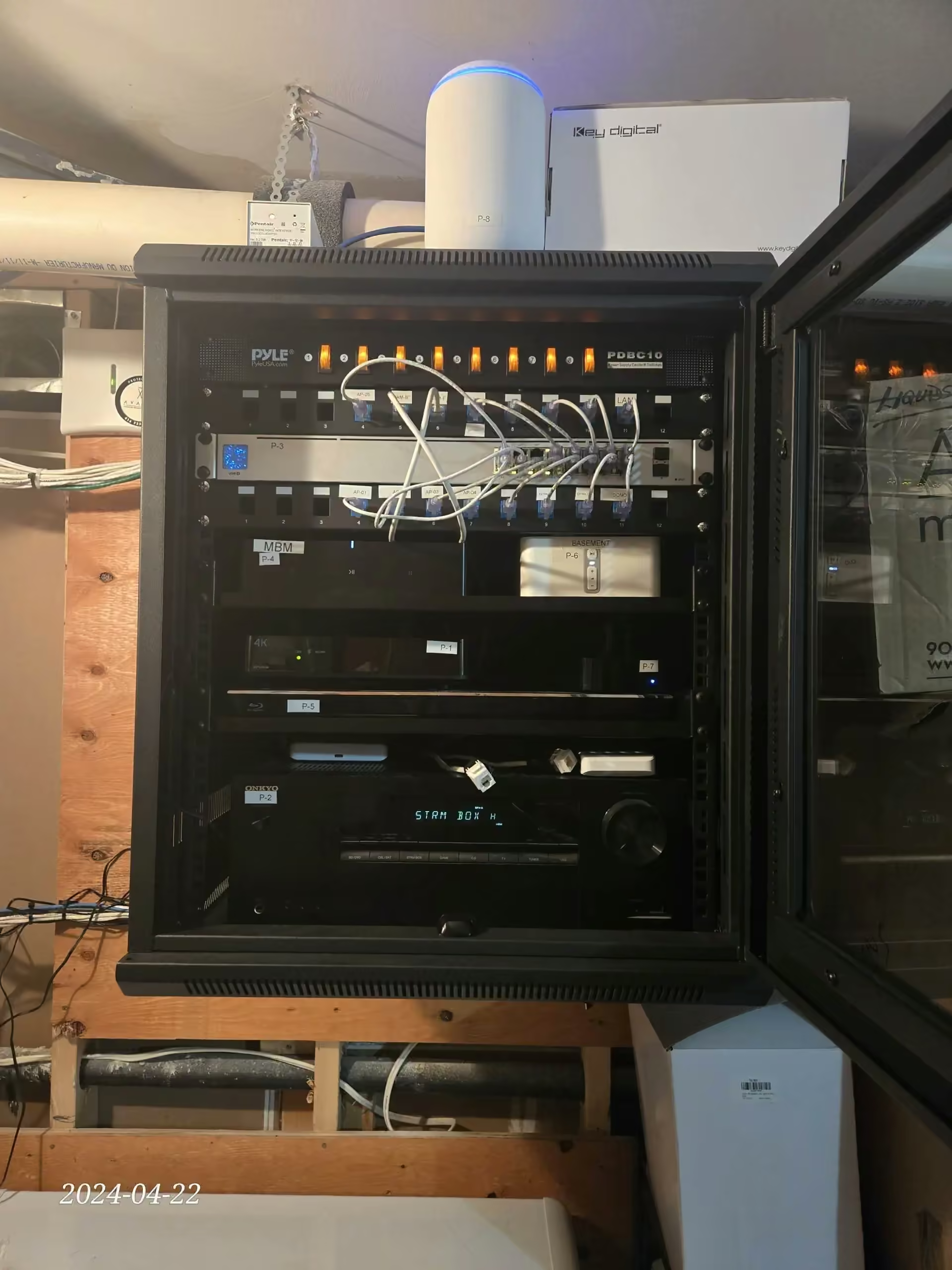
A 6,200 square-foot custom estate on an Oak Ridges Moraine lot, two above-grade levels plus a finished walkout, a detached pool house, and an outdoor terrace seating ten, came to us with three dead zones: the east-wing primary bedroom, the third-floor home gym, and the pool house itself. The previous setup was an ISP gateway router with two daisy-chained mesh extenders. The homeowner assumed the ISP had throttled their connection.
The real diagnosis: the kitchen mesh node was running at 40 percent backhaul signal to the gateway, and the east-wing node was down to 18 percent backhaul to the kitchen node. That meant the east wing was working off a fraction of the home's gigabit. Wireless backhaul was getting cut roughly in half at each hop across the property.
We installed a UniFi Dream Machine Pro gateway and a 24-port PoE switch in the basement rack, with Cat6 runs through the attic and basement ceilings to four interior UniFi U7 Pro Wi-Fi 7 access points (main floor, second floor, east-wing primary, third-floor gym), one indoor U6 Pro at the pool-house gateway, and one outdoor-rated UniFi U7 Outdoor on the terrace under the soffit. We set up a three-VLAN structure, main household, IoT (32 devices migrated), and guest with rate limiting. The Control4 controller and Sonos amplifiers sit on the main VLAN with static IPs. A 12 MB/s file upload from the east-wing home office became a 75 MB/s upload once the install was done.
"Our home is 4,200 square feet with plaster walls, and we'd been fighting Wi-Fi dead zones for years. SetupTeam ran a proper survey, pulled three Cat6 runs through the basement ceiling and attic, and put in three UniFi access points. The third-floor home office finally gets the same speed as the main floor. The whole job wrapped in two days."
"We thought we needed a better mesh system because our bedrooms had no signal. SetupTeam looked at the concrete construction and installed a single wall-mounted UniFi access point in the hallway with a wired drop from the suite closet. Full signal everywhere now, and it cost less than the three-pack we'd already bought and returned."
"Extenders, more extenders, that was the previous guy's whole plan for our 5,800 square feet plus the pool house. SetupTeam ran actual numbers at every corner of the property instead, then built four access points inside and one weatherproofed unit under the pool-house soffit, wired the whole thing into our Control4 setup, and the difference is night and day. Proper engineering, finally."
Ready to scope a Richmond Hill Wi-Fi project?
Estate dead zones, a multi-wing Oak Ridges build, a Langstaff concrete condo, or an Observatory Hill pre-wire, tell us about the property and what's failing. We'll come back with a clear estimate after the site survey.
Bayview Hill · Oak Ridges · Jefferson · Langstaff · Observatory Hill · Rouge Woods · Westbrook · Crosby · Mill Pond Contact UsWi-Fi Optimization in Richmond Hill
Frequently Asked Questions
Wi-Fi Optimization Near You in the GTA
SetupTeam serves communities across the Greater Toronto Area.
Is there a room in your Richmond Hill home Wi-Fi never reaches?
Whether you're fighting dead zones in a Bayview Hill estate, planning a network for a new Observatory Hill build, or dealing with a Langstaff condo where concrete walls have made mesh Wi-Fi useless, book a site visit. We'll start with a proper heatmap survey before recommending anything.

