

Network Installation for Finished Aurora Homes
The router sits in the basement and the upstairs office runs at a crawl. We pull Cat6 up through the wall, terminate it on a plate beside the desk, and hang an access point on the ceiling where the coverage gap sits.
Why Is There Still a Dead Zone
After Adding a Mesh Node?
Because a mesh node has no wire behind it. It repeats the signal it receives, so a node in the weak corner rebroadcasts a weak link and splits its radio time doing it. Running Cat6 to that corner and feeding an access point over it removes the repeat.
We settle the route in a house here before we touch the cable. Older homes along the Yonge and Wellington corridor hide their routes well: an addition built over what was once an exterior wall, a chase that stops short of the top floor, plaster that will not take a blind cut. Newer streets east of Bayview and through Bayview Wellington read more predictably, with stacked closets and an attic you can cross. Either way we walk the attic, check whether the basement ceiling is open or finished, look for the closet stacks and cold-air chases the original builder left behind, and confirm what sits inside the cavity before drilling. Work in that order and you avoid most of the damage people fear when retrofitting Ethernet cable in a finished house.
There is one exception. If the walls are open because you are building or mid-gut, cable goes in at framing for a fraction of the cost, and that scope belongs under new construction pre-wiring instead.
- Wall and ceiling composition checked before a single hole is drilled
- Route walked first: attic, closet stack, basement ceiling, or soffit
- Cat6 or Cat6A fished to the room that never had a port
- Ceiling access point drop placed at the coverage gap, not at the outlet
- In-wall speaker cable pulled into finished rooms where the path allows
- Camera, doorbell, and shade-motor runs added on the same visit
- Existing panel or new rack punched down, dressed, and labelled
- Every run tested before we leave, and the port map handed over
What Can Be Added to a House
Once the Drywall Is Up?
Ethernet drops, ceiling access points, camera runs, and in-wall speaker cable go into finished homes here on a regular basis. We price each of them from the path between the panel and the room.
Ethernet Drops in Finished Rooms
Cat6 or Cat6A fished from the panel to a keystone plate beside the desk or the TV. We open a single-gang cut at the plate, and where a joist or a fire block sits in the way, one small access hole that gets agreed and patched.
Wired Access Point Positions
We measure the weak rooms before choosing a ceiling position, then pull PoE Cat6 to it from the switch so the access point needs no outlet nearby. We set the mount point from the coverage reading rather than from where the router happens to sit.
Speaker Cable With Walls Closed
16/2 in-wall cable pulled to ceiling and wall speaker positions in rooms that are already finished, home-run back to the amplifier rather than looped between rooms. Each penetration gets drilled from a position we can reach, and sleeved.
Camera and Doorbell Runs
PoE Cat6 to soffit and corner camera positions on a finished house, routed through the attic or along an existing service penetration where one exists. The doorbell drop follows the path of the original chime wire where that wire is still live.
Panel or Rack Termination
Runs land on a patch panel or straight onto the switch, depending on the drop count and what the homeowner wants to look at. Ports carry a label at both ends, so the next technician traces a cable instead of hunting for it.
Sub-Trade Work for Renovation GCs
Low voltage priced as its own line and scheduled against your trade rotation. We take the drop list from the designer or the homeowner, quote it, and take the site once electrical is done and before the drywallers book in.
Can a Renovation Contractor Hire
Out the Low-Voltage Package?
Yes. The request usually arrives from a GC mid-renovation in Aurora who has an electrician on site and nobody to pull data, speaker, or camera cable. We quote the low-voltage package as a separate line, take the site for the days we need, and hand back a labelled panel.
Priced as Its Own Line
We quote data, speaker, camera, and shade-motor runs as separate line items, so you can price the package against the rest of the trade sheet or hand it straight to the homeowner.
Booked Around Your Rotation
Tell us the days the house is yours and we take the site inside them. In an occupied home we work room by room so the family keeps a floor, and the space goes back broom-clean at the end of each day.
Electrician or Low-Voltage Trade
An electrician can run Cat6, and plenty do it well. The difference shows at termination: bend radius held, pair twist carried right up to the jack, and every run tested rather than plugged in and eyeballed.
Drop List From the Drawings
Send the floor plan with drop positions marked, or a photo per room with a note. You get back a count, a route for each run, and the access holes we expect to need before anyone commits to a price.
One Trade for the Whole Stack
The same visit covers data, speaker wire, camera runs, and shade-motor pathways. You are not sequencing three subs around each other, and one crew owns the result at handover.
WSIB, Insurance, Site Paperwork
WSIB coverage and $2M liability, with certificates sent to your office before we arrive. We sign in, follow the site rules, and stay clear of whoever is booked behind us.
Can Outdoor Speakers and Backyard Wi-Fi
Go In After Landscaping?
Yes, though you get less say in the route. With interlock down and soffits closed, exterior runs follow what already exists: the soffit line, an old conduit, the garage service penetration, or a trench where we can lift the landscaping and put it back. We price the path before the speakers.
Speaker Cable to a Finished Yard
Direct-burial rated cable to patio, deck, and cabana positions, sleeved where it crosses hardscape. Every run returns inside to a single amp position at the panel, which is where the Sonos installation in Aurora already lands.
- Direct-burial rated past the building envelope
- Sleeved under pavers and across stone joints
- Lift-and-relay trench where the landscape allows it
- Ends at the same amp position as the indoor zones
Coverage Past the Back Door
Cat6 to a soffit corner, a garage gable, or the entry point of a detached structure, fed by PoE so nothing needs an outlet at the mount. On the deeper lots here the outbuilding takes a wired uplink instead of a repeater, so the far end of the property runs at the speed of the house.
- UniFi, Ubiquiti, and Meraki hardware supported
- PoE fed, so no outlet is needed at the mount
- Pool decks, detached garages, and outbuildings
- Managed from the same switch as the indoor APs
Where Does the Rack Go
in a House That Is Already Finished?
Wherever the internet service already enters, provided you can ventilate and reach that spot. In most homes here that is the mechanical room, the laundry, or an unfinished basement corner. Every drop home-runs to it, and the same enclosure carries the Wi-Fi optimization, Control4 automation, and Sonos audio work, so the low-voltage stack has one address.

What Does the Finished Panel
Look Like at Handover?
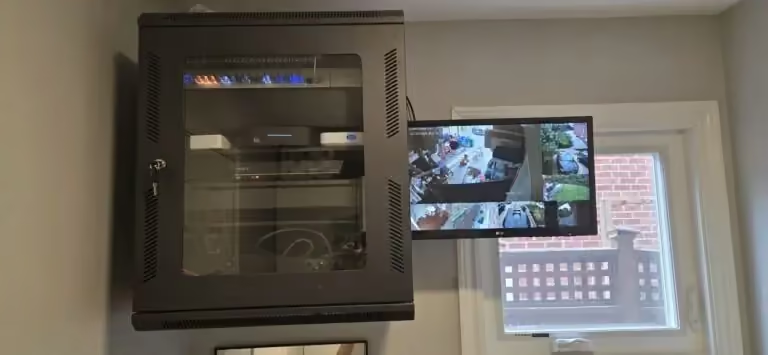
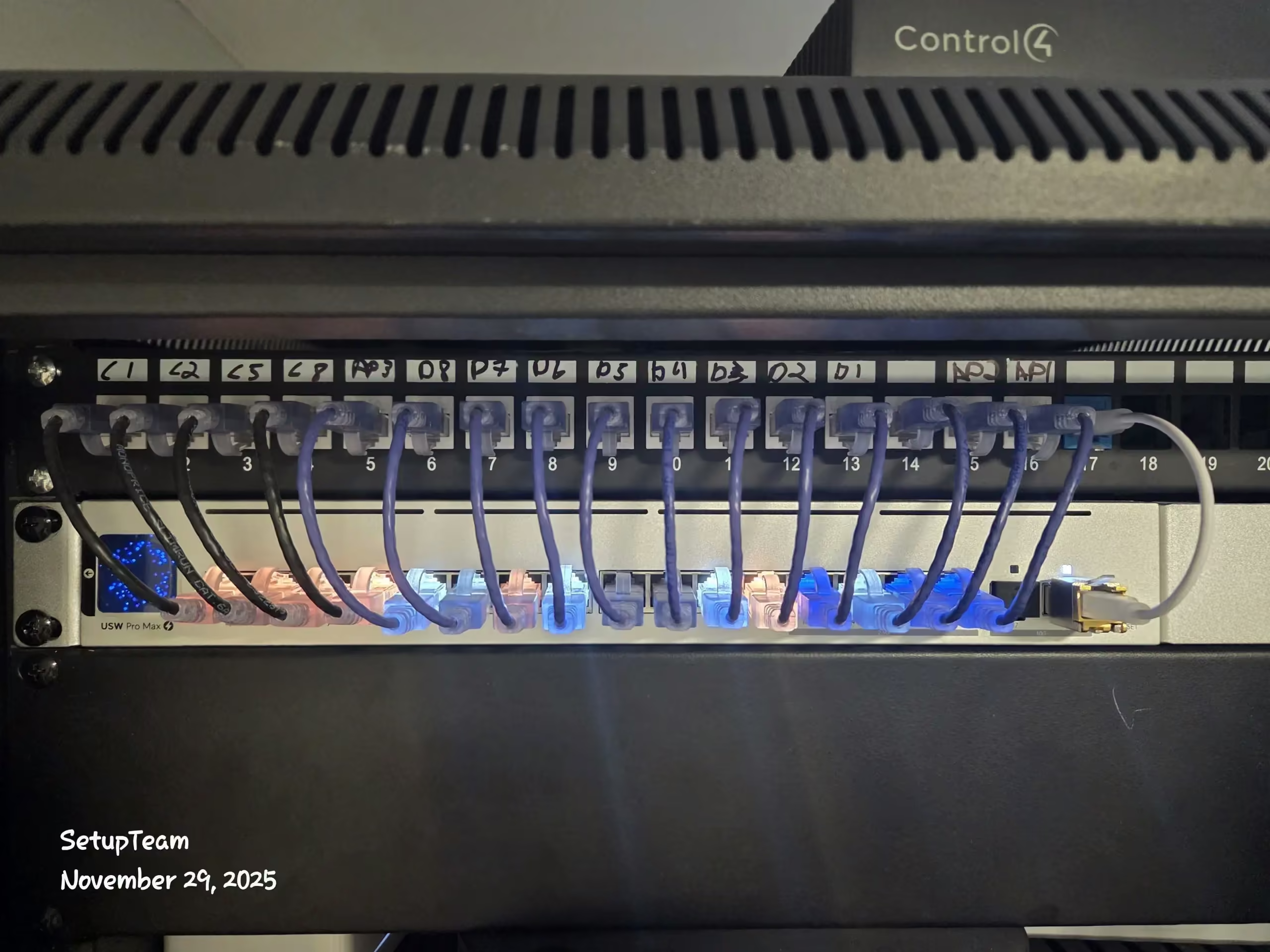
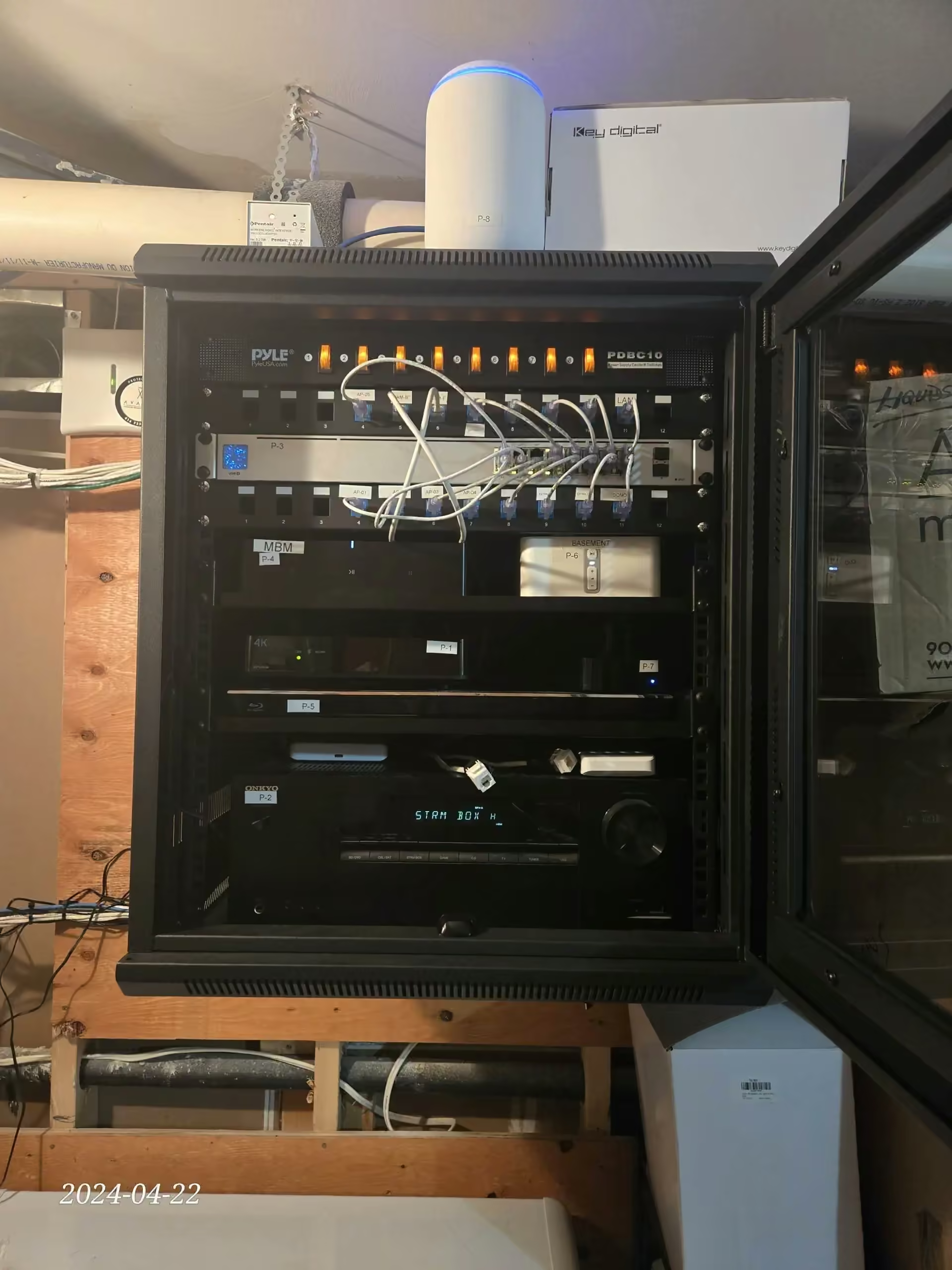
On a recent job in the area we brought every low-voltage endpoint back to a single 12U wall-mount rack. Cat6 drops landed on a 24-port patch panel, we labelled the ports at the panel and again at the keystone, and the layout left room for an NVR, the Sonos amplification stack, and the homeowner’s own router. Each line passed continuity and certification testing before handoff.
What Went In
An organized rack build with labelled drops, certified lines, and headroom for the access points, camera count, and audio zones the homeowner plans to add next.
- One 12U wall-mount rack carrying every low-voltage endpoint
- 24-port patch panel with the Cat6 and Cat6A drops punched down
- Ports labelled at the panel and again at the keystone
- Space left for an NVR, Sonos amplification, and the house router
- Continuity and certification testing on every line before handoff
Dead Zone, or a Room
With No Port, in Aurora?
Send the room that has the problem, what the walls are made of if you know, and the nearest cross-street. You get back a route, a drop count, and a fixed line-itemized price before anyone brings a drill into the house.
Contact UsWhat Do Homeowners Ask
Before a Retrofit Starts?
Wall access, dead zones, cost drivers, and what a renovation GC needs from us in writing. These come up on almost every first call.
Network Installation Near You in the GTA
SetupTeam serves communities across the Greater Toronto Area.
Ready to Wire the Rooms
That Got Missed?
Book a wiring visit. Finished-wall Ethernet drops, ceiling access points, in-wall speaker cable, camera runs, and panel termination across Aurora, Bayview Wellington, and the neighbouring York Region towns.

