

Control4 vs Home Assistant: Which Smart Home System Fits Your House?
Choosing between Control4 and Home Assistant is easier when the people comparing them install both. We are an authorized Control4 dealer and a URC Total Control dealer, and we also install Home Assistant, so this guide is not a sales pitch for one side.
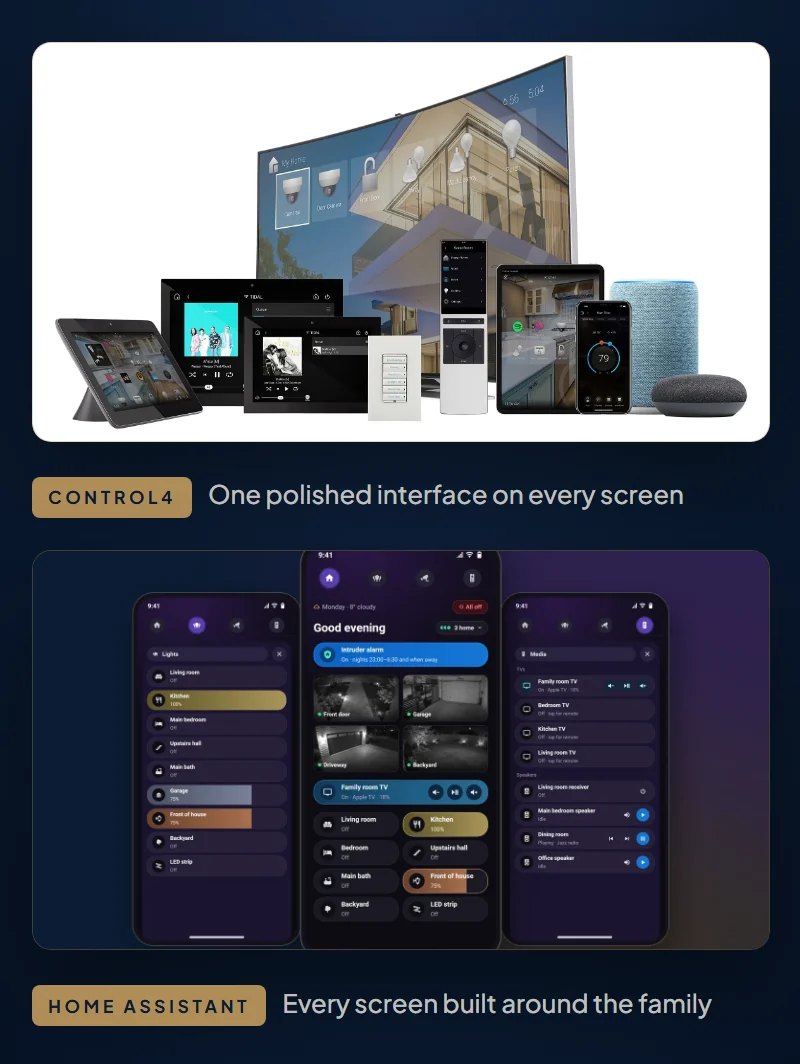
Since 2015 we have completed more than 10,000 projects across Toronto and the GTA, and we have seen each platform shine. The two approaches solve the same problem in opposite ways. Dealer-installed systems are closed, vetted and supported through one company. Home Assistant is open, endlessly customizable and cheaper to start.
Below, we compare them honestly, so you can decide which fits your house and your patience for tinkering. If cost is your first question, skip to the cost section. If you already own a Control4 system, read the section on running both together.
- Dealer-installed systems such as Control4 and URC Total Control use manufacturer-approved equipment and give you one point of contact. Control4 systems we take over often still run well after a decade. The trade-off is higher equipment cost and a dealer for every change.
- Home Assistant is free, open-source software that works with thousands of brands. Its biggest strength is customization: every screen, layout and automation can be changed.
- Home Assistant needs more maintenance. Brand updates and monthly releases can break things, so it benefits from staged updates, backups and a support plan.
- Canadian cost: Control4 with SetupTeam runs $7,000 to $18,000 for core systems. A Home Assistant starter installation is $799 + HST, and whole-home integration starts at $2,499 + HST.
- Many homes do best with both. Home Assistant can run beside an existing Control4 system, and rooms can move over one at a time.
What is a dealer-installed smart home system?
A dealer-installed system is a closed, branded ecosystem. You buy it through a licensed integrator, who designs, programs and supports it. The manufacturer controls the software, the hardware and the rules for outside products.
That control is the point. Products with certified drivers have been tested by the manufacturer. Control4, for example, runs a certification program in which partner drivers are tested in its labs for interoperability. Certification is optional for partners, so not every driver has had the same testing. A good dealer chooses products with a proven record.
These brands also sell plenty of their own gear, from controllers and keypads to audio, lighting and networking. Because it is designed to work together, it tends to keep working for years. A Control4 system can be installed once and need almost no attention for a decade.

The price of that polish is cost and dealer lock. Equipment costs more, and the programming tools belong to the dealer. In return, you get one phone call when something does not work. These systems suit people who do not want to tinker and just want it to work.
We sell, install and support two of these systems.
Control4
Control4 is our main dealer platform. Its current software is Control4 X4: OS 4.1 shipped in September 2025, and Snap One released X4.2 in April 2026. It is programmed in Composer Pro, which only authorized dealers can use. Control4 is made by Snap One, now part of ADI, which Resideo spun off as a separate company in August 2026. Dealer-programmed controllers, touchscreens, keypads and remotes work together with a large library of drivers.
URC Total Control
URC Total Control is the second system we sell, install and support. SetupTeam is a URC Certified Dealer. Total Control is programmed only by certified dealers in URC’s Accelerator software, including its handheld remotes and scenes. Like Control4, it is a closed ecosystem that a dealer builds around your house.
The rest of the field
Other brands sit in the same category. They are sold mainly through trained dealers, but they are not systems we sell.
| Platform | What to know |
|---|---|
| Savant | Sold and set up by authorized dealers. It uses an annual subscription called Savant Essentials, so ask your dealer who pays and how much. |
| Crestron | Installed and programmed by authorized dealers. Crestron says Home OS updates come automatically, at no charge to homeowners. |
| RTI | Makes control processors, touch panels, keypads and remotes. AVPro Global announced its acquisition of RTI in May 2025. |
| ELAN | Ask any dealer quoting it who owns the brand today and what licensing and support cost. |
| Josh.ai | Voice-first control, sold only through dealers who apply and are certified. |
If you are weighing these against each other, the same questions apply to all of them. Who programs it? What recurring fees apply? What happens if your dealer moves on? You can read how we handle Control4 on our Control4 installation page, and see more in brands we work with.
What is Home Assistant?
Home Assistant is a free, open-source home automation platform. It runs on a small computer inside your house and connects products from many different makers. The Open Home Foundation, a Swiss non-profit, owns and governs it, with Nabu Casa as its commercial partner.
It is also big. The foundation’s 2025 annual report counts more than 2.28 million active households. Home Assistant’s own integrations page describes thousands of brands across more than a hundred categories.
There is no software licence and no per-device fee. Your phones, tablets and wall panels become the touchscreens. For a closer look at what we build with it, see our Home Assistant installation service.
How far can you customize each system?
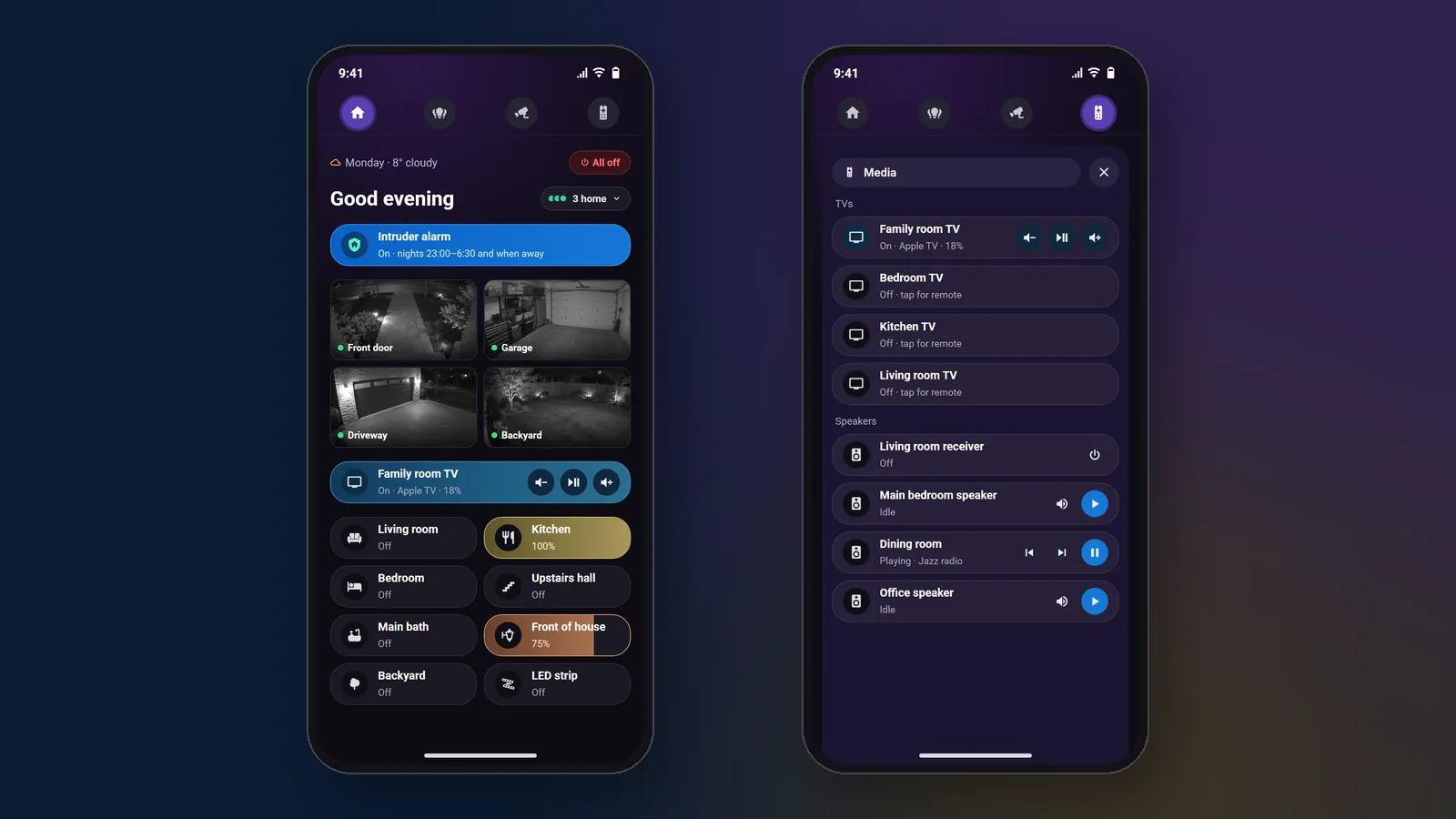
Customization is Home Assistant’s biggest advantage, and it covers every part of the system, head to toe. You can design every dashboard, give each family member a separate home screen, and use any layout you like. Themes change colours, fonts, icons and card styles. Any phone, tablet, wall panel or TV can be a screen.
Automations go further too. Home Assistant can combine signals from many brands into detailed rules, and you can change them yourself or hire any installer to do it.
Control4 is customizable, but not to the same extent. In the X4 app, you can pin favourites to the Home Screen or to a room, add widgets such as camera views and quick actions, and set up your own Routines. Curated Routines come with a Connect plan. However, Control4 sets the app’s layout and design, and advanced logic stays in Composer Pro with your dealer.

That table reflects Control4 X4 (OS 4.1) and Home Assistant as of November 2026. Some people see Control4’s fixed design as a strength, since the same polished app appears in every home. Others find it limiting.
In practice, the Home Assistant difference is easy to see. In a recent whole-home project, each family member got their own home screen with a greeting, the weather, who is home, the alarm switch, the TVs, the lights and four camera tiles. Lights show brightness as a coloured bar, and TV tiles carry volume and pause buttons.

The automations in that house show the same range. After 10:30 PM, a camera that sees a person at the driveway turns the outside lights to full for five minutes, while cars and raccoons are ignored. A camera that hears glass breaking sets off lights, speakers, TVs and phone alerts together. We describe it step by step in our whole-home alarm project.
Control4 can run many of these automations too. The difference is that each new one is built by your dealer, and the screens keep Control4’s design.
Which one lasts longer over ten years?
A well-installed Control4 system is built for the long haul. We regularly take over 10 to 12 year old Control4 systems where essentially everything, including the original automations, still works. That longevity comes from vetted equipment, first-party hardware and software that changes slowly under dealer control.
There is an honest nuance. Control4 eventually retires old hardware. The HC-800 controller, for example, stopped at OS 3.3.1. OS 4.1, released in September 2025, ended support for T3 touchscreens and Gen 1 and Gen 2 dimmers, switches and keypads, and removed the on-screen display from EA controllers, which otherwise stay supported. A decade-old system keeps running, but moving it to X4 may mean replacing some of that hardware.
Home Assistant can be dependable every day when it is built well. The ten-year question is different. No single company retires its hardware, and any small computer can run it. On the other hand, the world around it keeps moving, so it needs regular care, which we cover next.
Both systems also depend on the home network underneath them. Wi-Fi congestion or a router change causes many of the faults we are called to fix. A solid network installation protects either choice.
What breaks, and how much upkeep does each need?
Home Assistant needs more upkeep, because it combines thousands of brands. That is both its charm and its weak point. Ordinary integrations are not vetted by the manufacturers. A brand can change something on its side, and your automation stops working.
Chamberlain’s myQ is the well-known case. Home Assistant removed its myQ integration in December 2023 after Chamberlain blocked third-party access, and pointed users to ratgdo, a local alternative. Updates matter too. Home Assistant releases monthly, and each release lists backward-incompatible changes. The November 2026 release, for instance, changed how device and entity names are shown and removed the polling setting from the Control4 integration.
The exception is the “Works with Home Assistant” program. Certified devices put local control first, are tested by experts, and come with firmware update access. Brands in the program include Aqara, Reolink and SwitchBot, along with some of Shelly’s Z-Wave models.
Here is how we manage the risk:
- Staged updates. We read the release notes first, update in steps and test the automations that matter.
- Backups. Home Assistant can schedule automatic backups nightly or weekly, and its cloud backups are always encrypted. We confirm they run, and we keep the encryption key safe.
- Local-first choices. Where we can, we pick devices that run on your network rather than a maker’s cloud.
- A support plan. Our technology support plans cover updates and backups.
Control4 needs far less. Updates happen through your dealer, and most faults we see trace back to the network rather than the Control4 project. Expect an occasional controller upgrade over the years, not monthly attention. One thing to check: Control4’s OS 4.1 release notes list an active Connect subscription as a requirement for that upgrade.
Match the upkeep to your patience
Some owners want a system they never think about, and others enjoy adjusting it. Tell us which you are and we will confirm which platform fits, with the real upkeep for each.
Which brands and devices does each work with?
Home Assistant works with most of what a house already contains. We connect Lutron, Sonos, UniFi, Denon and Marantz, LG, Samsung, Sony, Apple TV, ecobee, Philips Hue, Reolink and thousands more. You keep the equipment you own instead of replacing it to suit one brand.
Matter and Thread are supported as well. However, Matter currently exposes only basic features, and Home Assistant says compatibility issues are still expected.
Some brands work only through their own cloud. Ring and Google Nest doorbells, for example, work but can lag, while UniFi, Reolink and DoorBird report a press over your own network almost instantly. See our security camera installation work for what we pair together.
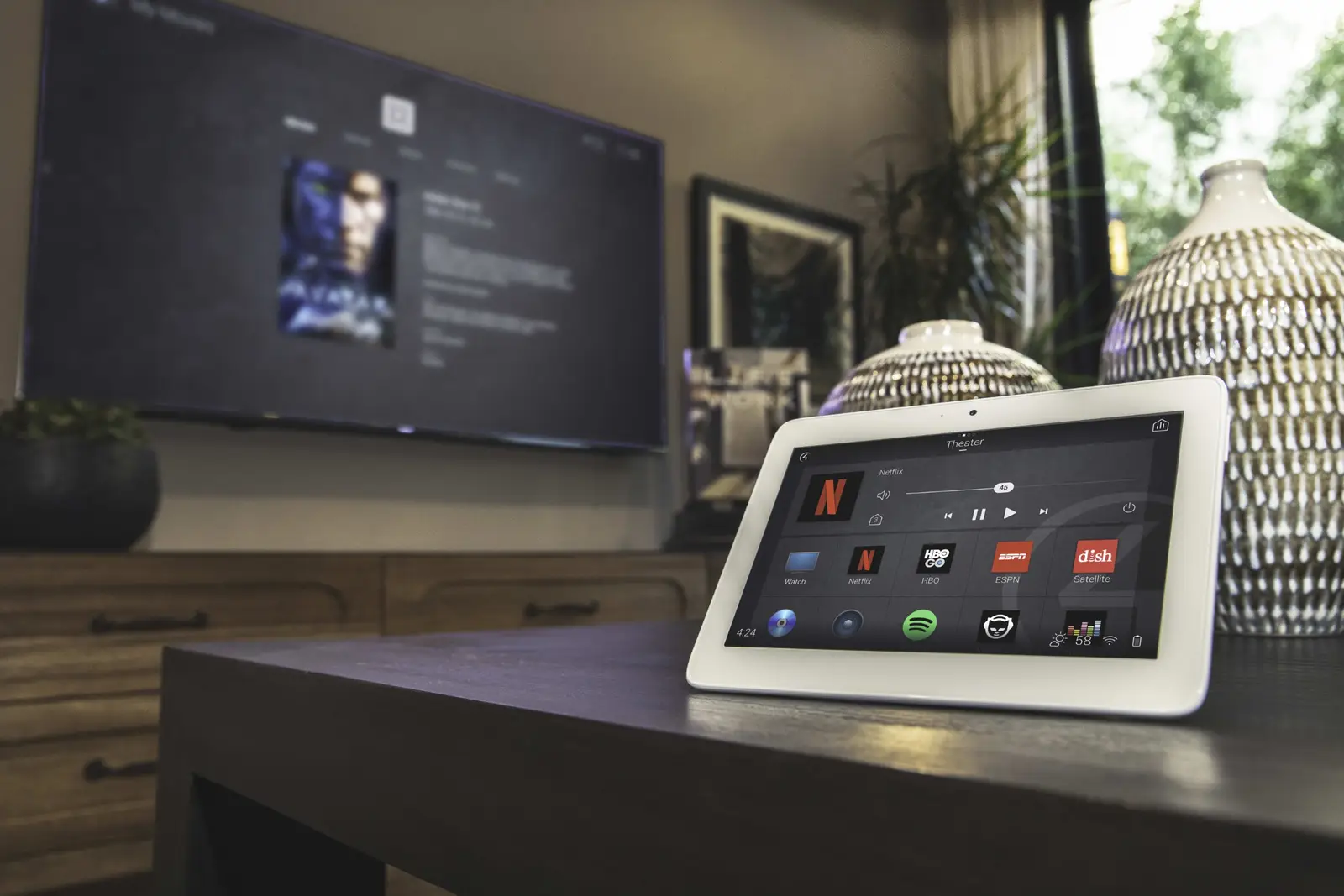
Control4 has a large library of drivers. Common integrations include Lutron dimmers and shading, Sony and Samsung displays, Triad distributed audio, smart locks, IP cameras and video doorbells. Quality depends on the driver and on how carefully your dealer programs around it. Our Sonos installation page explains how music fits in.
The practical difference is breadth against assurance. Home Assistant reaches further. Control4 reaches a narrower, better-tested set.
How much do Control4 and Home Assistant cost in Canada?
Home Assistant costs far less to start. In our own quotes, it usually comes in 50 to 80 percent below a Control4 system doing the same job. You skip the dealer controller, the touchscreens and the licensed programming. The dealer-system prices below are for Control4.
| Control4 with SetupTeam | Home Assistant with SetupTeam | |
|---|---|---|
| Entry | Core systems: $7,000 to $18,000 | Starter installation: $799 + HST, hub and Zigbee/Thread stick included (about half a day, up to about 15 devices) |
| Whole home | $18,000 to $40,000 | From $2,499 + HST for 30 or more devices; most homes land between $2,500 and $4,000 |
| Large estates | From $40,000 | Quoted after a consultation |
| Software | Licensed, sold through dealers | Free and open source |
| Yearly cost | Control4 Connect, about $400 a year in Canada (US list price US$249), optional since November 2025 | $0 with an encrypted VPN; optional Home Assistant Cloud about CA$87 a year |
| Later changes | Through your dealer | Remote programming at $125 an hour, or any installer you choose |
Control4 with SetupTeam
Core systems from $7,000 to $18,000, whole-home systems from $18,000 to $40,000, and estates from $40,000. We are an authorized Control4 dealer and URC Certified Dealer, with dealer takeovers for existing systems. Control4 Connect (remote access; optional on X4) is about $400 a year in Canada. URC Total Control is quoted after a walkthrough. Suits owners who want a vetted system installed once, with one company to call. Explore Control4
Home Assistant with SetupTeam
A starter installation is $799 + HST, with the hub and Zigbee/Thread stick included, for up to about 15 devices. Whole-home integration starts at $2,499 + HST for 30 or more devices, and most homes land between $2,500 and $4,000. The software is free, and later changes are $125 an hour, quoted before we start. Suits owners who want full customization, many brands and a lower start. Explore Home Assistant
Control4 Connect deserves a closer look. It became optional for new X4 systems in November 2025 and for existing systems in early 2026, and local control works without it. Without Connect, you lose remote access, Curated Routines, Apple HomeKit and new features.
Home Assistant Cloud, which is being renamed Home Assistant Link, adds remote access, offsite backups and voice assistant links. It is optional. We usually set up an encrypted VPN instead.
Over ten years, the gap in yearly fees adds up. If you keep Connect, today’s rate works out to roughly $4,000. Home Assistant costs $0 over a VPN, or about $870 with Home Assistant Cloud.
Not sure what you need yet? An on-site consultation maps your equipment and plans the system. It costs $300 + HST (more for properties farther away). If you hire us, the fee is credited on your installation invoice: in full when labour is over $1,000, and half when it is $1,000 or less.
Who controls the system after it is installed?
With Control4, your dealer does. It is programmed in Composer Pro, which only authorized dealers can use, and Control4 is not sold direct. A new scene or device means a call, a quote and a visit or remote session. On X4.2, Snap One also limits local Composer Pro access to technicians assigned to your dealer’s account.
That structure also protects you. If your dealer retires or closes, another dealer can take over. You request the change, the new dealer completes a takeover, and the system moves from Control4’s holding account to them. Some cases need an on-site visit of a few hours, and our Control4 service handles these takeovers regularly.
Home Assistant works the other way. The admin account and backups are set up in your name, and the passwords are handed over. Any installer can work on it later, and you can change schedules and scenes yourself. You can switch our remote access off at any time.
Ownership brings a duty, however. Keep your backups and your backup encryption key somewhere safe. A system that nobody maintains will slowly drift out of date.
Decide who should hold the keys
Some homeowners prefer one dealer to call. Others want the freedom to change things themselves or use any installer. We install both and will explain exactly how changes work on each.
Can you run Control4 and Home Assistant together?
Yes, and many homes do best that way. Home Assistant has an official Control4 integration that covers lights, room media, covers and climate. It needs Control4 OS 3.0 or later, a fixed address for the controller, and your Control4 app credentials. It talks over your local network, and it does not support 4Sight remote access.
We confirm compatibility with your OS version before we start, since the integration’s page does not state whether it works with newer X4 systems.
Keep the Control4 keypads, touchscreens and years of reliable scenes. Add Home Assistant for custom dashboards, other brands and smarter automations. Then move rooms across one at a time, so nothing goes dark on the day.
In one house, outside lights kept switching off twenty minutes after they came on. We traced it to a forgotten Control4 rule and removed it. The full project write-up shows how both systems now share the house.
How do Control4 and Home Assistant compare side by side?
Control4 wins on assurance and low upkeep. Home Assistant wins on customization, brand reach and starting price. The table sums up the differences we explain to homeowners every week.
| Control4 (dealer-installed) | Home Assistant | |
|---|---|---|
| Best for | Owners who want it installed once and never tinkered with | Owners who want full control, many brands and a lower start |
| Upfront cost | $7,000 to $18,000 for core systems | $799 + HST starter; whole-home from $2,499 + HST |
| Yearly cost | Connect about $400, optional on X4 | $0 with VPN; optional Cloud about CA$87 |
| Customization | Favourites, widgets and Routines; layout set by Control4 | Every screen, layout, theme and person |
| Automations | Routines in the X4 app (curated with Connect); advanced logic in Composer Pro | Advanced, editable by you or any installer |
| Brands and devices | Large driver library, partner-focused | Thousands of brands |
| Vetting | Certified drivers lab-tested; others vary by developer | Not vetted, except Works with Home Assistant devices |
| Upkeep | Very low; dealer manages | Higher; staged updates and backups |
| Who can change it | Mostly your dealer | You, or any installer |
| Screens and hardware | Touchscreens, remotes, keypads, app and TV | Any phone, tablet, browser, wall panel or TV |
| Without internet | Local control works; remote access needs Connect | Local devices work; remote access and cloud-only brands stop |
| Ten-year outlook | Runs for years; older hardware may need upgrades | Depends on care; hardware is replaceable |
URC Total Control is also dealer-programmed. Ask us for its pricing and app options.
Which smart home system fits you?
The deciding factor is usually how much you want to tinker, not how big the house is. Use the lists below as a quick test.

Choose Control4 or URC Total Control if you:
- want a system installed once that quietly runs for a decade
- prefer equipment vetted by the manufacturer
- want one company to call when something fails
- are building a large new home with keypads in every room
- are happy to pay more and let a dealer handle changes
Choose Home Assistant if you:
- want to customize every screen, with a separate home screen per person
- own equipment from many brands and want it working together
- want a lower entry price and room to grow room by room
- are comfortable with some upkeep, or want a support plan to handle it
- want any installer, or yourself, to be able to change things
Consider both if you:
- already have Control4 but find small changes costly or the app limiting
- like Control4 keypads but want custom dashboards and cross-brand automations
- want to move gradually, one room at a time
Still unsure? An on-site consultation ($300 + HST, more for properties farther away, credited in full or in part on your installation invoice if you hire us) is the quickest way to match the platform to your house.
How does SetupTeam install each system?
For Control4 and URC Total Control, we are an authorized dealer for both, with the programming access to design, install and modify systems. We also handle rescue work and dealer takeovers. Learn more on our Control4 installation page, or ask us about URC Total Control.
For Home Assistant, a technician installs the hub, connects the gear you own and puts the app on every phone. Whole-home work adds a dashboard for each person and 8 to 12 automations. After that we build changes remotely at $125 an hour, quoted first. See our Home Assistant service for the packages.
We serve Toronto and the wider GTA with all three platforms, and our support plans can look after either system afterward.
Frequently Asked Questions
10 answersIt depends on how you value your time. Control4 is worth it if you want vetted equipment, one point of contact and little upkeep. Home Assistant fits better if you want full customization, many brands and a lower starting price.
In most homes it can cover the same jobs, with far more customization, though Control4 keypads and touchscreens stay tied to Control4. If your Control4 system works and you never want to think about it, keep it.
Yes. Home Assistant has an official Control4 integration for lights, room media, covers and climate. Your Control4 system keeps running while Home Assistant adds dashboards and cross-brand automations. We check your Control4 OS version first.
With SetupTeam, core systems run $7,000 to $18,000, whole-home systems $18,000 to $40,000, and estates start at $40,000. The price follows zones and devices rather than square footage, and we quote after a walkthrough.
Not for the core system, which runs locally. Control4 Connect adds remote access for about $400 a year in Canada, and since November 2025 it has been optional on X4. Without it, you lose remote access, Curated Routines and HomeKit.
Another authorized dealer can take over. You request the change, the new dealer completes a dealer-of-record transfer through Control4, and some cases need a short on-site visit. The new dealer then handles updates, programming and hardware.
A well-built system is dependable day to day, and local devices keep working when the internet drops. The risk is upkeep: brand changes and monthly releases can break integrations, so staged updates, backups and a support plan keep it steady.
Each monthly release lists backward-incompatible changes, such as removed integrations or renamed settings, and brands sometimes change their own systems. The official advice is to back up and read the release notes before updating, then test the automations that matter.
The software is free and open source, with no licence or per-device fee. The catch is that you pay for hardware, installation and upkeep. Remote access is free over a VPN, or about CA$87 a year with Home Assistant Cloud.
SetupTeam does. A starter installation is $799 + HST including the hub, and whole-home integration starts at $2,499 + HST. SetupTeam is not certified by Home Assistant, so ask any installer to show you real projects.
Home Assistant, Control4, URC, Total Control, Savant, Crestron, RTI, ELAN, Josh.ai and other product names are trademarks of their respective owners. SetupTeam is not affiliated with or endorsed by the Open Home Foundation or Nabu Casa. Brand names are used to describe compatibility only.
Confirm which path
fits your house
Whether you lean toward a vetted dealer system such as Control4 or URC Total Control, a fully customizable platform or a mix, we will give you a straight answer. Tell us what you own and what frustrates you today. Call (647) 464-0606 or email us.

