

A Whole-Home Alarm Built With Home Assistant: Cameras, Lutron, Sonos and TVs Working Together
A camera hears glass breaking. Seconds later the lights are flashing, every speaker in the house is sounding a siren, the TVs are showing the cameras and both phones have a critical alert. Here is how we built it from equipment the house already had, and what else the same system now does.
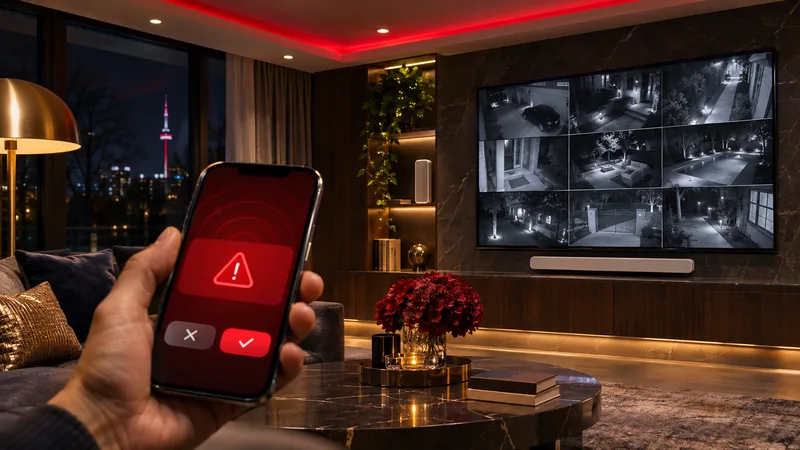
This house had good equipment from ten different brands and no way for any of it to work together: Lutron lights, Sonos soundbars, a Denon receiver, a VSSL amplifier, eleven UniFi cameras, a UniFi doorbell, four TVs and three Apple TVs. We connected all of it to Home Assistant, a free home automation platform that runs on a small computer in the house, and turned it into one system with one app on each phone.
What it connects
Lutron lighting, Sonos, Denon HEOS and VSSL audio, eleven UniFi Protect cameras, a UniFi G4 Doorbell Pro, LG, Sony and Samsung TVs, Apple TV and an LED strip.
What it costs to run
Nothing per year. Home Assistant is free and open source, and remote access runs over an encrypted VPN. There is no dealer licence and no subscription.
What it is not
A monitored alarm. It wakes the house and alerts the phones, and nobody watches it for you. For monitoring, pair it with an Ajax alarm and a monitoring station.
Have one built
A starter installation is $799 + HST with the hardware included, and whole-home systems like this one start at $2,499 + HST. New automations after that are built remotely. See the service.
One app now runs all of it
What problem was this house trying to solve?
Too many apps and no teamwork between them. The lights were in the Lutron and Control4 apps, the speakers in Sonos and HEOS, the cameras in UniFi Protect, and every TV had its own remote. Each brand did its own job well, but a camera seeing someone at night could not switch on a light, and the doorbell could not be heard upstairs over the music.
The family wanted three things: an alarm that uses the whole house, outside lights that respond to people, and one app that everyone can use without a lesson. Home Assistant sits in the middle and lets an event from one brand trigger an action in another.
How does a security camera become a glass-break alarm?
A UniFi Protect camera with audio detection listens for the sound of glass breaking and reports it to Home Assistant over the home network. Home Assistant checks whether the alarm is armed, and if it is, it sets off every response at once. Nothing new was installed for the trigger itself: the cameras were already on the walls.
When the alarm is armed
- Automatically every night from 11:00 PM to 6:30 AM.
- Any time the whole family is away. The phones on the home Wi-Fi tell the system who is home.
- There is an on/off switch at the top of the phone app, and the alarm re-arms itself every day at noon, so nobody forgets to turn it back on.
What happens in the first few seconds
- Every outdoor light and the main-floor lights flicker, so the house looks alarmed from the street. Upstairs lights come on at half brightness so the family can see.
- The LED strip in the living room strobes red.
- A siren and a deep spoken warning play on every speaker: Sonos, the Denon receiver and the VSSL amplifier. The message is different when someone is home and when the house is empty.
- The living room and main bedroom TVs switch themselves on and open the camera app, so the family sees the cameras without hunting for a phone.
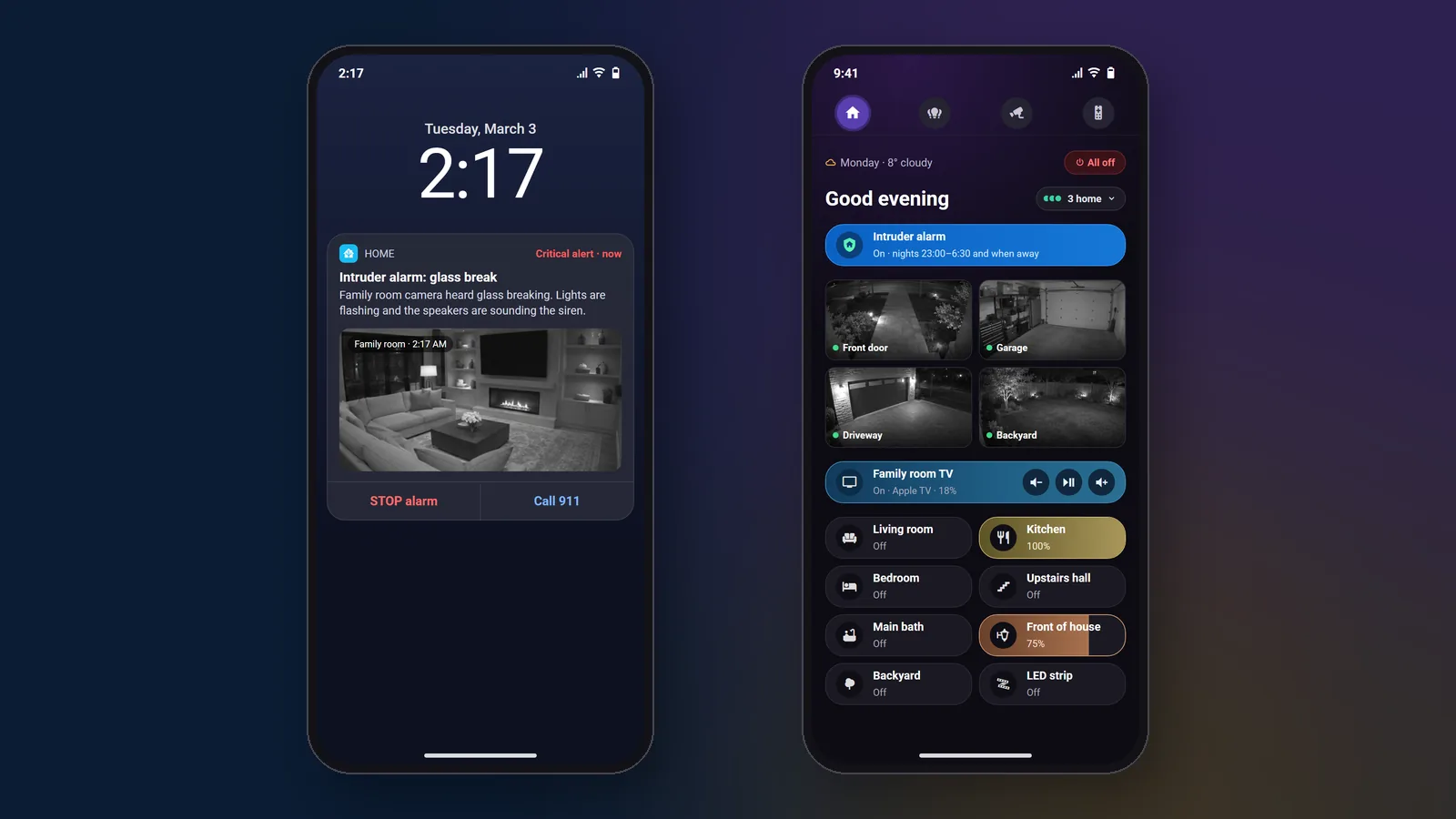
- Both phones get a critical alert that breaks through Do Not Disturb, with a camera snapshot, a STOP button and a one-tap Call 911 button.
Pressing STOP ends the siren and the flicker and leaves the lights on. We tested the whole sequence end to end in the house.
What it is not
This is not a monitored alarm, and it does not call the police by itself. The Call 911 button is there for the person holding the phone. If you want a monitoring station watching your home, we install Ajax with monitoring, and, where the hub can report to both, Home Assistant listens to it so a monitored alarm also flashes the lights and sounds the speakers. Our Ajax alarm guide explains how that system works.
Can a security camera hear a smoke alarm?
Yes. The same audio detection that hears glass breaking also recognises the pattern of a smoke alarm or a carbon monoxide alarm. When a camera hears one going off, Home Assistant switches on the indoor lights, flashes the living room LEDs red, and plays a calm spoken message on the speakers telling everyone to stay calm and get outside together.
The message repeats until someone presses Cancel in the phone notification, which also puts the lights back the way they were. The result is that ordinary smoke detectors, with no wiring changes, now warn the whole house out loud. It does not replace the detectors themselves or any monitoring you have, and it only hears alarms within earshot of a camera.
How do you play a doorbell through Sonos or other speakers?
Home Assistant watches for the doorbell press and immediately plays a chime on the speakers you choose. Here it is a UniFi G4 Doorbell Pro and a classic ding-dong on the dining room speakers, with no noticeable delay. On Sonos the chime plays over whatever is on, the music dips and then carries on.
It is not limited to UniFi. Any video doorbell that Home Assistant supports can do the same:
- Instant: doorbells that report a press over your own network, such as UniFi Protect, Reolink and DoorBird.
- Works, with some delay: Ring and Google Nest, which report through their own cloud.
- Speakers: Sonos, Denon and Marantz HEOS, Bluesound, VSSL and Google Cast speakers.
Dealer systems such as Control4 can also send a doorbell to speakers, but it needs a compatible doorbell driver and dealer programming. Here it is a few lines of automation on hardware the family already owned.
Want your house to do this?
A starter installation is $799 + HST with the hardware included. After that we build your automations remotely and quote each one first.
How do you make outdoor lights react to people and not cars?
Use the cameras’ person detection instead of a motion sensor. After 10:30 PM, when a UniFi camera sees a person at the driveway, the front door or the main entrance, the front and garage Lutron lights go to full brightness for five minutes and then switch off. Cars, raccoons and swaying branches are ignored, so the lights only come on when somebody is there.

The rest of the lighting runs on simple rules:
- Front of house and garage lights come on at sunset at 75 percent and go off at 10:30 PM.
- Backyard lights come on when a person is seen out back at night.
- Welcome home: lights come on when the first person arrives after dark.
- Away mode: when every phone has left, lights switch on and off in the evening so the house looks occupied.
- One All off button for the whole house.
The hidden Control4 rule
While building the sunset schedule, the outside lights kept switching themselves off about twenty minutes after they came on. Nothing in Home Assistant was doing it. We traced it to an old rule in the house’s Control4 programming that nobody remembered, and removed it. If an older automation system in your home does things nobody asked for, this is common, and it is something we look for. More on that on our Control4 page.
How do you control every TV from one phone?
Each TV gets its own remote screen inside the Home Assistant app. The house has four TVs, an LG, a Samsung, a Sony and a Sony Google TV, with Apple TVs in three rooms. From the phone you can switch each one on and off, move through menus, change the volume on the TV, soundbar or receiver, jump to YouTube or Plex, and type a search into the TV using the phone keyboard.
One Sony TV ignored the Apple TV’s signal to switch on over HDMI, so we gave it its own power-on step. The living room LED strip now comes on with the TV after sunset and goes off when the TV does.
What does the Home Assistant dashboard look like?
Each family member has their own home screen with a greeting, the weather, who is home, the alarm switch, the TVs, the lights and four camera tiles. Lights show their brightness as a coloured bar, and TV tiles have volume and pause buttons, so the common jobs take one tap. Separate screens hold every light, every TV and speaker, and every camera.

On a wall-mounted tablet and a desktop screen, the same controls sit beside a wall of all eleven cameras. Tapping any camera opens a full-screen live view in about a second and a half, and you can swipe between cameras.

How does the cost compare with Control4?
It is far cheaper. In our own quotes, a Home Assistant system usually comes in 50 to 80 percent below a Control4 system doing the same job. We are a Control4 dealer and still install it, so this comparison comes from quoting both.
The difference comes from what you don’t buy. Home Assistant software is free and runs on one small computer, and the family’s phones and a tablet are the touchscreens. A Control4 system needs its own controller, licensed programming done by a dealer, and the Control4 Connect subscription, about $400 a year in Canada, for remote access. With Home Assistant, changing a schedule doesn’t need a dealer visit, and any installer can work on it later.
Control4 still suits some projects, especially large new builds with keypads in every room. But when we meet Control4 owners who want more brands, a better app or lower running costs, we often recommend moving to Home Assistant, and the two can run side by side while rooms move over.
Could this work in your house?
Probably, if your equipment is on Home Assistant’s long list of supported brands. Most of what we install is: Lutron, Sonos, UniFi, Denon and Marantz, LG, Samsung, Sony, Apple TV, ecobee and Philips Hue. Check these first:
- Cameras: the glass-break and smoke alarms need cameras that support audio detection. Person-only lighting needs cameras with person detection.
- Lighting: Lutron needs its bridge or processor on the network.
- Speakers: announcements work best on Sonos, HEOS and Cast speakers.
- Network: a reliable home network matters, because everything talks over it. We often start with a UniFi installation.
Want your house to work like this?
A starter installation is $799 + HST with the hardware included, and whole-home systems like this one start at $2,499 + HST. After that you tell us what you want the house to do, we quote each automation and build it remotely.
- Home Assistant hub supplied, installed and updated
- Your lights, speakers, cameras and TVs connected
- The app on every phone in the house
- Encrypted remote access you can switch off
- Automations quoted before we build them
- No yearly platform fee, and you own the system
Frequently Asked Questions
6 answersYes. UniFi Protect cameras with audio detection report sounds such as glass breaking, smoke alarms and CO alarms to Home Assistant, along with person, vehicle and animal detections. Each report can trigger lights, speakers, TVs and phone alerts.
Yes, with Home Assistant in the middle. A doorbell that reports presses over your home network, such as UniFi, Reolink or DoorBird, plays a chime on Sonos almost instantly. Cloud doorbells like Ring and Nest also work but can lag.
No. It alerts the house and the phones, and the alert has a Call 911 button you press yourself, but it never calls the police on its own. For monitoring, pair it with an Ajax alarm connected to a monitoring station.
The parts inside the house will. Home Assistant, the UniFi cameras, Lutron lights and Sonos speakers talk over the home network, so the lights and sirens still run. Phone alerts need the internet, unless the phone is on your Wi-Fi.
Usually not much. You need a small computer for Home Assistant and devices it supports. Audio alarms need cameras with audio detection. Lutron needs its bridge or processor on the network, and speakers need to be a supported brand.
SetupTeam's starter installation is $799 + HST, including the Home Assistant hub, setup of up to about 15 devices and secure remote access. Whole-home systems like this one start at $2,499 + HST, and remote programming is $125 an hour. There is no yearly platform fee.
Home Assistant is a trademark of Nabu Casa, Inc. SetupTeam is an independent installer and is not affiliated with Nabu Casa. Brand names are used to describe compatibility only.
Make your gear
work together
Keep your Lutron, Sonos, cameras and TVs. We install and set up Home Assistant from $799 + HST, then build your automations remotely. Call (647) 464-0606 or email us to book.

