

Bell Said the Line Was Fine. The Logs Said Otherwise.
An Etobicoke home on Bell fibre lost its internet every day for a week. Bell’s support said everything looked fine from their end. Our eero Insight logs showed 3 hours 35 minutes of outages. It took four or five calls, a replacement modem and three technician visits before the third technician cleaned the fibre connection and the drops stopped.
If your internet keeps cutting out and your provider says the line tests fine, you need a record, not a description. A line test shows one moment. A monitored network logs every drop, with the day, the time and the total time offline. That record tells you whether the fault is inside your home or on the provider’s side, and it gives support something concrete to look at. Here is a real case from Etobicoke, with the logs.
Is it my Wi-Fi or the internet?
If every device loses the internet at once, including one plugged into the modem, look at the line or modem. If only some devices drop, or only in certain rooms, look at your Wi-Fi first.
Why does the provider say it’s fine?
A remote line test checks the connection at the moment it runs. Drops that come and go can pass it easily.
What evidence helps?
A dated log of each outage, with when it started and how long it lasted, collected over days rather than minutes.
What fixed this case?
Not the replacement modem. On the third technician visit, the fibre connection was cleaned, and the daily drops stopped after that.
Why Does Bell Fibe or Rogers Internet Keep Dropping When the Line Tests Fine?
Usually because the fault comes and goes. A provider’s remote line test is a snapshot: it checks the connection at the moment someone runs it. If the drops happen a few times a day, the test can pass while the problem is still there. The agent is telling you what their tools show at that moment.
Intermittent faults have a few common sources. On fibre, a dirty or damaged connector where the fibre enters the home or meets the provider’s modem can cause drops that come and go. A loose cable, an overheating modem or a failing power supply can do the same. Inside the home, a weak Wi-Fi or mesh link makes devices disconnect even while the internet itself stays up, and from the couch the two look identical.
The same pattern turns up with Rogers and other providers. The customer describes daily drops, the line test passes, and the call ends without a visit. What moves the conversation forward is evidence that covers days, not minutes: when each outage started, how long it lasted, and whether the whole connection went down or only one device.
How Does Monitored Mesh Wi-Fi Show Whether a Drop Is Inside Your Home or on the ISP’s Line?
It watches both sides at once. A monitored mesh system reports on each access point, each connected device and the internet connection itself, around the clock. When the internet goes down, it logs an outage. When a device drops but the internet stays up, the problem shows on that device or node instead. That split is the diagnosis.
On the eero systems we install, the network is linked to eero Insight, eero’s installer platform. From there we can see the connection-loss history, the status of each node and which devices are connected, without a house call. On UniFi, the system sits on our UniFi controller. With the remote access the homeowner chooses to allow, we see node signal, device connections and internet activity in the same way. Our mesh Wi-Fi installation bundles for both brands include a first year of remote monitoring and care.
One boundary matters here. An installer builds the network inside your home: the Wi-Fi, the mesh, the switching and the cabling. The internet service that arrives at the house, from the line and the fibre to the provider’s modem and the speed you pay for, belongs to your provider, and only they can repair it. What monitoring adds is proof of which side has the problem.
Retail mesh kits have their own apps, and many show basic status. The difference is that a professional has the same view, can read the history, and can tell you whether the next call should go to your provider or whether a node needs attention.
What Happened When an Etobicoke Home’s Bell Fibre Kept Dropping?
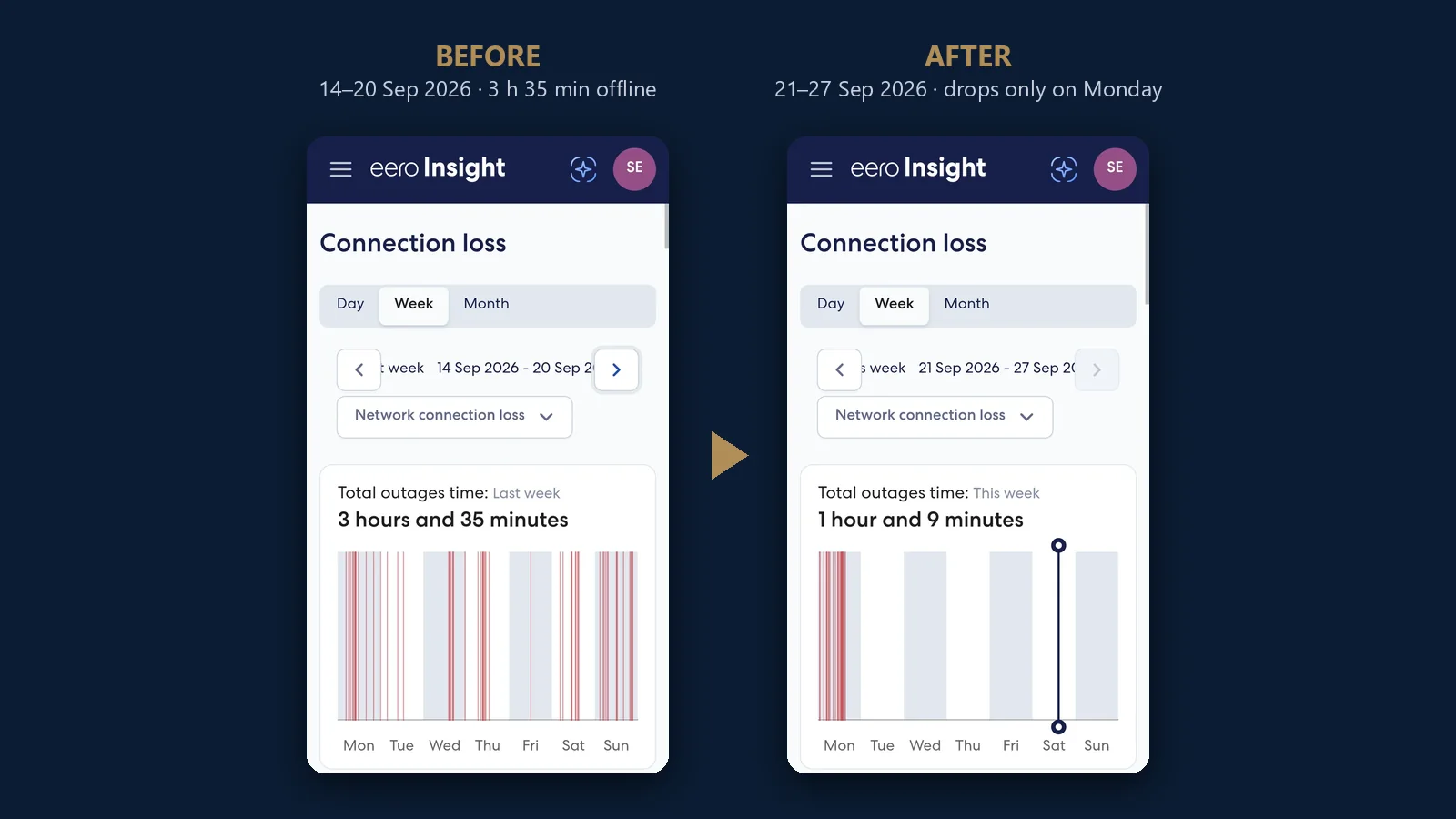
The homeowner has an eero mesh system that we installed and monitor through eero Insight. During the week of 14 to 20 September, eero Insight logged 3 hours 35 minutes of total outage, with drops on every day from Monday to Sunday. When the homeowner first called, Bell’s support said everything looked fine from their end.
On the second call, Bell suggested the modem might be the problem and sent a new one. The drops continued. Bell then started sending technicians. When the first visits didn’t fix it, we gave Bell the eero Insight outage reports. It took four or five contacts in total, and it was the third technician in the house, the first one after the reports, who cleaned the fibre connection. That was the whole fix. The third technician arrived on Monday, 21 September, at 2 pm. The report for that week, shown at the top of this page, has 1 hour 9 minutes of outage, all of it on Monday before the visit, and nothing from Tuesday through Saturday. The network has worked properly since.
This is the third home in 2026 where we have seen the same problem: daily drops, a line that tests fine, and a fibre connection that needed cleaning. The other two played out almost identically. For a company our size, that is a lot of homes.
Is your internet dropping and nobody can tell you why?
We install monitored eero and UniFi mesh systems across Toronto and the GTA, and we check the networks you already have. Call (647) 464-0606 or send us the details.
What Does a Weak Mesh Node Look Like?
It looks like a node with a low signal reading back to the main unit. In another home, a new UniFi Express 7 mesh showed its Dining room node at -68 dBm on a yellow meter in the UniFi app. That is a borderline wireless link, the kind that can make devices near it slow down or disconnect.

This kind of problem is inside the home, and no provider visit will fix it. A borderline backhaul (the wireless link between mesh units) carries less data and reacts more to walls, doors and furniture. Devices on that node can drop while the internet connection itself stays up. The usual fixes are moving the node to a clearer path, adding a node in between, or wiring it if a cable run is available.
This is where most homeowners get stuck: the app shows the node as connected, so it seems fine. If you run UniFi at home and devices keep dropping, our UniFi troubleshooting service can check it remotely at $150/hour + HST, or on site from $400 + HST. For weak spots and dead zones in the west end, see Wi-Fi optimization in Etobicoke.
How Do You Build an Outage Record Before You Call Bell or Rogers Support?
Log every drop for at least a week before you call: the date, the time it started, how long it lasted, and whether every device lost the internet or only some. A monitored network does this for you. Without one, a written log and a few simple checks still help.
- When it drops, check a device plugged into the modem by cable. If it’s offline too, the drop is on the line or modem side.
- Write down each outage: date, start time and how long it lasted.
- Note what you’ve ruled out: Wi-Fi only, certain rooms, or everywhere.
- Photograph the modem’s status lights during a drop.
- Keep every ticket number and a line on what each agent told you.
- When you call, describe the week’s pattern and offer to send the log.
If an installer monitors your mesh system, ask them for the outage report. That is what we gave Bell in the case above, and it is worth having before anyone replaces your modem. For ongoing help reading logs and deciding what to escalate, our technology support plans include remote troubleshooting guidance.
Bell and Rogers are trademarks of their owners; SetupTeam is not affiliated with either.
Want to Know Whether Your Drops Are Inside or Outside Your Home?
We install mesh Wi-Fi that logs every outage, and we troubleshoot the networks you already have. Call (647) 464-0606 or request a free estimate.
Frequently Asked Questions
5 answersDaily drops usually come from an intermittent fault: a dirty or damaged fibre connector, a loose cable, a failing modem or power supply, or a weak Wi-Fi link inside the home. A log over several days shows which side it’s on.
Their remote test checks the connection at the moment it runs. If your drops come and go, the line can pass between outages. A log covering several days shows the pattern that a single test misses.
Keep a dated record of every outage: when it started, how long it lasted, and whether every device went offline. A monitored mesh system logs this automatically. In our Etobicoke case, it showed 3 hours 35 minutes in one week.
Yes. Dust or damage on a fibre connector can weaken the signal enough to cause drops that come and go. In our Etobicoke case, a replacement modem did not help; the third Bell technician cleaned the fibre connection and the daily drops stopped.
If only some devices drop, or only in certain rooms, while a device plugged into the modem stays online, the problem is inside the home. A weak mesh node, like one reading -68 dBm, is one possible cause.

